9
ⓒ 2019. this is engineering Inc. All Rights Reserved.
Using Lezero Pilot Modes
Application “SHIFT Drone” offers various ight modes (Lezero Pilot modes) for users to take semi-
professional videos and photos. When in a ight mode, exercise caution against collisions and
maintain at least 2 m (6.6 ft) away from the drone.
1. To start a Lezero Pilot mode, tap on the button, which stays active only when the drone is
hovering.
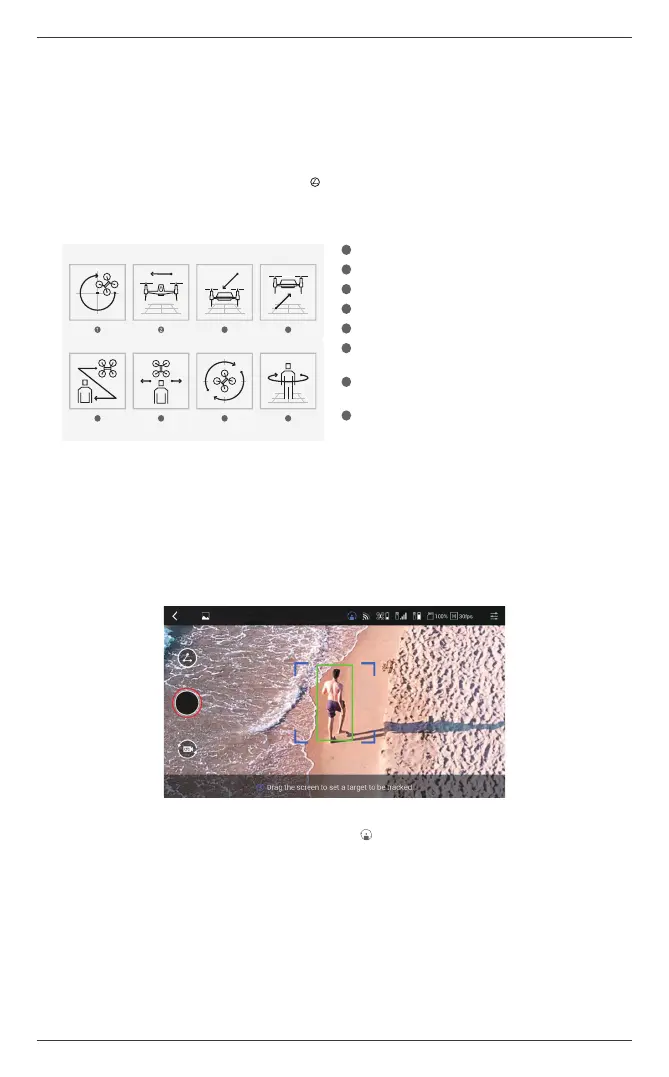
2. Choose one of the eight Lezero Pilot modes while referring to the descriptions below.
1
Orbit: The drone ies in orbit.
2
Dolly: The drone ies steadily from right to left.
3
Dolly In: The drone starts far and moves near.
4
Dolly Out: The drone starts near and moves far.
5
Following: The drone ies while following the target.
6
Horizontal Tracking: The drone tracks the target while in
horizontal ight.
7
Yaw Tracking: The drone performs a yaw rotation toward
the target while ying in position.
8
Hero: The drone ies while tracking the target, and orbits
once when the target stops.
3. Long-press the screen to begin free ight in the selected mode. While ying in the selected mode,
you can take photos or videos.
4. A target must be designated in the Following, Horizontal Tracking, Yaw Tracking or Hero mode.
Place the target in the center of the target box, and drag across the screen to designate the target.
When the target is successfully designated, the border of the drag box changes from red to green
and ight begins in the selected mode.
a
In Following or Hero mode, check that the drone altitude is at least 2 m (6.6 ft) before designating a target. The
appropriate altitude for the selected mode is indicated by the icon turning active.
a
The target must stand out from the background in terms of form and color to be successfully detected in a well-lit
environment. The drone switches to hovering if the target is moving too fast or if tracking has failed due to obstacles.
If the target falls inside the red drag box while maintaining a distance similar to the initial distance, tracking resumes
after about two seconds.
5. To stop the selected Lezero Pilot mode, long-press the screen, or hold the controller’s jog button.
3
4
6 7 85
4
8675
6 7 85
3
4


 To Next Page
 Loading...