Auto Power O and Charging
Press the button of the charging case to power on, put both earbuds
back to the case and close the case lid. The earbuds will disconnect
from the mobile phone and enter into charging mode.
Power O
Method 1: Turn o the mobile phone’s wireless function. The earbuds
will disconnect from the mobile phone and after 6 minutes they will
automatically power o.
Method 2: Long press the Left earbud‘s button 5 seconds, both ear-
buds will power o.
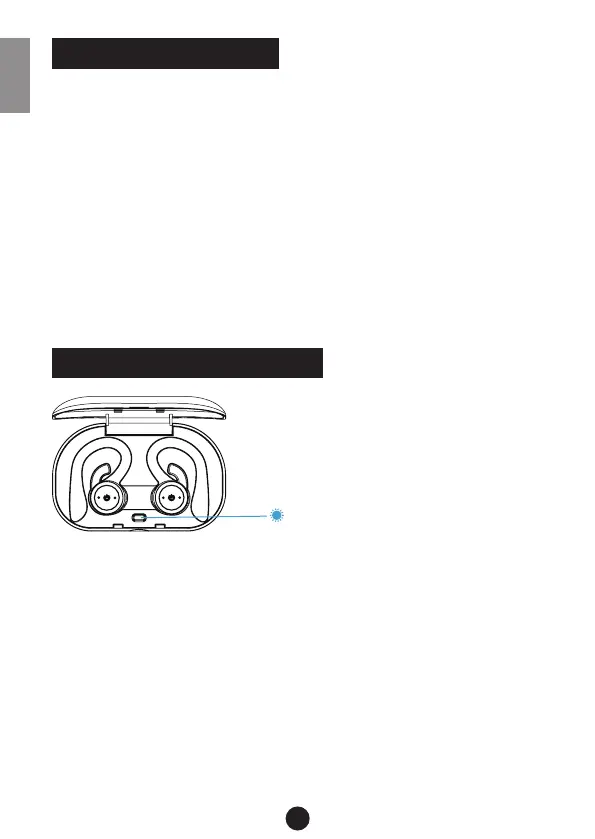
Blue light fast ash
1 time: 0~25% (power)
2 times: 25%~50% (power)
3 times: 50%~75% (power)
4 times: 75%~99% (power)
Charging the earbuds: The earbuds‘ LEDs light continuously red. The
charging case button ashes blue light.
Earbuds fully charged: The earphones‘ light is o. The blue light of
the charging case button will ash 7 times and the charging case auto-
matically enters the standby mode after 20 seconds.
Charging case fully charged: The button of charging case keeps on
blue light.
4
OPERATION
ABOUT THE CHARGING CASE
ENG


 To Next Page