INSTALLATION INSTRUCTIONS
4
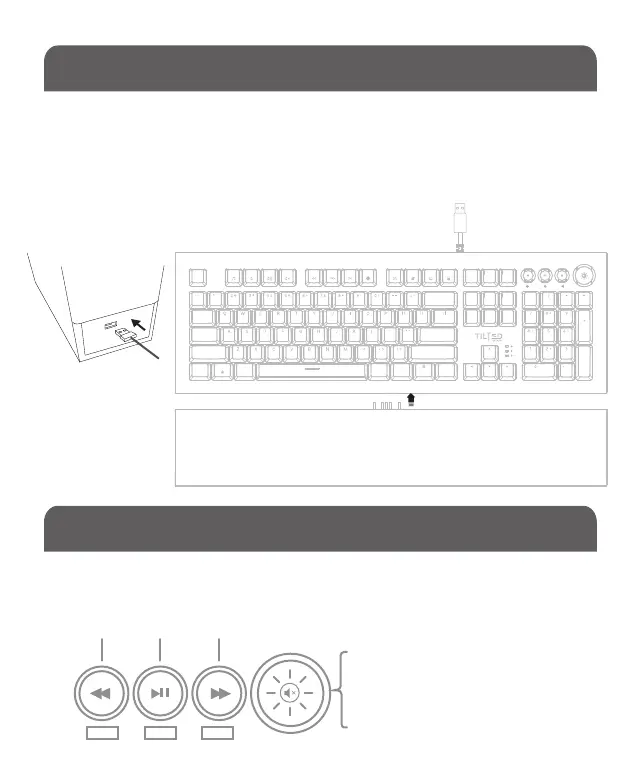
Connect the keyboard to any available USB A port on your computer
and attaché the palm rest to the keyboard by simply sliding the palm
rest pins into the pin slots located at the bottom of the keyboard. The
TNVOID is Plug-N-Play and will be ready to use after the driver is
automatically installed by Windows.
The top corner RGB/Media knobs serve as two functions:
• RGB control (default)
• Media control
RGB & MEDIA CONTROL KNOBS
RGB
1 2 3 MAIN
Press & Hold the main control knob
to switch them between RGB (default)
and media control.
REC SIDE
TAB
CAPS
CTRL CTRLFN
SHIFTSHIFT
ENTER
BACKSPACE
WIN A LT ALT
PRTSC SCRLK PAUSE
INS
ENTER
ESC
HOME
INS DEL
PGUP
PGDNENDDEL
NUM
F1 F2 F3 F4 F6
F7
F8
F9 F10
F11
F12
F5
KEYS REC SIDE
1
A
W


 To Next Page