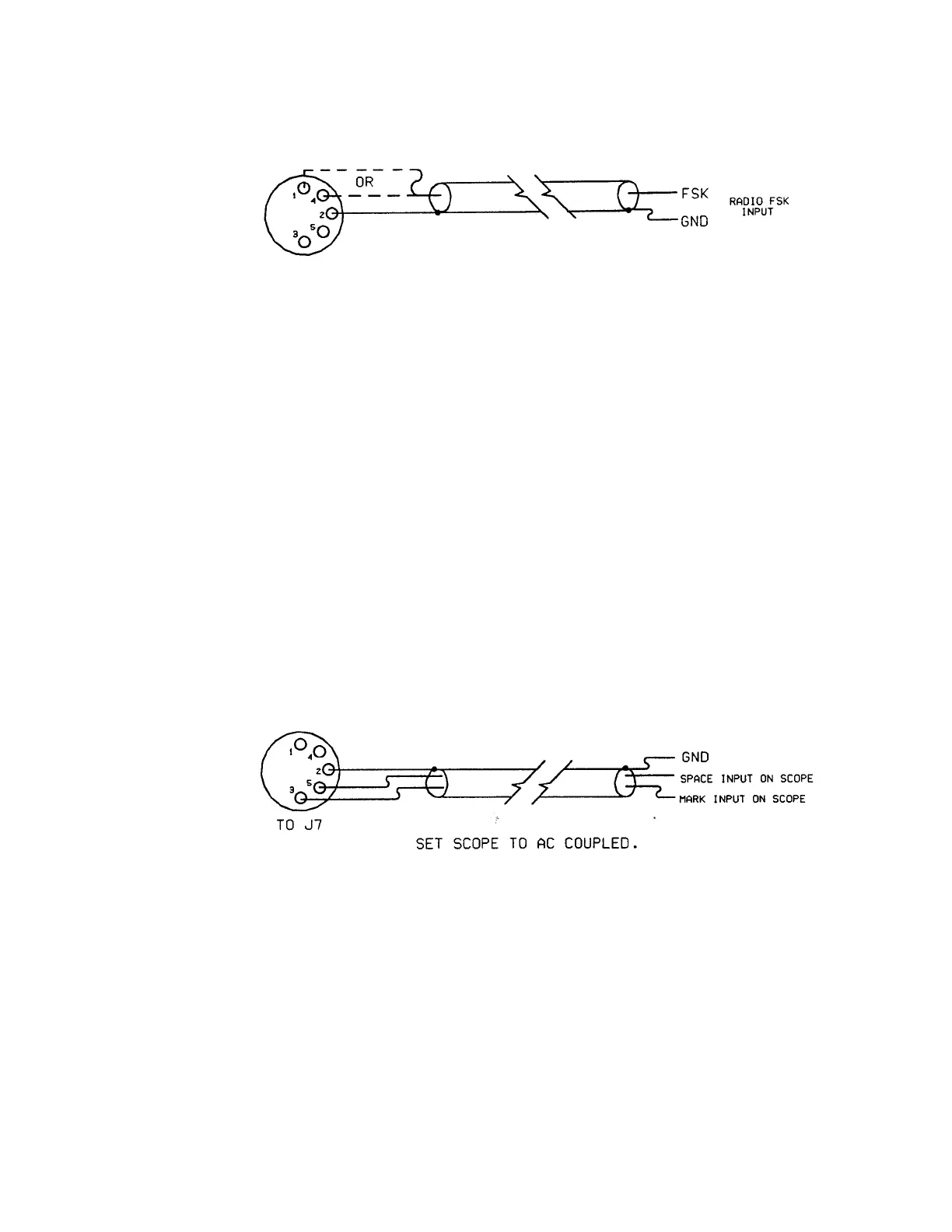
2. Connect the FSK lines from the PK-232 to your radio's FSK input
in accordance with your radio's requirements.
See Figure 3-4 below.
Figure 3-4 Connector J7 FSK Connections
NOTE: When using FSK, the same power and duty cycle limits apply
as cited earlier for AFSK operation. Consult your radio's
operating manual for any power or transmit time limits.
3.3.8 Connections for an Oscilloscope
Although the PK-232 has a built-in tuning bar-graph, you may also
attach an oscilloscope for more precise tuning. Any low cost or
surplus scope capable of the X-Y display of audio signals can be used.
Most station "Monitor Scopes" also have this feature.
o Connect the oscilloscope to Pins 3 (mark) and 5 (space) on rear
panel connector J7.
o Connect the oscilloscope ground return to Pin 2 of J7.
o See figure 3-5 below for connections to J7.
Figure 3-5 Connector J7 Oscilloscope Tuning Connections
NOTE: If your Oscilloscope cannot be AC coupled, you must place a
0.1 uf disc capacitor in series with your connections to
both pin-3 and pin-5 of J7.
4/91 3-7



 To Next Page