7
Listening to Radio, Nature Sounds or Other Portable Audio Devices
Note: Extend FM wire antenna fully for best FM reception. Rotate the unit, as required, for best AM reception.
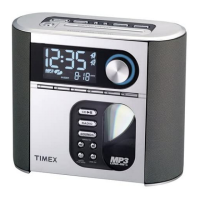
1. Press the Alarm Reset/Power On/Off Button to turn on the unit.
2. Press the Mode Button to select radio play mode ( AM, FM1 or FM2 radio band) , nature sounds or other portable
audio device through MP3 Line-in.
3. For radio band, press the << or >> Button to tune the radio to a desired station. To memorize the current station as
a preset, press and hold Preset Button 1, 2, 3 or 4. Repeat step 1-4 to preset up to 12 stations (4 AM and 8 FM). To
listen to a preset station at any time, simply press the desired preset button.
4. For Nature sounds, press << or >> Button to set the desired nature sound.
5. For Line-in devices, plug one end of the audio patch cord (included) into the headphone or line-out jack on your device
and the other end of the patch cord into the T-312 MP3 Line-in Jack, located on the right side of the unit. Turn on and
play your device and adjust volume on your device if necessary.
6. Turn the Volume Button on the main unit to adjust the volume.
7. To turn off the unit, press the Alarm Reset/Power On/Off Button to turn it off. Remeber to turn off your external audio
device, too.
Sleep Operation
Sleep mode lets you sleep to MP3, nature sounds or the radio. The unit will shut off automatically at the selected sleep time.
1. Press the Sleep Button to enter sleep mode. The Sleep Icon will appear on the display to indicate sleep mode. The
unit will automatically turn off after the selected time. Sleep mode has a Gentle Sleep feature which gradually lowers the
volume before shutting off .
2. You can adjust the sleep timer from 90, 60, 30 or 15 minutes by pressing the Sleep Button again.
3. After setting the sleep timer, pressing the Sleep Button once will show the sleep time remaining. Pressing it again will
change sleep time to next lowest increment.
4. To stop listening at any time, press the
Alarm Reset/Power On/Off Button on main unit to turn it off.
Dimmer Operation
During normal operation, press the Snooze/Dimmer Button to control the brightness of the LCD display.


 To Next Page