EasyManua.ls Logo

Titan Controls Atlas 3 - User Manual

Titan Controls Atlas 3
2 pages
Print Icon
To Next Page IconTo Next Page
Loading...
Atlas 3
TM
CO2 Controller
Instruction Manual
VANCOUVER, WASHINGTON U.S.A.
www.titancontrols.net
®
VANCOUVER, WASHINGTON U.S.A.
www.titancontrols.net
Notes:
_________________________________________________
_________________________________________________
_________________________________________________
_________________________________________________
_________________________________________________
_________________________________________________
________________________________________________
1 Square = 1 Foot
Question and Answer IconNeed help?

Do you have a question about the Titan Controls Atlas 3 and is the answer not in the manual?

Overview

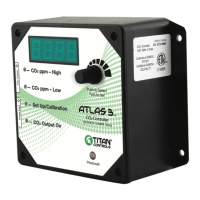
The ATLAS 3 CO2 Controller is a device designed to monitor and regulate CO2 levels in an environment. It is manufactured by Titan Controls and is intended for indoor use.

Function Description:

The primary function of the ATLAS 3 is to maintain desired CO2 concentrations within a specified area. It achieves this by continuously monitoring the CO2 ppm (parts per million) and activating or deactivating a connected CO2 generator or regulator based on user-defined high and low set points. The device features a digital display that shows the current CO2 level and allows for easy setup and calibration. A photocell is integrated to enable day/night operation modes, which is crucial for optimizing CO2 delivery based on plant light cycles.

Important Technical Specifications:

  • Power Input: 120 Volts, 5 Amps, 60 Hz. The unit requires a dedicated 120 V outlet and the second end into the power input connector on the left side of the unit.
  • CO2 Output: The controller is capable of managing a CO2 generator or regulator up to 120V 120V 5 Amps 60Hz. The CO2 generator plugs into the 120V outlet on the left side of the unit.
  • Measurement Range: The CO2 sensor measures CO2 levels in parts per million (ppm).
  • Operating Modes: The device supports different operating modes for day and night, allowing for customized CO2 enrichment schedules.
  • Compliance: Conforms to ANSI/UL STD 917 and certified to CAN/CSA C22.2 No.177.
  • Serial Number: S/N SCO2-00604 (example).
  • Made in Canada.

Usage Features:

The ATLAS 3 CO2 Controller offers several user-friendly features for setup and operation:

  • Connecting the Equipment:

    • Place the controller on a wall or flat level surface.
    • Connect one end of the detachable power cord into a 120 V outlet and the other end into the power input connector on the left side of the unit.
    • The controller warms up for 30 seconds before displaying a valid CO2 level.
    • Plug the CO2 generator into the 120V outlet on the left side of the unit.
  • Setting High Value:

    • Click the knob and turn to set the desired high ppm value. This value represents the upper limit for CO2 concentration.
  • Setting Low Value:

    • Click the knob and turn to set the desired low ppm value. This value represents the lower limit for CO2 concentration, below which the CO2 generator will activate.
  • Setting Operating Mode:

    • Click the knob and turn to select your setup. The available settings include:
      • F11: CO2 enrichment – day only
      • F12: CO2 enrichment – night only
      • F13: CO2 enrichment – day & night
      • F14: CO2 exhausting – day only
      • F15: CO2 exhausting – night only
      • F16: CO2 exhausting – day & night
    • Click the knob to return to the CO2 display.
  • Display and Navigation:

    • The device features a digital display for showing CO2 levels and menu options.
    • A "Push to Select, Turn to Set" knob allows for intuitive navigation through menus and adjustment of settings.

Maintenance Features:

The ATLAS 3 CO2 Controller incorporates features and guidelines to ensure proper operation and longevity:

  • CO2 Sensor Calibration:

    • Importance: Calibration is crucial for accurate CO2 readings. The CO2 sensor is factory calibrated, but it's recommended to recalibrate every 6 months or if the unit displays values outside the 300-450 ppm range in ambient air.
    • Calibration Procedure:
      1. Ensure the unit is in normal operation mode.
      2. Step 01 – IS CALIBRATION NEEDED? Expose the controller to outdoor air for a minimum of 5 minutes. If the value on the screen is around 350 to 450 ppm, calibration is likely not needed. If not, proceed to recalibrate.
      3. Step 02 – CALIBRATION IS NEEDED: Click the knob repeatedly until "Set Up/Calibration" indicator turns ON.
      4. Step 03: Press and keep the knob pressed for about 5 seconds until the light indicator begins to flash and "CAL" appears on the screen.
      5. Step 04: Let go of the knob. "CO2 CAL" appears on the screen. Click the knob again. If 400 appears on the screen, click the knob again. If the unit is in fresh air before starting the calibration, the controller will not need fresh air calibration. Just click the knob to abort calibration.
      6. Step 05 – STARTING CALIBRATION: Press and keep the knob pressed for at least 5 seconds until "CAL" flashes on the screen, then let it go.
      7. Step 06: Automatic calibration takes a few seconds to complete. "CAL GOOD" will appear on the screen for 5 seconds, and the controller will return to normal operation automatically.
  • Warranty Service:

    • Troubleshooting: If the unit is not working, users should return it to the dealer where it was purchased. If the dealer cannot help, contact Titan Controls directly for technical support.
    • RMA (Return Merchandise Authorization): If a return is necessary, an RMA number must be obtained from Titan Controls. The RMA form should be completed and included with the unit.
    • Packaging: The unit must be packaged in its original packaging. If it is damaged in shipment, the customer is responsible.
    • Shipping: Once received, Titan Controls will repair or replace the controller within 48 hours (business) and return it via FedEx or UPS ground shipment.
    • Contact Information for Warranty Service:
      • Phone: 1-888-80-TITAN or 1-888-808-4826.
      • Website: www.titancontrols.net

The ATLAS 3 CO2 Controller is a robust and reliable device designed to provide precise CO2 control, contributing to optimal growing conditions in controlled environments.

Titan Controls Atlas 3 Specifications

General IconGeneral
BrandTitan Controls
ModelAtlas 3
CategoryController
LanguageEnglish

Related product manuals