130
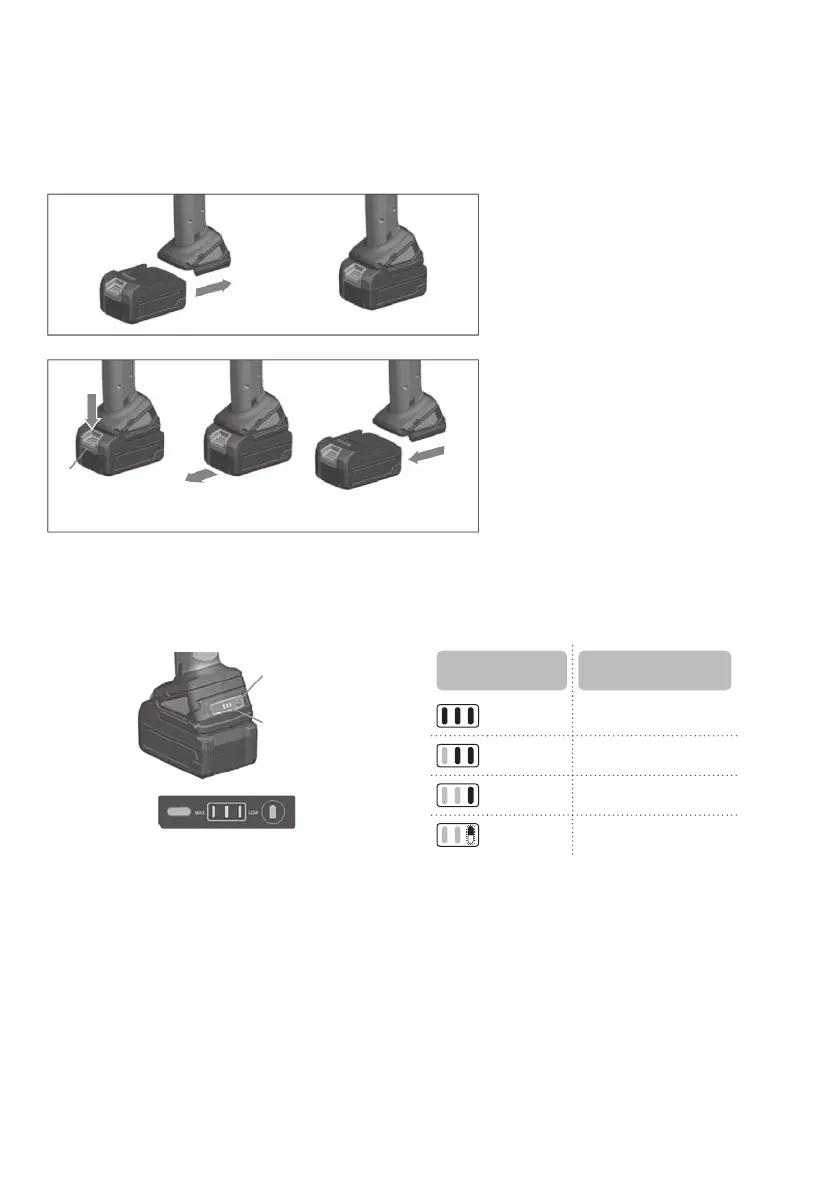
Installing and removing battery
Do not use force when inserting the battery. To insert the battery, align the tongue on the battery
with the groove in the housing and slip into place. Always insert it all the way until it locks in place
with a little click. If not, it may accidentally fall out of the tool.
Battery capacity indicator
Ifyoupresstheswitchonthebottomofthepowertool,theLEDlightwillturnoafterafewseconds.
Check the battery levels as follows.
Indicator
Remaining battery
capacity
3 light on (Over) 80%
2 light on (Over) 50%
1 light on (Below) 80%
1ickering 80% or less
Check the state of your work site
Before using the tool, check whether the state of the work site is as follows. Is the worksite free of
foreignobjects,debris,water,ice,snow,poweredelectricalcables,andexcessivedust?Istheoor
free of obstructions? Is their adequate ventilation? Is the worker properly insulated from the ground.
Follow the operation instructions and avoid prohibited items.
Remove hazardous substances
Sincethetoolisabatterytool,itmaysparkandcauseanexplosionorareifoperatedneargas
cylinders,thinner,orexplosiveandotherhazardoussubstancesorinaplacelledwithammable
gas, etc. Therefore, do not use the tool in places where such hazardous substances are present.
Ignoringthiswarningmaycausedeathorseriousinjury.Neverusethetoolinplaceslledwitham-
mablegasornearhazardoussubstancesofhighammability.
Button
` Inserting battery
` Removing battery
1. Push the button as
the picture
2. Withdraw it from the tool
while sliding the button
Remaining
battery
button
Battery capacity
indicator


 To Next Page
 Loading...