4
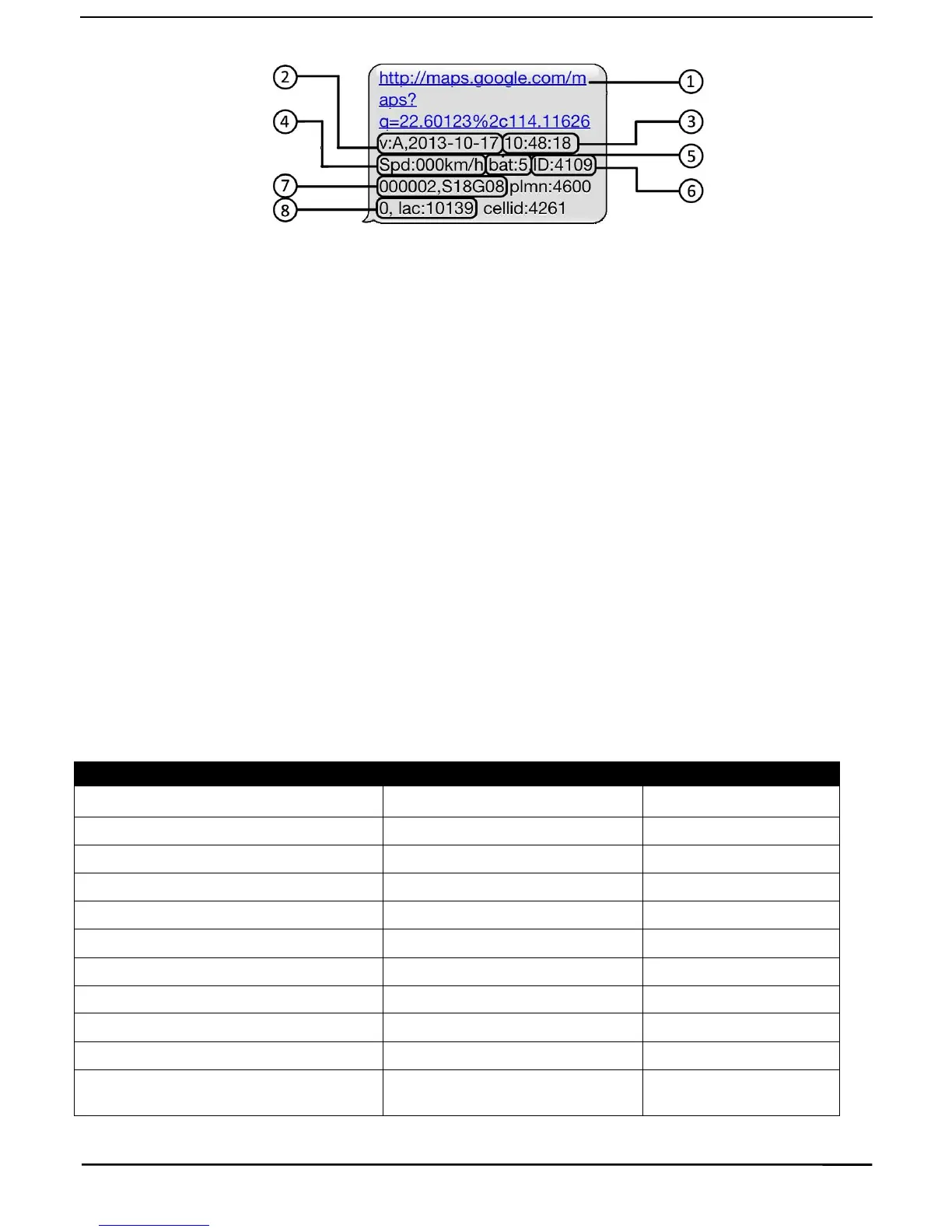
2.3 EXPLANATION OF PARAMETERS/CODES IN SMS MESSAGE
1. Google Maps link: This is the link to the Google map showing the position of the tracker unit.When click
the link, if a map is displayed, there is GPS information for the unit. If there is no may, there is no GPS
information for the tracker.
2. V:A/V: Indicates GPS signal. V:A indicates there is a GPS signal; V:V indicates there is no GPS signal.
3. 2013-08-30 20:54:15: The date and time stamp when the unit last received a GPS signal.
4. Spd: 000km/h: This indicates the last known speed of the unit.
5. Bat: The approximate amount of battery charge remaining. The value is between 1 and 9, with 9 being
fully charged.
6. ID: 4102000759: The ID code of tracker device. This number is used for tracking website and the app.
7. S19G04; plmn: 46001 The GSM operator data from the cell towers. You can safely ignore this information.
8. Lac: 9516,cellid: 23596: Location based service data that indicates if the data came from a cell tower, GPS,
or GPRS.
3. SMS Tracking
1) Call the SIM-card phone number in the device by other cell phone
2) Receive a Google Maps link by SMS to your mobile phone
3) Click on the Google Maps link
4) Now it displays the position of device.
3.1 Command Instruction


 To Next Page