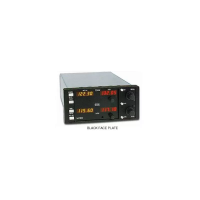
T
Transmit. The transmit mode on the transceiver is selected by grounding the MIC Key
line on the unit's rear panel.
Clearing all frequency presets. To clear the entire memory, both NAV and COMM,
except for factory presets:
1. Turn radio off.
2. While holding down the TEST button, turn the radio on. The unit will reset to factory
preset default channels in both active and standby (COMM 121.50/120.00) (NAV
108.001112.00).
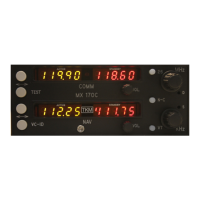
Frequency Storage. The MX170C NAV COMM allows up to 50 NAV and 50 COMM
preset frequencies to be stored in the memory for recall. The use of memory presets is
described in the following procedures.
Examining / Changing / Inserting / Deleting frequency presets. These operations on
individual frequency presets are accomplished in EDIT mode. To enter EDIT mode, turn
on the power to the radio while holding the VT button depressed. When the radio is in
EDIT mode, the active displays show the sequential number of the preset (1,2,3,etc.) and
the standby displays show the actual preset frequency.
EDIT mode operations can be performed on either the COMM or NA V preset list,
according to where the tuning tic indicator is displayed. The tuning tic appears
immediately to the left of the COMM or NA V standby displays. Pressing the N-C
button toggles between NA V and COMM preset editing.
Examining presets (EDIT MODE). Pressing the COMM F-F button will step to the next
frequency in the preset list. Pressing the TEST button will step to the previous frequency
in the preset list. Pressing COMM F -F when the last preset is displayed will cause the
first preset to display. Similarly, pressing TEST when the first preset is displayed will
cause the last preset to display. Warning: When there is only one preset in the list, the
radio will not appear to "do anything" when the COMM F-F or TEST is pressed. This is
because the current, previous, and next presets are all the same preset.
Changing a preset (EDIT MODE). Press COMM F-F or TEST until the preset to be
changed is displayed. Dial in the new preset frequency using the tuning controls and
press either COMM F-F or TEST.
Inserting (Adding) a preset (EDIT MODE). Press COMM F-F or TEST until the desired
insert point is displayed (the new preset will be inserted AFTER this insert point). Dial
in the desired frequency using the tuning controls and press NAV F-F. Remember that a
preset list may contain a maximum of 50 entries. Inserting commands that would cause
this limit to be exceeded are ignored.


 To Next Page
 Loading...