Need help?
Do you have a question about the TKM MX170C and is the answer not in the manual?
Details the MX170C as a 760-channel COMM transceiver and 200-channel NAV receiver for aviation services.
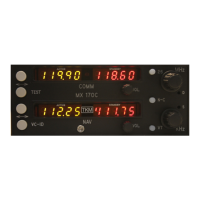
Explains digital displays, frequency selection knobs, flip-flop button, VC-ID button, and test button functions.
Details physical, power, general performance, COMM channel count, frequency range, and stability.
Covers transmitter output, modulation, microphone, side tone, duty cycle, and receiver sensitivity, selectivity, squelch.
Details NAV receiver accuracy, ident filter, AGC, output, and DME channeling configurations.
Details auxiliary audio inputs, frequency responses, and headphone/speaker output specifications.
Explains insertion into mounting tray, removal steps, and extraction tool usage for the MX170C.
Highlights FAA authorization, TSO requirements, and the need for compatible antenna and receiver.
Grants permission to reference installation instructions for Continued Airworthiness (ICA) documentation.
Lists external interconnect pin numbers and their corresponding descriptions for the MX170C.
Explains active/standby COMM/NAV frequencies, and the meaning of 'tic' indicators.
Details how COMM and NAV volume controls function as power switches for the unit and remote units.
Explains using N-C button, MHz/KHz knobs, and the '25' button for frequency selection.
Describes VC-ID for NAV signals and TEST button for squelch override.
Covers transmit mode selection, clearing presets, and frequency storage.
Explains entering EDIT mode, changing, inserting, and deleting presets.
Explains retrieving COMM and NAV presets by holding specific buttons while in normal operation.
Details limitations on installation environment, aircraft type, mounting distance from compass, and autopilot compatibility.
Provides a quick reference for the function of various controls and indicators on the unit.
Lists tested environmental conditions like temperature, altitude, humidity, shock, vibration, and susceptibility categories.
Covers RF emission testing and final installation precautions for the MX170C.
 General
| Frequency Range | 136-174 MHz |
|---|---|
| Channel Spacing | 12.5/25 kHz |
| Transmitter Power | 5 W |
| Output Power | 5 W |
| Battery Type | Li-ion |
| Antenna Impedance | 50 Ω |

 To Next Page