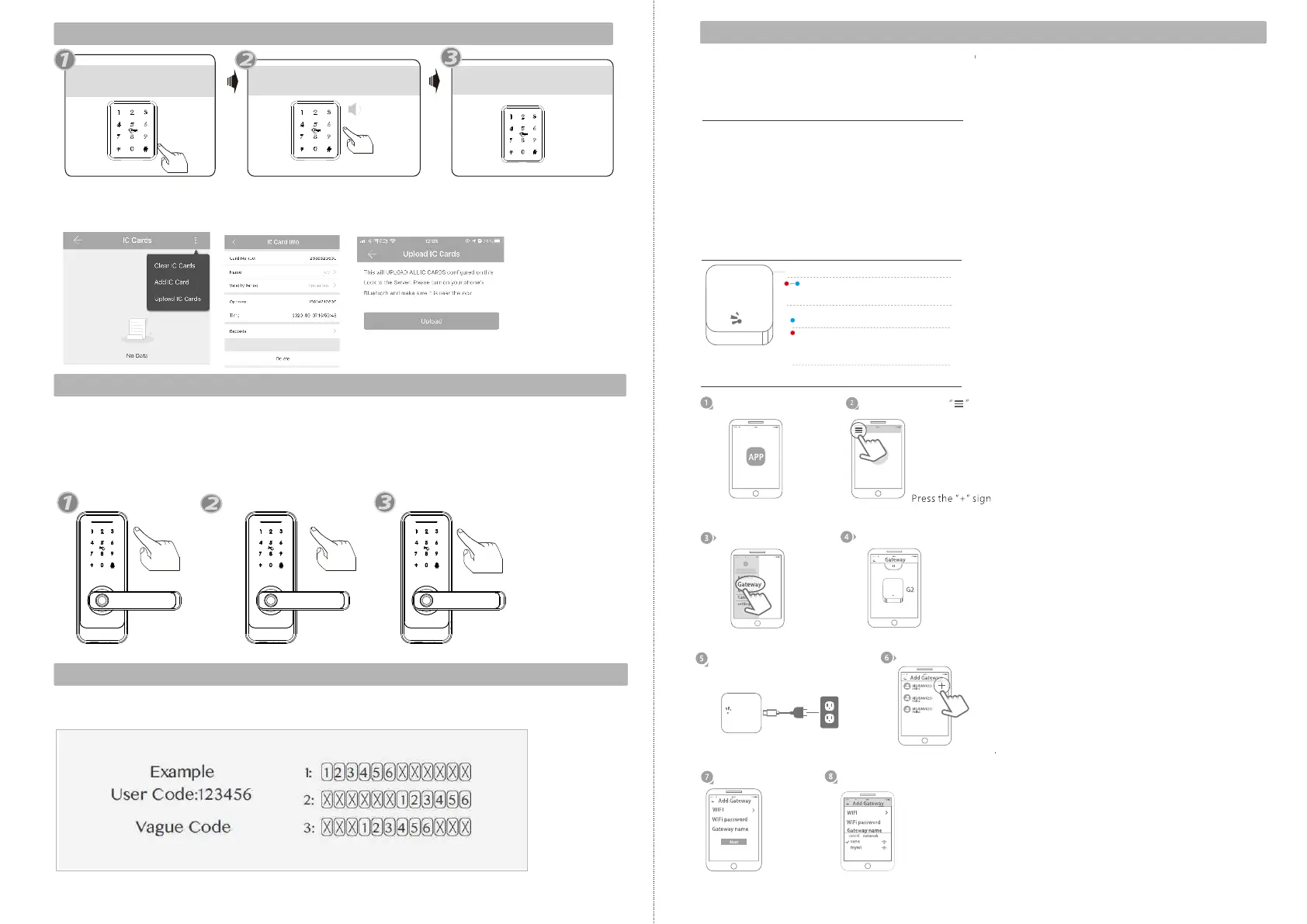
9.Delete User Card
Press *69 # button
“Please Input Administrator
passcode”
Operation successful!
all user cards are deleted.
Under the mobile APP, you can find the added IC Cards, you can edit any username and click
Delete button to delete the card, also you can choose upload IC Cards to ensure the card is
deleted in the server.
10.Passage Mode
Unlock the door with any valid passcode or fingerprint.
Press button during the time of unlocking.
123#
Sound tip: the lock set to passage mode
Then the lock is under always open state, you can enter any valid passcode or fingerprint to
cancel this function.
Press 123#
any valid passcode
or fingerprint
11.Anti-peep Keypad
The lock supports up to 16-digit Vague Code. Just enter any 16-digit code, as long as
a correct code is included in what you entered, you can open the door.
The new version Wi-Fi gateway is to enable the remote unlock function when you are
far from the lock, the gateway is required to configured with lock. please refer to the
below parameters and operations. (Wi-Fi gateway is not included. you should
purchase it separately. )
Model: G2
Dimension: 70x70x26mm
Network: Wi-Fi 2.4G
IEEE Standard: 802.11b/g/n
Power Interface: Type C USB
Power Input: DC5V/500mA
Light Status:
When the gateway is powered on:
Light flashes alternately with red and blue:
Stand-by mode,ready for connection
Blue light: working mode
Red light: network failure
Pair the Gateway with APP
Activate the APP
Press the button
Select the [Gateway]
Select the [G2]
Plug the gateway and power
on it, light flashes alternately
with red and blue.
Press the “+”.
Add Gateway
Select Wi-Fi and enter password
Finish paring gateway
12.WiFi Gateway(G2 version)
EN - 19 support@tmezon.comEN - 20 support@tmezon.com



 To Next Page