EasyManua.ls Logo

Toa BS-301B - Installation

Toa BS-301B
8 pages
Print Icon
To Next Page IconTo Next Page
To Previous Page IconTo Previous Page
Loading...
4
5. INSTALLATION
5.1. Satellite Speaker
Notes
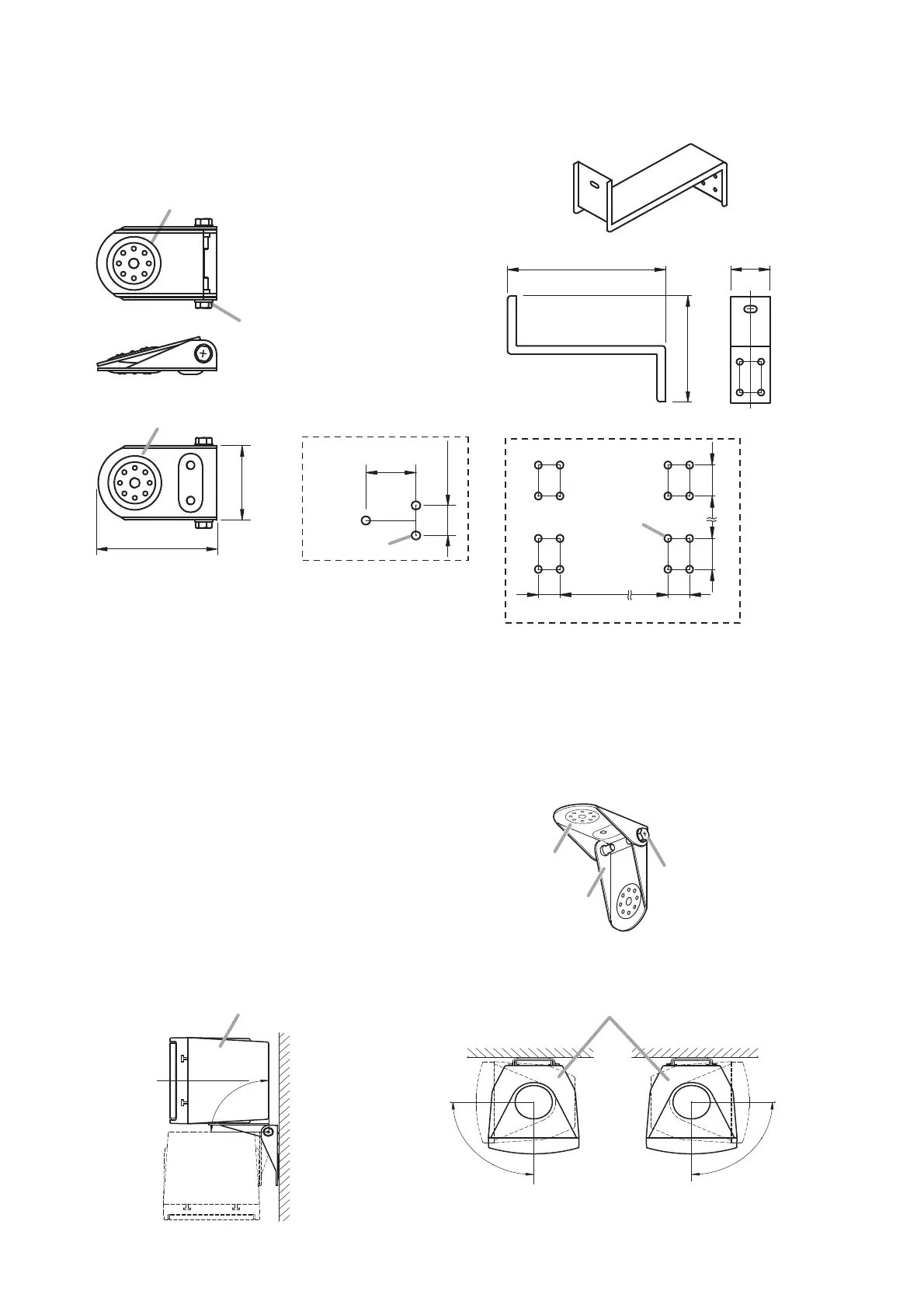
When mounting the satellite speaker mounting
bracket to a wall or ceiling, secure the Bracket A at 3
points to the wall or ceiling.
Use the Bracket B only to support the speaker.
Screws for mounting the bracket to the wall or ceiling
are not supplied. Use screws that are appropriate for
the ceiling's or wall's structure and composition.
4.3. Mounting Brackets
4.3.1. Satellite speaker mounting bracket 4.3.2. Subwoofer mounting bracket
Loosen the tightening screws (right and left) to install
the bracket to the speaker unit.
3-φ4.5 (0.18)
20 (0.79)
32
(1.26)
Tightening screw
Bracket A (for wall/
ceiling/speaker)
Bracket B (for speaker)
68 (2.68)
42 (1.65)
[Top]
[Bottom]
[Side]
[Wall/Ceiling mounting
dimension]
Unit: mm (in)
[Front][Side]
[Wall mounting dimension]
222 (8.74) 55
(2.17)
16-φ9 (0.35)
30
(1.18) (1.18)(12.99)
330 30
155 (6.1)
45
(1.77) (17.01)(1.77)
432
45
Note
Loosen 2 tightening screws
to open or close the bracket.
Satellite speaker mounting
bracket (accessory)
Bracket A
Bracket B
5.1.1. Speaker direction angle
(Horizontal)
(Vertical)
(Vertical)
90°
90°
(Toward the right)
90°
(Toward the left)
Satellite speaker (side view) Satellite speaker (top view)

Related product manuals