EasyManua.ls Logo

Toa IP-A1 Series - User Manual

Toa IP-A1 Series
14 pages
Print Icon
To Next Page IconTo Next Page
Loading...
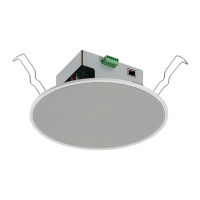
IP-A1PC238IP CEILING SPEAKER
INSTRUCTION MANUAL
Thank you for purchasing TOA’s IP Ceiling Speaker.
Please carefully follow the instructions in this manual to ensure long, trouble-free use of your equipment.
TABLE OF CONTENTS
1. SAFETY PRECAUTIONS
......................................................................................................... 2
2. SUMMARY AND FEATURES .................................................................................................. 4
3. ABOUT SECURITY MEASURES ............................................................................................ 4
4. DIMENSIONAL DRAWINGS ................................................................................................... 5
5. NOMENCLATURE AND FUNCTIONS ................................................................................... 6
6. HANDLING PRECAUTIONS .................................................................................................... 6
7. INSTALLATION PRECAUTIONS ............................................................................................ 7
8. INSTALLATION ......................................................................................................................... 7
9. CONNECTIONS ......................................................................................................................... 8
9.1. Connections to Control Input and Output Terminals ............................................................ 8
9.2. Removable Terminal Plug Connections .............................................................................. 9
10. SETTINGS .............................................................................................................................. 10
10.1. System Settings Summary ............................................................................................... 10
10.2. System Requirements ...................................................................................................... 10
10.3. Connection with Browser ................................................................................................. 11
11. INITIALIZATION OF SETTINGS ......................................................................................... 12
12. CAUTIONS REGARDING THE AVC/H.264 PATENT LICENSE ..................................... 13
13. OPEN SOURCE SOFTWARE .............................................................................................. 13
14. ACCESSORIES ..................................................................................................................... 13

Other manuals for Toa IP-A1 Series

Questions and Answers

Overview

The TOA IP-A1PC238 is an IP ceiling speaker designed for use in local networks, featuring a built-in power amplifier and sound source memory. It is powered via PoE (IEEE 802.3af) switching hubs, ensuring a streamlined installation with a single cable for both power and data.

Function Description:

The IP-A1PC238 supports multiple broadcasting modes, offering versatility in its application:

  • Internal Sound Source Broadcasting Mode: This mode allows for the broadcast of up to 20 internal sound source files, triggered by control inputs or Remote API (HTTP).
  • VMS Broadcasting Mode: It enables backchannel audio broadcasts from Video Management System (VMS) software, utilizing common protocols for IP cameras.
  • SIP Broadcasting Mode: The speaker can receive SIP broadcasts from any voice communications device that uses the SIP protocol, such as SIP or IP telephones (IP-PBX systems).
  • Multicast Broadcasting Mode: Up to 20 multicast ports can be configured, allowing for 20 multicast audio stream paging groups.

The device incorporates a priority system, allowing higher-priority broadcasts to interrupt and override lower-priority ones. It also features individual offset adjustable volumes for each broadcasting mode and internal sound source patterns, enabling normalized or optimized broadcasting volumes. Broadcasts can be controlled via Remote API or external control inputs, and external equipment can be controlled by the speaker's control outputs in synchronization with broadcasts.

Important Technical Specifications:

  • Power Supply: PoE (IEEE 802.3af Class 3) switching hubs.
  • Amplifier Rated Output: 8 W.
  • Mounting Hole Dimension: Ø200 mm ± 2 mm (7.87" ± 0.08").
  • Control Input Terminals: 2 channels, no-voltage make contact input.
    • Open circuit voltage: 5 V DC.
    • Short-circuit current: 2 mA or less.
  • Control Output Terminals: 1 channel, open collector output.
    • Withstand voltage: 30 V DC.
    • Allowable current: 10 mA or less.
  • Wire Compatibility for Terminal Plugs: AWG 28 – 22 wire (ø0.32 – 0.64 mm solid wire or multi-stranded wire with a cross-sectional area of 0.08 – 0.32 mm²).
  • Stripped Wire End Length: Approximately 7 mm (0.28").
  • Recommended Slotted Screwdriver: Blade width of about 2.5 mm (0.1").
  • Default Network Settings:
    • Username: admin
    • Password: guest
    • IP address: 192.168.14.1
    • Subnet mask: 255.255.255.0
    • Default gateway: 0.0.0.0
  • System Requirements for Browser Connection:
    • Display Resolution: 1366 x 768 or greater.
    • OS: Windows 10 Pro (64-bit), Windows 10 Home (64-bit), Windows 11 Pro, Windows 11 Home.
    • Browser: Microsoft Edge, Google Chrome.

Usage Features:

  • Control Input/Output: The speaker includes control input terminals for triggering actions based on external signals and control output terminals for synchronizing external equipment with speaker operations. Assignable functions for control inputs include SIP device calls, internal sound source broadcasts, and volume adjustments (mute or volume offset). Assignable functions for control outputs include indicators for SIP, VMS, multicast, and internal sound source broadcasts in progress.
  • Status Indicators:
    • LINK/ACT indicator (green): Flashes when data is being sent or received over the network.
    • Status indicator (orange): Indicates operating status: flashing twice for system startup, continuously lit for broadcast standby or broadcasting, flashing quickly for system mute, and flashing slowly for initialization or firmware updating.
  • Reset Key: A reset key is provided for restarting the speaker or initializing its settings to default by holding it down until the Status indicator flashes slowly.
  • Browser-Based Configuration: The speaker's settings can be configured via a PC browser connected to the same network. This includes network settings (IP address, SIP connection, multicast settings), audio settings (speaker volume, input volume), media management (upload/download/deletion of sound source files), pattern registration, event synchronization, priority settings for broadcast modes, user management (username/password), and maintenance functions (firmware update, hardware reboot, action log download).
  • High Volume Output Warning: The speaker is capable of extremely high volume sound output. Users are advised to turn down the volume before adjustments, avoid positioning ears close to the speaker, point the speaker away from people during tests, and avoid prolonged listening at high volumes to prevent hearing impairment.

Maintenance Features:

  • Firmware Updates: Users are encouraged to apply the latest firmware version, available from the TOA DATA Library, to ensure optimal performance and stability.
  • Periodic Inspection: Regular checks by a qualified service personnel are recommended to prevent corrosion or damage that could lead to the speaker falling.
  • Manual Rebooting: Periodic manual rebooting is suggested to extend the product's life. The product may also reboot automatically for stable operation.
  • Security Measures: Users are responsible for implementing sufficient security measures. It is crucial to change the default user ID and password to prevent illegal access. The setup manual provides detailed instructions for these settings.
  • Initialization of Settings: The speaker's settings can be returned to their factory defaults using the reset key. This process restarts the speaker and initializes all settings, except for sound source files in "Media," which are not deleted. Full factory defaults, including deletion of sound source files, can be performed via the browser settings menu.
  • Open Source Software: The product utilizes open source software. Information regarding the original open source software, including source code, can be downloaded from the TOA DATA Library.
  • AVC/H.264 Patent License: The speaker employs MPEG technology (AVC/H.264 Standard). Usage is generally restricted to personal and non-profit purposes. For sales promotion or commercial use, additional licensing information should be obtained from MPEG LA, LLC.

Toa IP-A1 Series Specifications

General IconGeneral
BrandToa
ModelIP-A1 Series
CategorySpeakers
LanguageEnglish

Related product manuals