3-76
Chapter 3
INSTALLATION AND SETTING PROCEDURES (HARDWARE)
8.3.5. Connecting other input equipment
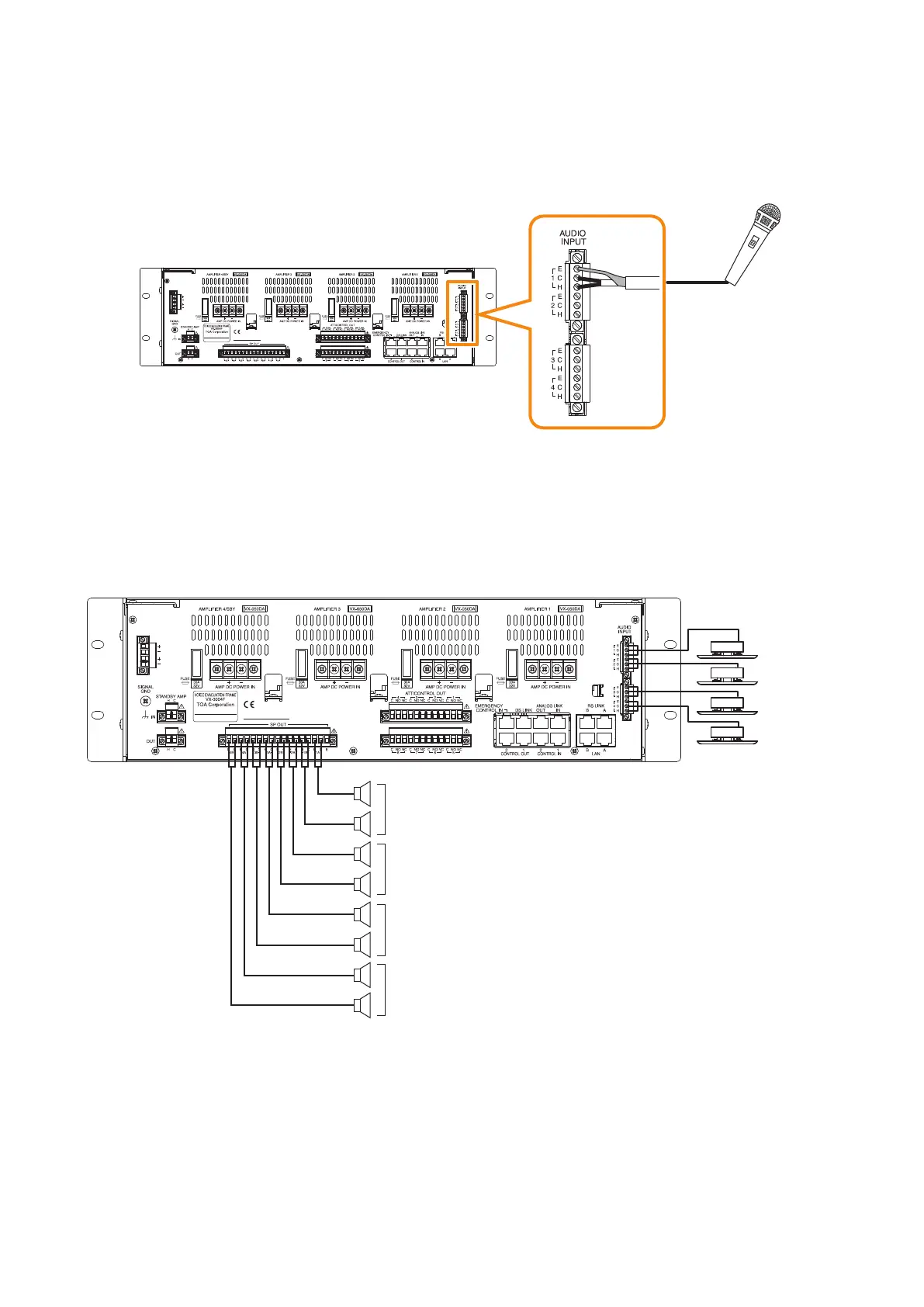
Connect microphones or other sound sources with audio inputs using 2-core shielded cables.
Four input channels (1 through 4) are provided for the AUDIO INPUT. Use the VX-3000 Setting Software to
set their volume, purpose, and type, etc. (See the separate Setting Software Instructions, "Unit conguration
setting.")
VX-3000F
Microphone
[When using the ANC function]
Connect a sensor microphone when using the ANC function.
The ANC setting applies to a single or multiple Audio output channel numbers within the preset unit.
You need to perform settings for ANC function using the VX-3000 Setting Software.
VX-3004F
Sensor 1
Sensor microphone
Zone 1
Sensor 2
Sensor 3
Sensor 4
Zone 2
Zone 3
Zone 4
In addition, you need to perform work and settings for sound output at the installation site after completing the
device connections.
For details, see the separate Setting Software Instructions, "ANC Function."



 To Next Page