3
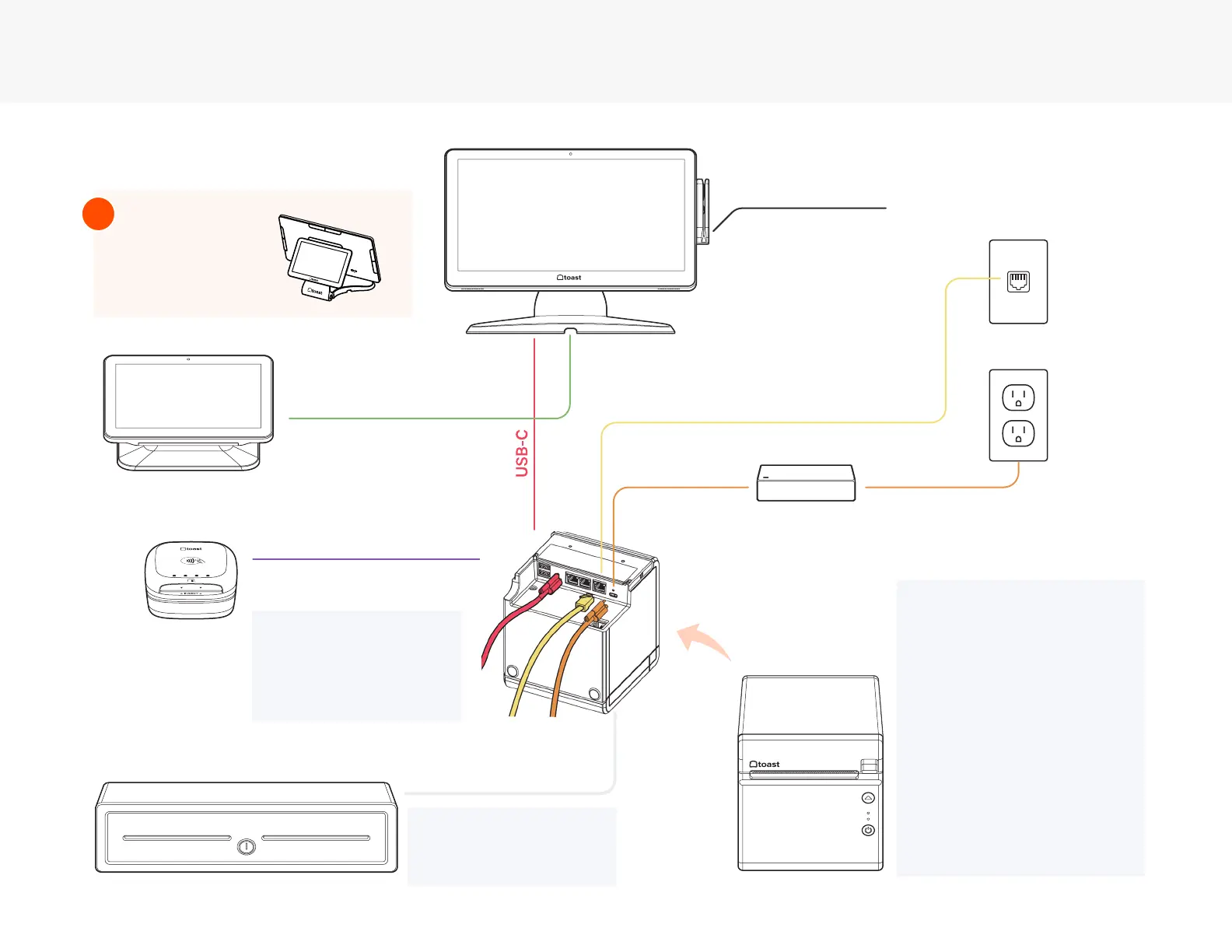
Cabling Diagram
Use the cabling diagram as a guide for how your system will be wired when it’s all set up.
Toast Flex for Guest
(Direct Attach) is
already attached
to the Toast Flex
Terminal.
!
NOTE
The Toast Printer has two
additional ethernet out ports
built in. These can be used
if additional equipment
from Toast needs to be
connected in the area and
no other ethernet cables
going to the Toast network
are available.
Toast Flex
MSR Card Reader
Wall Outlet
Ethernet Cable
Power Brick
Toast Printer
USB-C
(On-Counter)
Cash Drawer
USB-A to
Micro USB
To Meraki /Toast Network
On the
back of
the printer
(RJ11 to RJ12)
Only if you have a Toast
Flex for Guest (Wedge)
Only if you have a Toast
Flex for Guest (Wedge)
Toast Flex for Guest (Wedge)
Direct Attach
NOTE
Toast Tap can also be
plugged directly into the side
of the Flex Terminal.
Toast Tap
Cash Drawer Kick
NOTE
A dierent cable is used if you
are using an APG cash drawer.



 To Next Page