6
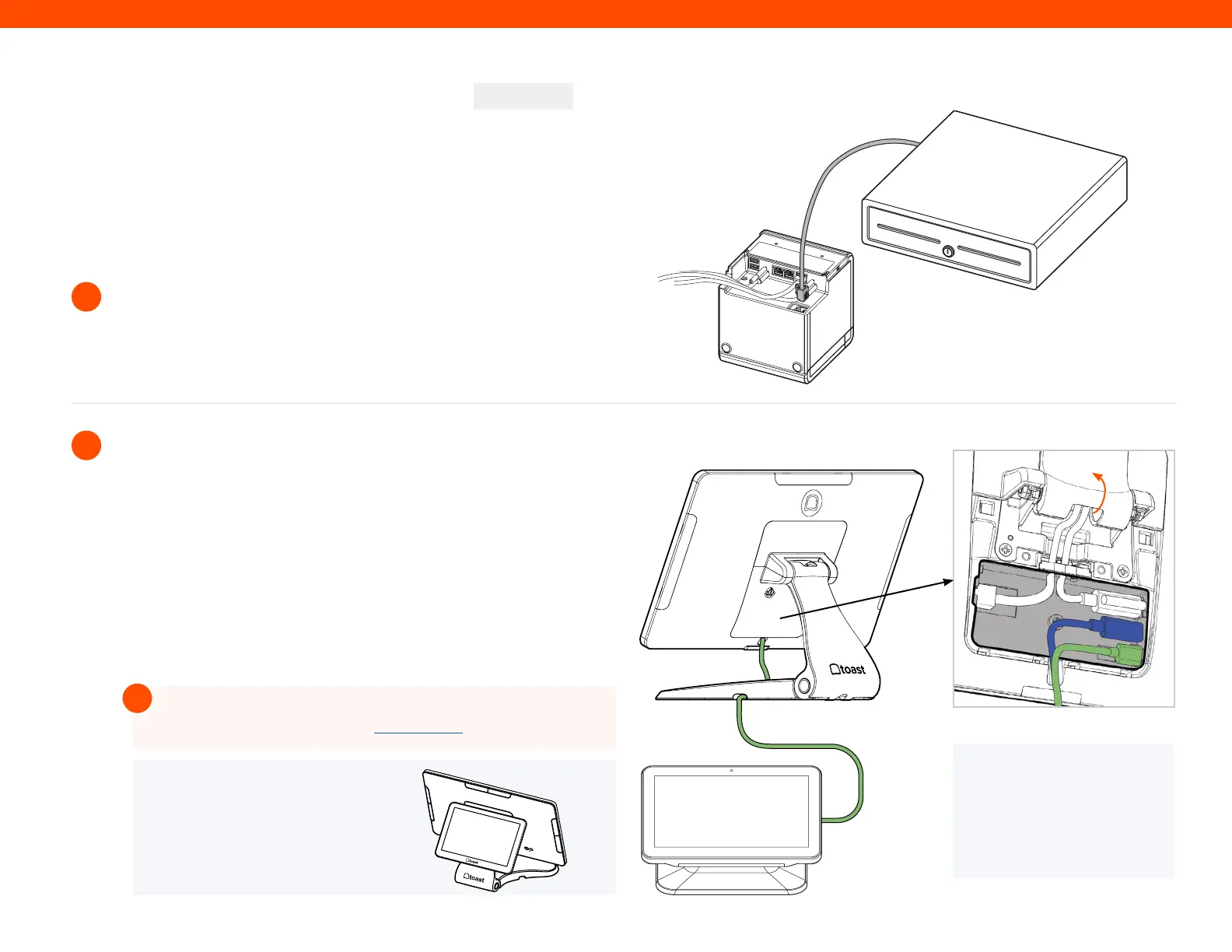
If you have a cash drawer, plug in the cash drawer cable to your Toast
Printer.
Toast Flex + Toast Printer
8
9
CONTINUED
For more information on Guest Display set up search “Guest-
Facing-Display Setup Guide” in Toast Central
!
How to Add Peripherals
If you have a Toast Flex for Guest (Wedge), gently flip and place
your Flex Terminal so that the display faces down and unscrew the
two thumb screws and lift up to remove the back plate.
A
B
Grab the free ends of the 5ft. Extension Cable and connect the
green (GFD) and blue (HDMI) cables to the Flex Terminal. Make
sure ‘UP’ text is facing up when plugging in. Place the cable
through the slot in the top of the terminal. Put back on the back
plate and screw in the two thumb screws.
Step 8
Step 9
Toast Flex
for Guest (Wedge)
Green and the
blue cables
combined
NOTE
If you are using the direct attachment
for Toast Flex for Guest, this is already
in place on the Toast Flex terminal. (See
image on the right)
NOTE
Flip the stand upwards,
open the Connector Bay
cover, and expose the
pocket to follow step 9B
Direct Attach
Connector Bay
Open
the back
cover to
install
cables



 To Next Page