6
Troubleshooting Your Toast Go 2
Q: Tapping a credit card doesn’t work, what do I do?
Each tap-enabled credit card has an NFC coil inside. This
coil powers the credit card chip when it’s near the card
reader. However, each card is made dierently and the coil
is not always located at the same spot.
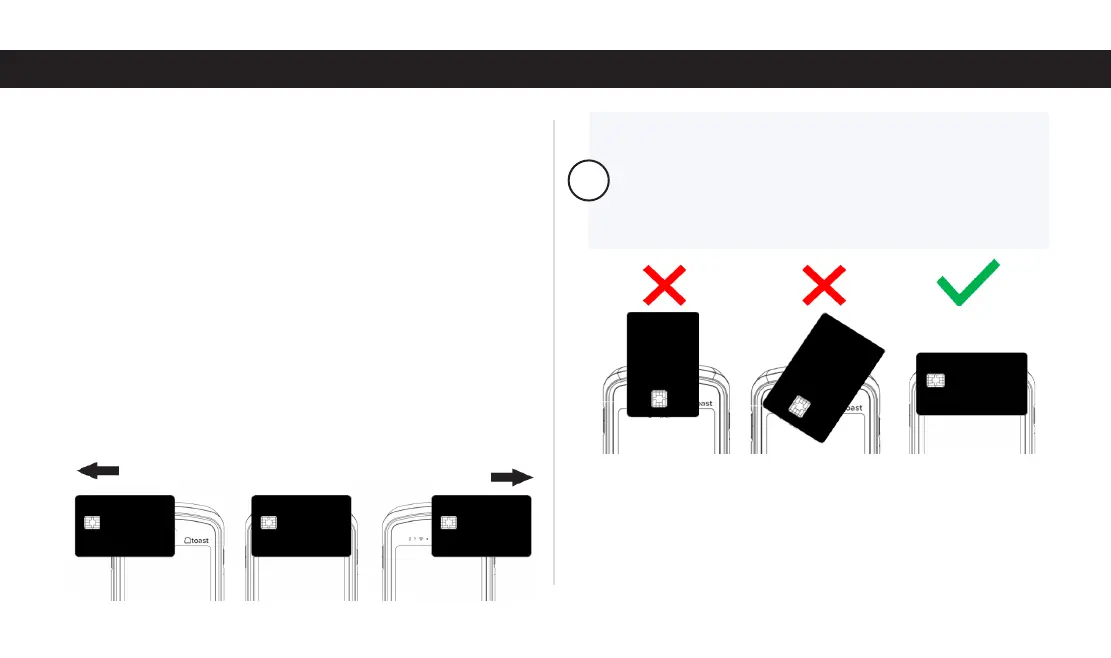
Align the card horizontally with the top of the device.
Then, move the card slightly to the left or right. Once the
Contactless Reader detects the coil, it will read the card.
When using the Contactless Reader, it’s important to
hold the credit card correctly. Make sure guests center
and horizontally align the credit card with the top of
the device as shown below.
!
iv. Open the Toast app, log in using your Toast
account, and retry the payment.
If the payment fails, contact Toast Customer Care.
Q: Why is it diicult to insert a card into the card reader?
The Toast Go 2’s EMV Card Slot was made more compact
to keep out water and foreign materials. Although it seems
like a tight fit, this extends the life of your card reader.



 To Next Page