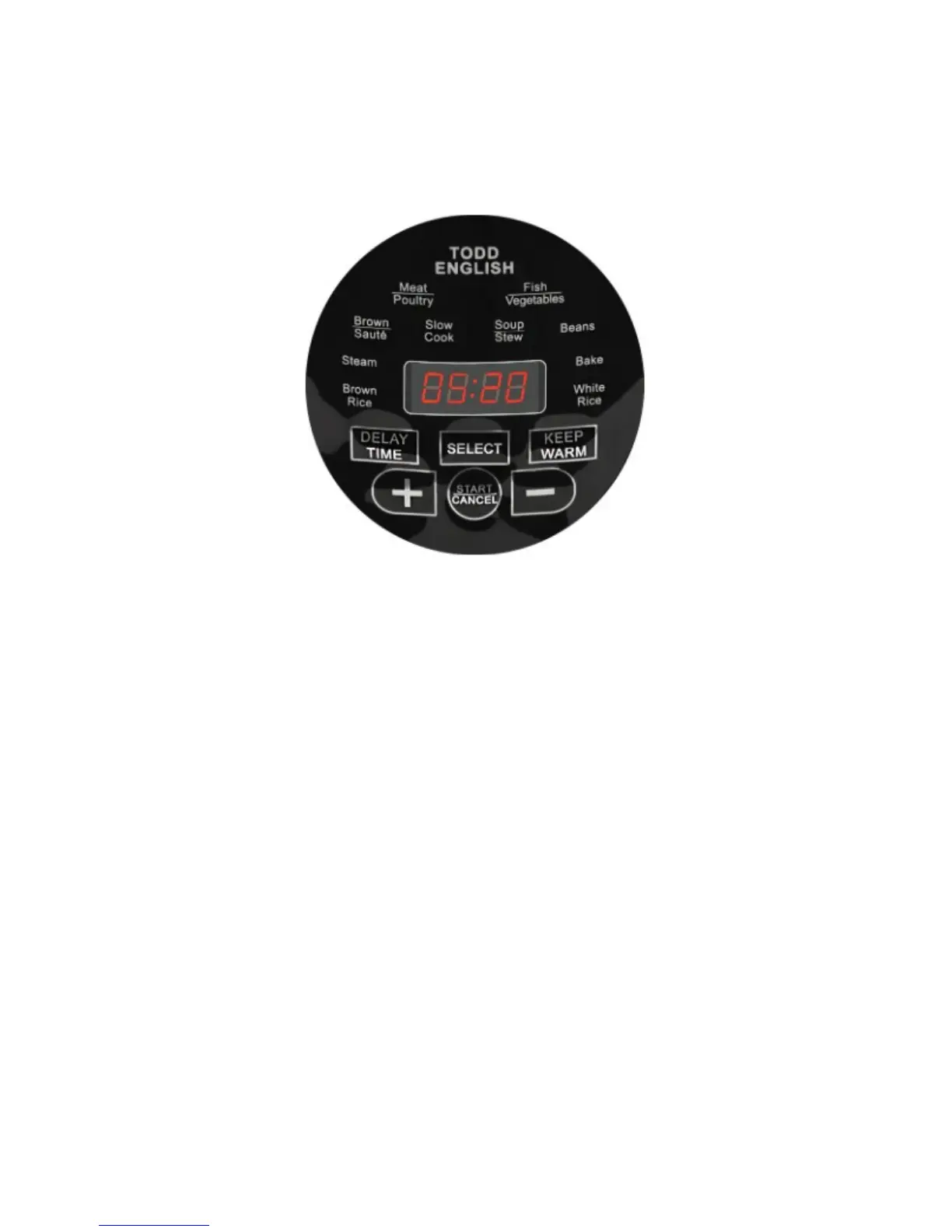
THE CONTROL PANEL
The control panel will light up with blue icons and a red timer when the
unit is plugged in. Select one of the ten cooking presets by pressing MENU until
the desired preset’s icon is highlighted and the timer flashes with P: followed by
the hours:minutes. This time can be adjusted in one-minute increments by
pressing + (PLUS) or – (MINUS). Once the desired time is reached, press
START/CANCEL.
Once START/CANCEL is pressed there will be a red indicator light near
the timer that moves up and down. This indicates the unit is building pressure
and heat. Once it reaches the desire temperature and pressure, the indicator
light will stop moving. Once the cooking cycle beings it will go away.
If the P:(hours:minutes) are flashing the lid is not on correctly and the unit
will not heat or build pressure. After adjusting the lid, the pressure cooker will
automatically begin the cycle.
You can stop the function by pressing START/CANCEL again.


 To Next Page