
 Need help?
Do you have a question about the Tomar 948L-DCP and is the answer not in the manual?
Lists functions for Auxiliary, Slide, Arrow, Dim, Manual, Horn, and Rotary switches when controlling a lightbar.
Details functions of switches when connected to a 940-AMP, including output assignments and voltage.
Outlines default settings for slide switch positions and auxiliary switches, including momentary and toggle functions.
Explains how to change AUX switch functions (ON/OFF, Momentary, Time Delay, RRB/MIC) and ignition enabling.
Describes how to link AUX switches to slide switch positions for mode control and saving selections.
Details how to exit programming mode and save selections, including locking out changes.
Explains how to enable siren activation in different modes (1, 2, 3) via rotary and horn buttons.
Guides users on changing the secondary siren tone by scrolling through available options and saving the selection.
Provides steps to unlock a previously secured 948L-DCP unit using specific button presses and connections.
Explains how to copy programmed settings from a master unit to un-programmed controllers using a CAT5 cable.
Details the procedure to reset the 948L-DCP to its original factory default settings.
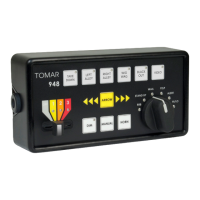
The TOMAR 948L-DCP is a digital siren and control panel designed for emergency vehicle applications. It serves as a digital output switch interface, capable of directly controlling TOMAR 930L or 970L series lightbars equipped with a digital cable, or the TOMAR 940-AMP. This device offers a comprehensive set of controls for various warning and illumination functions, making it a central component for emergency vehicle warning systems.
The 948L-DCP provides a range of auxiliary switches, a slide switch, an arrow switch, a dim switch, a manual switch, a horn switch, and a rotary switch, each with specific functions depending on whether it's controlling a lightbar directly or interfacing with a 940-AMP.
When directly controlling a lightbar, the switch functions are as follows:
When interfacing with a 940-AMP, the switch functions change to control amplifier outputs and siren tones:
The 948L-DCP is designed for intuitive operation with clearly labeled buttons and a rotary switch for siren tone selection. The slide switch allows for progressive activation of warning modes, from Mode 1 to Mode 3, providing flexibility in warning intensity. Auxiliary switches offer control over specific lighting functions like takedown, alley lights, and preemption.
The device features a programming mode that allows users to customize switch functionalities. To enter programming mode, set the Rotary Switch to STAND-BY, then press and hold the MANUAL and HORN buttons simultaneously for 2 seconds. AUXILIARY 1 through 6 LEDs will flash 3 times to indicate successful activation.
Individual AUX switches can be programmed for different behaviors:
After selecting a function, press the MANUAL button to save. AUX switches can also be configured to operate only when the ignition line to the siren amplifier is activated. This is done by pressing the desired AUX switch, then the ARROW button, and finally the MANUAL button to save.
Users can associate AUX switch functions with specific slide switch positions. To do this, move the slide switch to the desired position, press the AUX switch(es) to associate, and then press the MANUAL button to save. This allows for complex, multi-function warning configurations.
The default siren setting activates only in Mode 3 with the tone indicated on the rotary switch. To enable siren activation in Mode 1 or Mode 2, move the Mode switch to the desired position, move the rotary switch to WAIL, and press the HORN button. The YELP, ALERT, and HI/LOW LEDs will flash. Press MANUAL to save, then return the rotary switch to STAND BY. For independent siren control, move the slide switch to Mode 3, press HORN, then MANUAL to save.
The default secondary tone is YELP. To change it, start with the slide switch in the off position, set the rotary switch to WAIL, press the HORN button. Once the STAND BY LED flashes, return the rotary switch to STAND BY. The currently programmed secondary tone will flash. Press the HORN button to scroll through available tones: Wail > Yelp > Hyper Yelp > Alert > Hyper Alert > Hi/Low > Hyper Hi/LOW. Select the desired tone and press MANUAL to save.
To exit programming mode and save changes, press and hold the MANUAL and HORN buttons simultaneously for 2 seconds. The AUX switch indicator LEDs will flash 3 times.
To prevent further changes, exit programming mode by pressing and holding the ARROW button, and while holding it, simultaneously press and hold the HORN and MANUAL buttons for 2 seconds. The AUX switch indicator LEDs will sweep three times, confirming that changes are saved and locked.
To unlock a previously locked unit, press and hold the MANUAL button while plugging the unit into the slave port on the 940-AMP. AUXILIARY 1 through 6 will flash 3 times, indicating programming mode activation. Exit programming mode by pressing and holding MANUAL and HORN for 2 seconds to save the unlocked setting.
The 948L-DCP supports copying configurations to other units. Attach the programmed 948L-DCP (MASTER) to the MASTER port of a 940-AMP using a CAT5 cable. Enter programming mode, then move the rotary switch to the RRB position. Attach the un-programmed 948L-DCP (SLAVE) to the SLAVE port of the 940-AMP. The AUX 1 indicator on the SLAVE unit will flash, indicating it's ready to receive a program. Press the MANUAL button on the MASTER 948L-DCP. The MASTER's AUX 1-6 LEDs will flash three times, confirming the program has been sent. The SLAVE's AUX 6 LED will flash to indicate successful reception.
To reset the 948L-DCP to its original factory settings, enter programming mode. Once in programming mode, press and hold the ARROW button, then simultaneously press and hold both the DIM button and the HORN button until all LED indicators begin to flash. Release the buttons, then press the MANUAL button to accept the change. Exit programming mode by pressing the HORN and MANUAL buttons simultaneously until the AUX 1-6 LEDs flash three times.
 General
| Brand | Tomar |
|---|---|
| Model | 948L-DCP |
| Category | Control Panel |
| Language | English |

 To Next Page