TAKING A READINGTAKING A READING
4.
7.
1.
5.
4.
2.
6.
Push until it is secure. If the hygiene cover did not connect
rmly,thisiconwillbeashingontheLCDscreen.
Remove the hygiene cover and re-install.
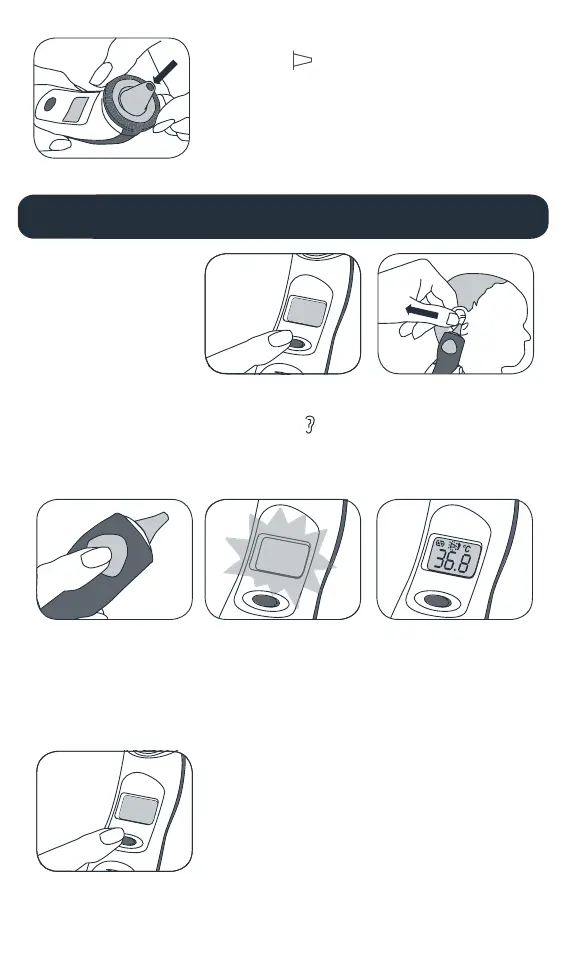
To measure the ear
temperature, press the
‘Scan’ button until there is a
long beep.
To power off, hold down the ‘On/Mem’ button for
approximately5seconds,untiltheLCDscreenshows‘o’.The
thermometer will automatically shut down after 1 minute if it is
however not turned off, helping prolong battery life.
Press ‘On/Mem’ button. The
thermometer is ready for use
when the ear icon stops
ashingandtwoshortbeeps
have sounded.
TheLCDscreenwilllightup
automatically after pressing
the scan button, and will
automatically turn off after 5
seconds.
Gently pull the baby’s ear
back, straightening the ear
canal. Position the probe
snugly into the ear canal,
ensuring an accurate reading.
The temperature will show
clearlyontheLCDdisplay.
HANDY TIP
Ensure the ear canal
is clean.


 To Next Page