(1) iOS
(2) Audroid
/ /
Please clear memory of the background program in time to reduce the CPU usage.
Important Notes:
To ensure a better recognition when perform the hand-gesture functions:
1. Please face to the camera rightly;
2. Please perform these functions in a good light environment;
3. The distance between your hands and the camera should be about 2m.
Some situation may result in a low camera recognition:
1. Low light or backlighting;
2. Under weak WiFi signal or the signal is interference.
Reminder 1
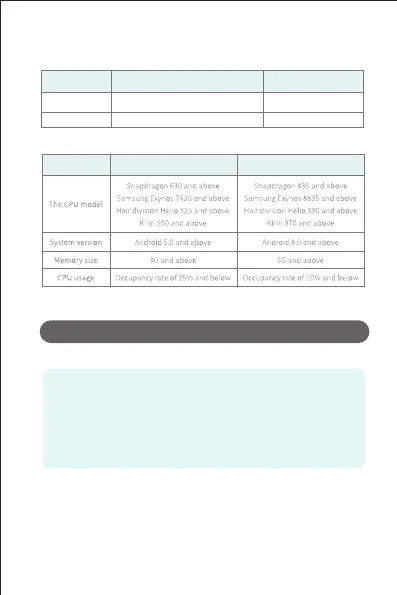
3. The recommended model configuration
Configuration
Recommended
Optimal
Configuration
Recommended
Optimal
Image stabilization function(some phone models do not support this feature)
1. Requirements for mobile devices: It is recommended to use the “best configuration” mobile phone of
“recommended model configuration” in the manual;
2. It can only be strated under 720P image transmission;
3. When in the anti-shake mode, gesture recognition is turned off The hand-geature modes can not be
performed under anti-shake mode.
4. Starting the master following mode and plam following mode or entering MV recording will make the
App exit anti-shake function.
5. The anti-shake mode is not working when use the bottom camera.


 To Next Page