LIGHT INSTRUCTION:
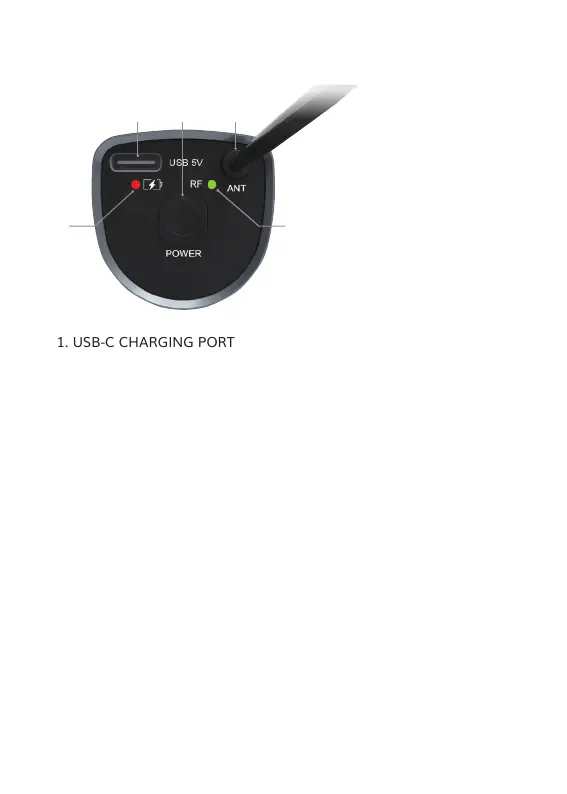
Battery indicator 4
Red light when shutdown charging: The receiver is in charging
model.
Light off when shutdown charging: The receiver is fully charged.
Green light: The receiver is turn on.
Yellow light when turn on charging: The receiver is in charging
model. The light turns green when the receiver is fully charged.
RF light 5
Turns off: The receiver is not connected to the microphone.
Stays on: The receiver and microphone are successfully connected.
Flashes quickly: The receiver and microphone are successfully
connected, and the microphone is transmitting audio signals.
Flashes slowly: The power of the receiver is in a low battery status.
1. USB-C CHARGING PORT
2. POWER BUTTON (long press for 2 seconds to tum it on/off)
3. SIGNAL ANTENNA
4. BATTERY INDICATOR
5. RF LIGHT
RECEIVER INSTRUCTION FOR TW620 AND TW630
06
2
1
3
4 5


 To Next Page