5
ASSEMBLY
1
2
3
4
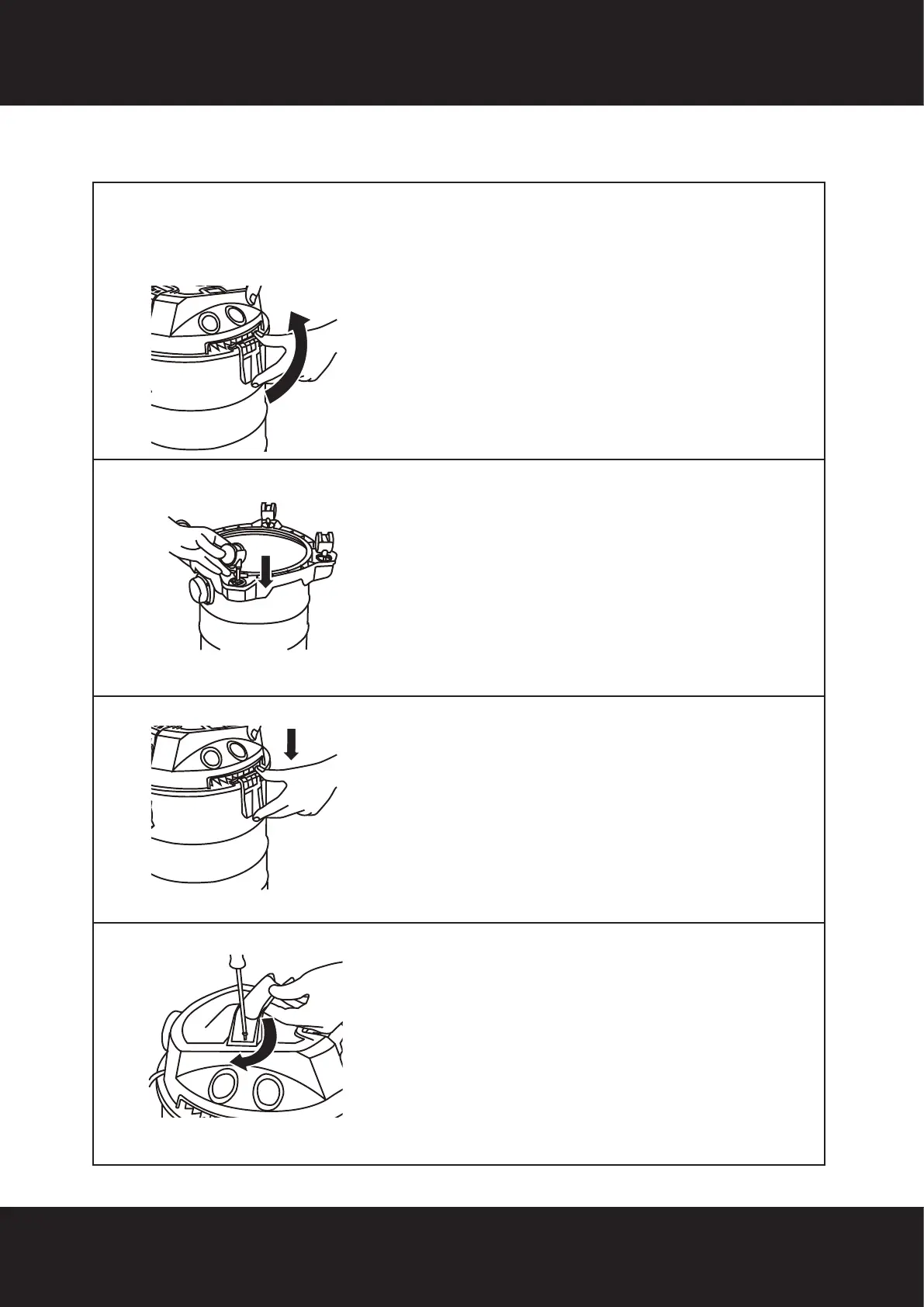
Remove the appliance head from the tank by
unlocking the 2 x side locking handles pulling
them outwards, then upwards.
Then turn the tank upside down.
Fit the 4 x castor wheels by inserting the mounting
pin on the castor wheel into the designated
mounting hole on the underside of the base.
Firmly push the castor wheels into the mounting
holes.
When all 4 x castor wheels are tted, turn
the product the right way up, and re-attach
the appliance head ensuring you align the
notches on the ridge of the tank lip with the
side locking handles, and secure the 2 side
locking handles in position.
1. Place the carry handle in the grooves on the
top of the appliance head so that they are tted
and align correctly.
2. Using a phillips screwdriver, insert and secure
the screws through each side of the handle
until secure.
WARNING: To prevent serious injury from accidental operation, turn
the power switch of the vacuum off and unplug the appliance from its
electrical outlet before performing any procedure in this section.


 To Next Page