10
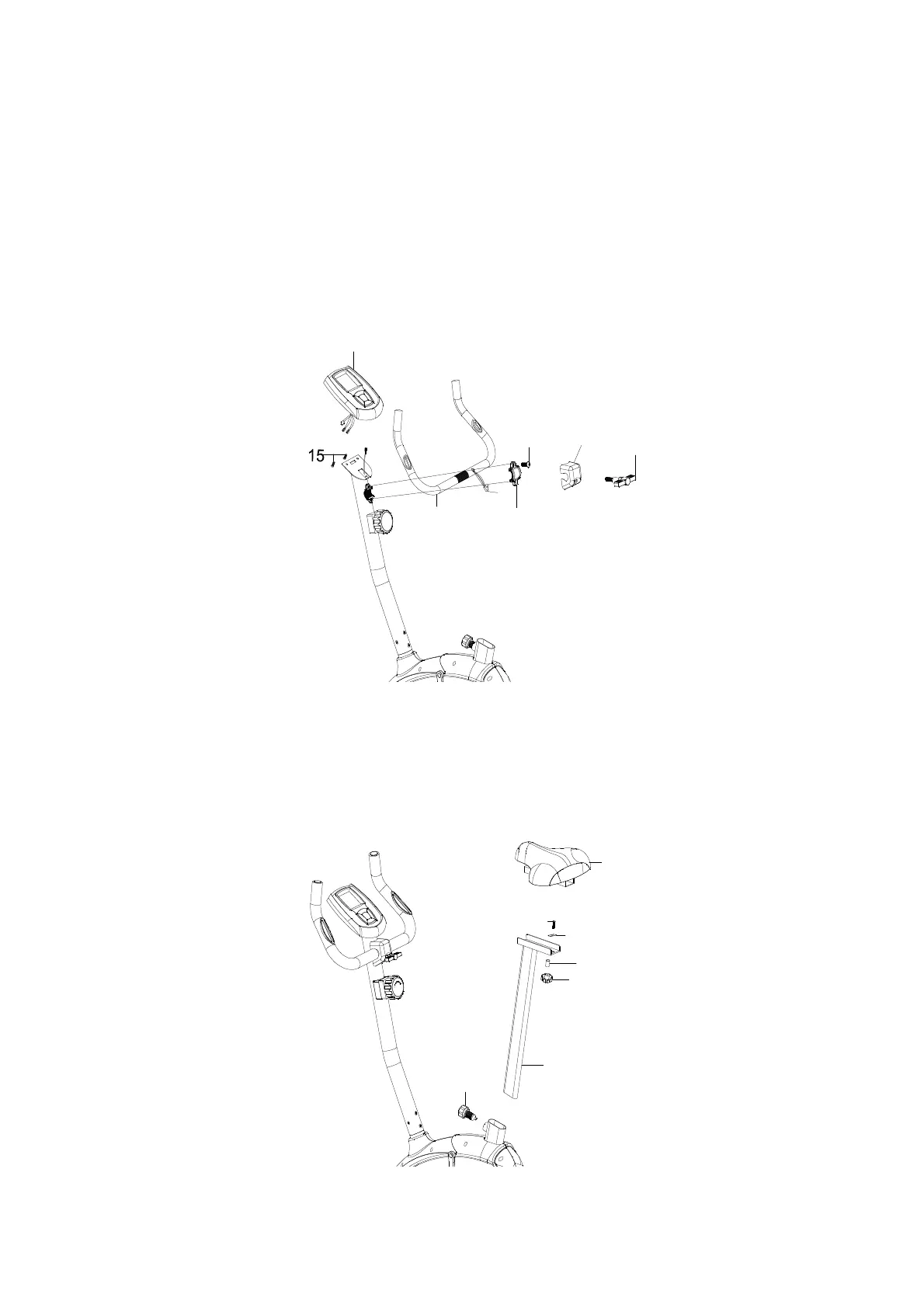
STEP 3
(a) Remove the clamp (21) and allen screw (22) from the front post . Attach handlebar (19) to
front post, Secure by using the clamp (21), allen screw (22), clamp cover (33) and T type
knob (23).
(b) Insert the hand pulse wires (20) through end cap for wire (37) and insert through the hole
in the front post, pull the hand pulse wires (20) through the hole at the top of the front post
and insert end cap for wire(37) into the front post.
(c) Connect the hand pulse wires (20) and middle sensor wire (14) to the back of the
computer (18) . Attach the computer onto the bracket of front post. Secure by using two
screws (15) which are pre-assembled on the back of computer.
STEP 4
Take the Quick release knob (9) off from main frame . Insert seat post (28) into the main
Frame (1), then tighten with knob (9).
Attach seat (11) to seat post, tighten with carriage bolt (62), square washer(17),spacer (16)
and knob (64).
1
9
2
1
2
2
2
3
1
8
2
0
3
3
9
2
8
1
1
6
4
1
6
1
7
6
2


 To Next Page