6
10 Operation and use
10.1 Connect your smartphone or
tablet to the camera
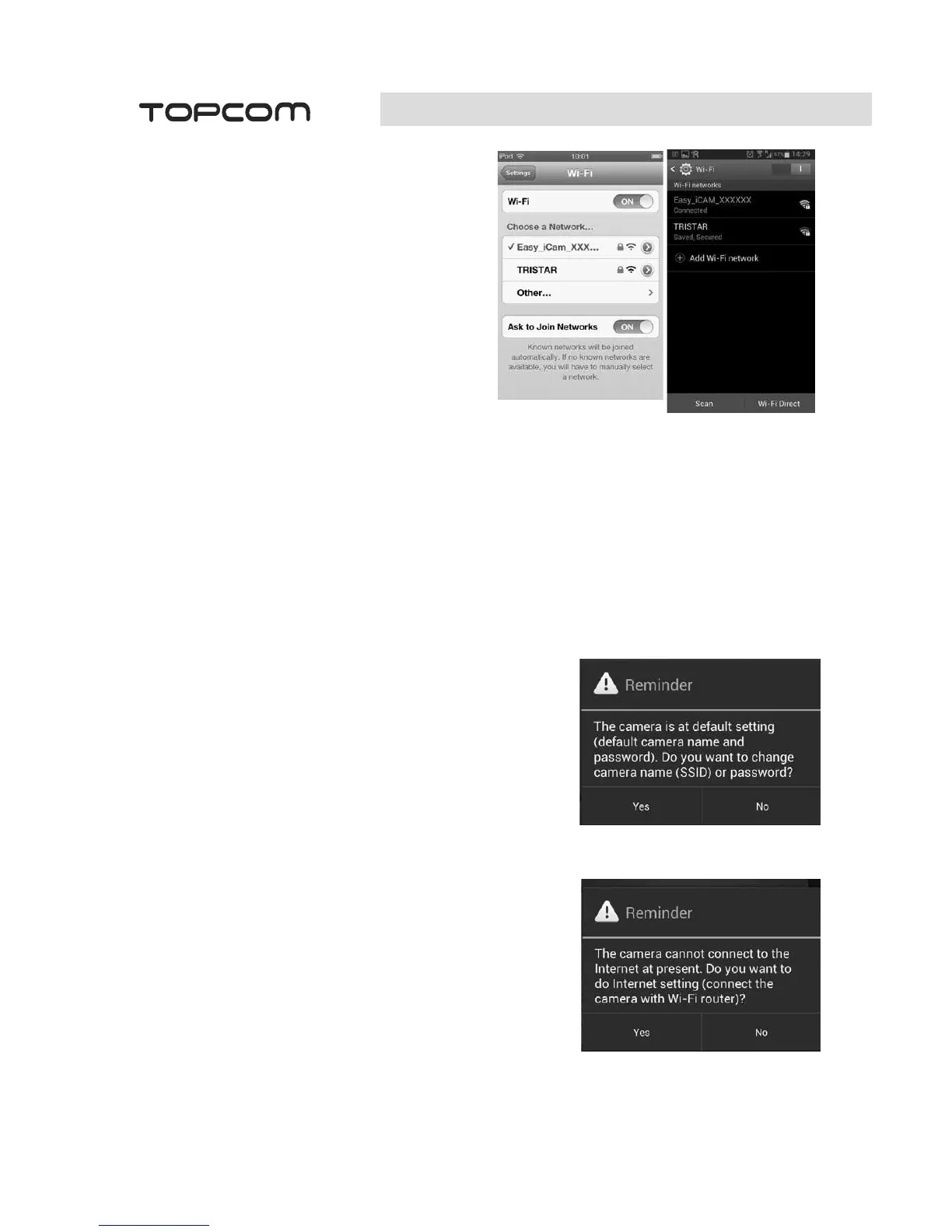
• Turn on the Wi-Fi of your smartphone or
tablet and go to the WiFi setting menu.
• Tap the screen to select
"Easy_iCAM_XXXXXX" under Wi-Fi
Networks.
• Enter the password. The default password
is "12345678".
• Launch the Easy iCAM App on your
smartphone or tablet.
• Follow the on-screen app instructions.
10.2 Setting up the camera name
(SSID) or password
When launching the app for the first time, the screen will show a message that reminds you to
change the Wi-Fi camera name (SSID) or password.
• If you select "Yes", you can change the Wi-Fi camera name or password.
Note: The password must contain at least eight characters.
• When you complete the setup of camera name or password and tap the ok icon, the app
will ask you if you want to set up an Internet connection.
• If you select "Yes", Internet setup will be started (see “10.3)
• If you select "No", the camera will restart to change the
camera name and password automatically.
Note: When the name has been changed, you have to re-
select the camera by its new SSID in WiFI setting of your
smartphone or tablet.
• If you select "No", the app will ask you if you want to
setup an Internet connection.
10.3 Setting up an Internet connection
The screen will show a message asking if you want to set up an Internet connection.
• If you select "Yes", the camera will scan for available
Wi-Fi networks in range. Tap the name of your Wi-Fi
network, and enter the password of your Wi-Fi router if
necessary. Then the first-time setup is done.
Note: If the camera cannot find the Wi-Fi network you
want to connect to, please tap the scan icon to rescan for
available Wi-Fi networks.
Android
iOS


 To Next Page