4
TOPCOM Time Master 500
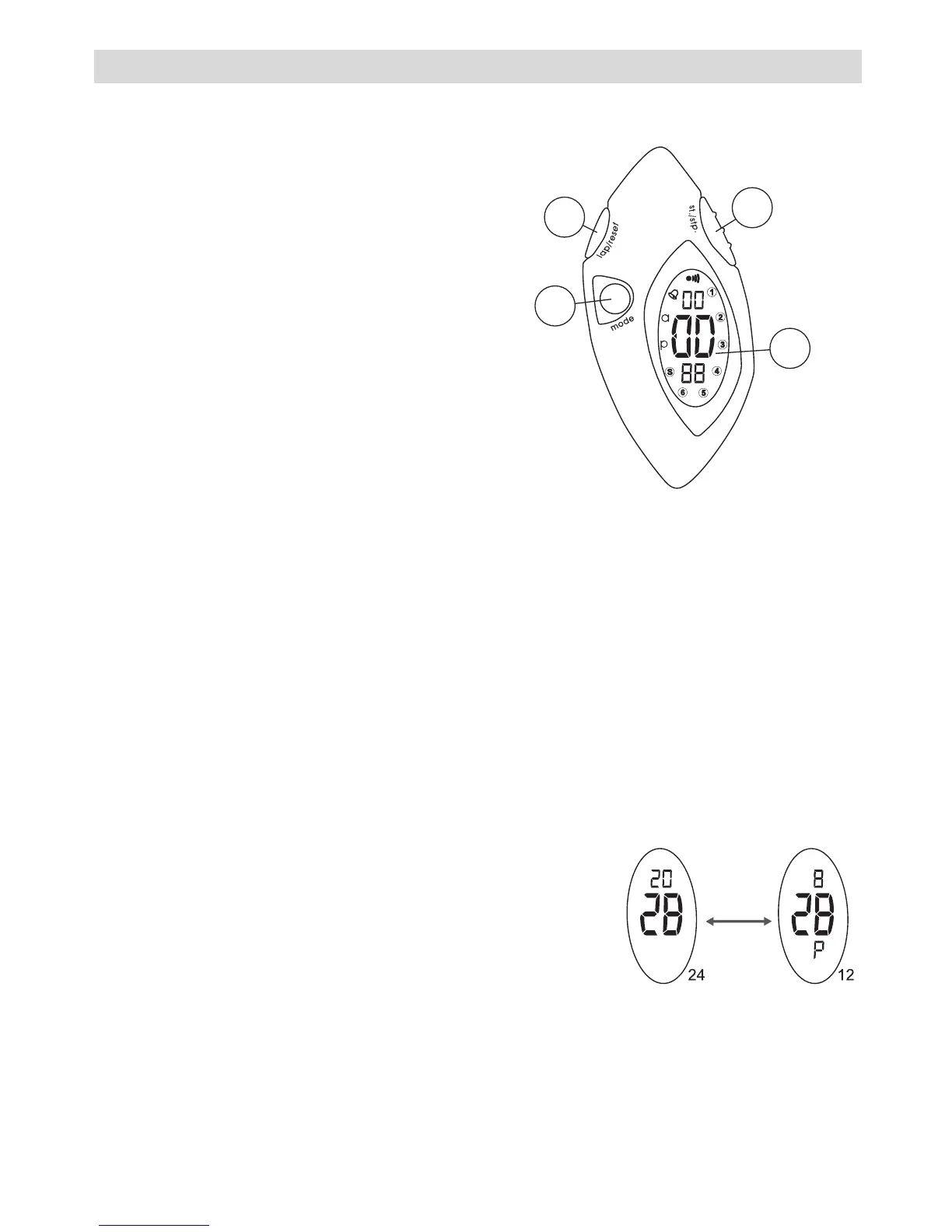
4 BUTTONS
A. START/STOP BUTTON [st./stp.]
• To 'start' or 'stop' the chronograph
function during chronograph mode.
• To select date in time mode.
• To confirm in setting mode.
B. DISPLAY
C. MODE BUTTON [mode]
• To select among the Time mode
and Chronograph mode.
D. LAP/RESET BUTTON [lap/reset]
• To see the lap time or to reset the
chronograph during chronograph mode.
• To increase the digits under setting display.
• To toggle Yes/No.
5TIME MODE
• Press the [st./stp.] button to select Month, Date and Day of the week.
The day is expressed with numbers on the side of the display 1
to 6 and S (Sunday).
• Press the [lap/reset] button to see the alarm time.
5.1 12/24 HOUR SETTING
During normal time display:
• Press and hold the [lap/reset] button.
• Press the [mode] button once, ‘P’ or ‘A’ will
appear when 12 hour system is set or disap-
pear when 24 hour system is set.
• Release the [lap/reset] button.
A
B
C
D



 To Next Page