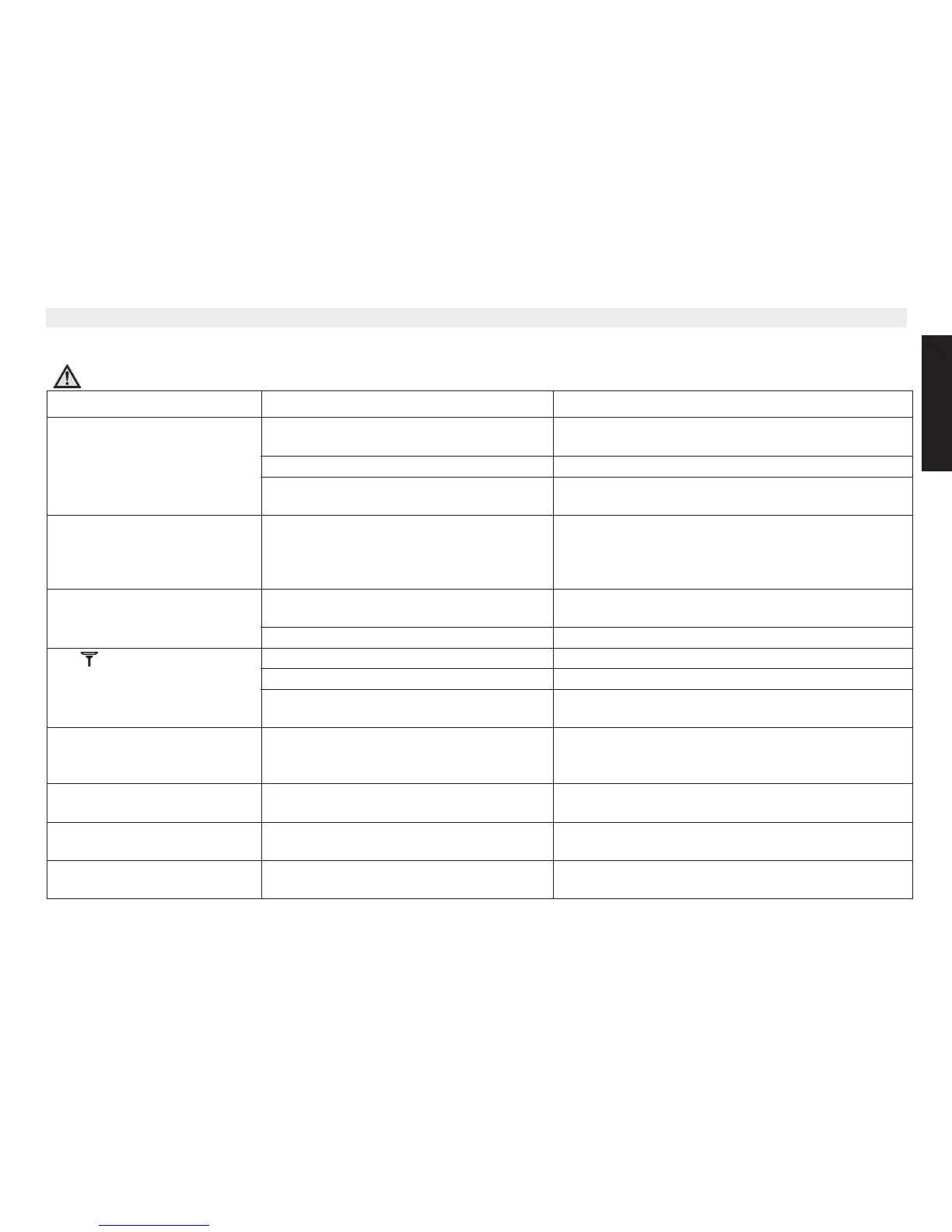
6\PSWRP 3RVVLEOHFDXVH 6ROXWLRQ
Display remains dark. Battery packs inserted incorrectly. Check the connector of the battery pack (see “2.3
Commissioning the charging station S1200c”).
Batteries not charged. Charge the batteries.
Handset is switched off. Switch on the handset (see “4.2 Switching the handset
on/off”).
No power. Check that the devices has the correct power supply.
Check if the handset is activated (Only Outdoor
S2010c). See “2.6 OUTDOOR S2010c Handset
activation”
No sound. Telephone cable incorrectly connected or
defective.
Check the connection of the telephone cable (see “2.1
Commissioning the base station”).
The line is engaged by a different handset. Wait until the other handset hangs up.
The symbol is flashing. Handset is out of range. Move closer to the base station with the handset.
The base station has no power. Check the power connection to the base station.
The handset is not registered to the base
station.
Register the handset to the base station (see “9.1
Registering an additional handset”).
The base station or handset
does not ring.
The ringer volume is off or too low. Set the ringer volume (see “4.16 Setting the ringer
volume on the handset” and “7.1 Setting the ring
volume on the base station”).
No connection despite good
sound quality.
The dialling mode is incorrect. Check the dialling mode (see “8.4 Setting the dialling
mode”).
Calls cannot be forwarded on a
PBX.
The flash time is too short. Set the device to a long flash time (see “8.2 The flash
key (R)”).
Telephone does not
respondwhen keys are pressed.
Programming error. Remove the batteries and then insert them again after
1 minute.















 To Next Page