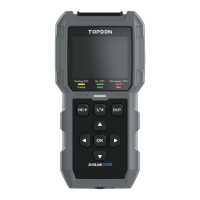
2. Indicator Status: The 3-color (green. yellow, red) LED
indicator shows the OBD-II diagnostic and battery test
results.
The Denition of 3-Color Indicator
●
Green LED: Indicates that all on-board systems are
"OK" operating normally. There is no DTC stored in
the ECU. The battery is in a good condition and no
need to charge or replace it.
●
Yellow LED: Indicates that the pending code(s) are
present. The battery is in a normal condition, might
need to be charged and tested again later.
●
Red LED: Indicates that the permanent code(s) are
present. The battery is in a bad condition and needs
to be replaced.
3. Help Shortcut Button: When pressed, it leads you directly
to the Help menu, which includes the basic info of OBD-
II, Datastream, I/M Readiness, and instructions for printing
the report.
4. I/M Readiness Shortcut Button: When pressed, the scan
tool automatically communicates with the emission-
related system and monitor associated components such
as the fuel system, oxygen sensor, catalyst converter,
misre monitor, etc.
5. Exit Button: When pressed, it brings you back to the
previous menu.
6. Arrow Keys & OK Button.
7. DB15 Male Connector: The connector is for you to connect
the OBD-II diagnostic cable and battery test cable. (See
Figure 2.1.2)
Figure 2.1.2


 To Next Page