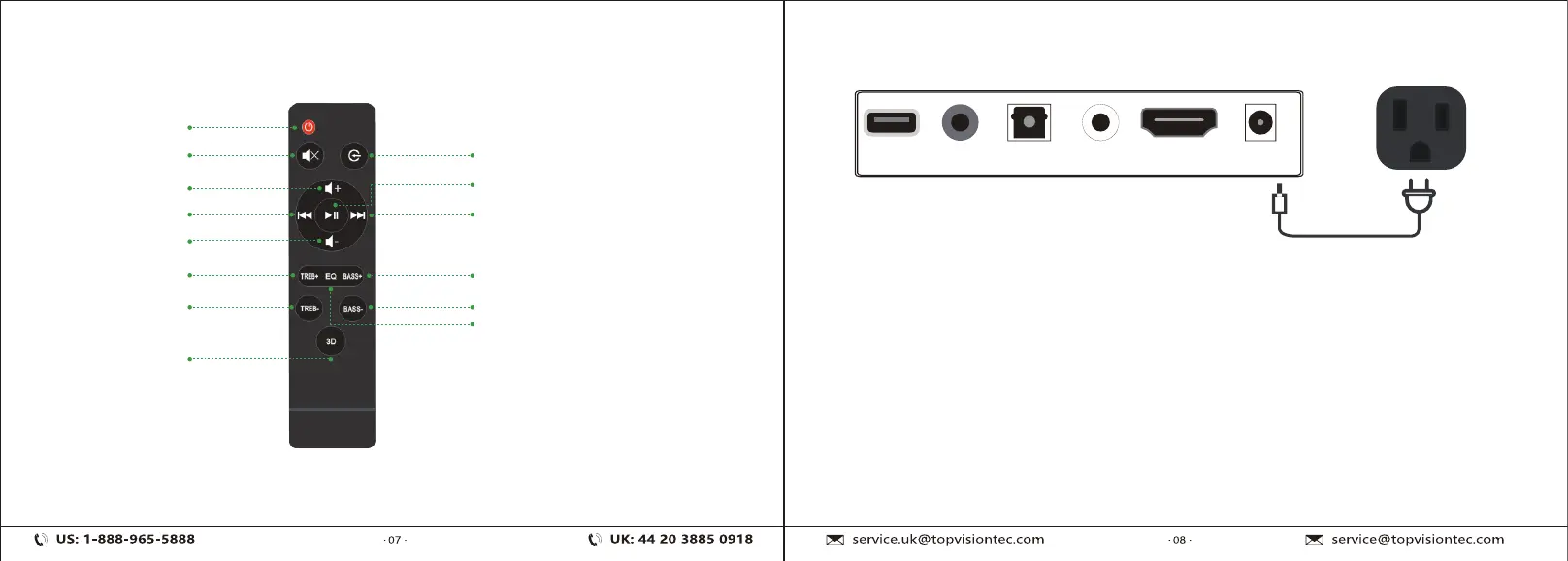
Know your Remote Connecting Electrical Power
USB
AUX OPTICAL COAXIAL HDMI DC
ON/OFF
Mute
Vol+
Previous Song
Vol-
Treble-
Bass-
3D Surround
Mode Transformation
Next Song
Play/Pause
Treble+
Bass+
Sound Effect
(Short press to switch sound effects,
long press to turn sound effects on
or off)
Make sure to rest the AC/DC adapter flat on a table or the floor. If you place
the AC/DC adapter so that it is hanging with the AC cord input facing
upwards, water or other foreign substances could enter the adapter and cause
the adapter to malfunction.
Note:
When disconnecting the power cable of the DC/AC power adapter from a wall
outlet, pull the plug. Do not pull the cable. Do not connect this unit or other
components to an AC outlet until all connetions between components are
completed.
Outlet


 To Next Page