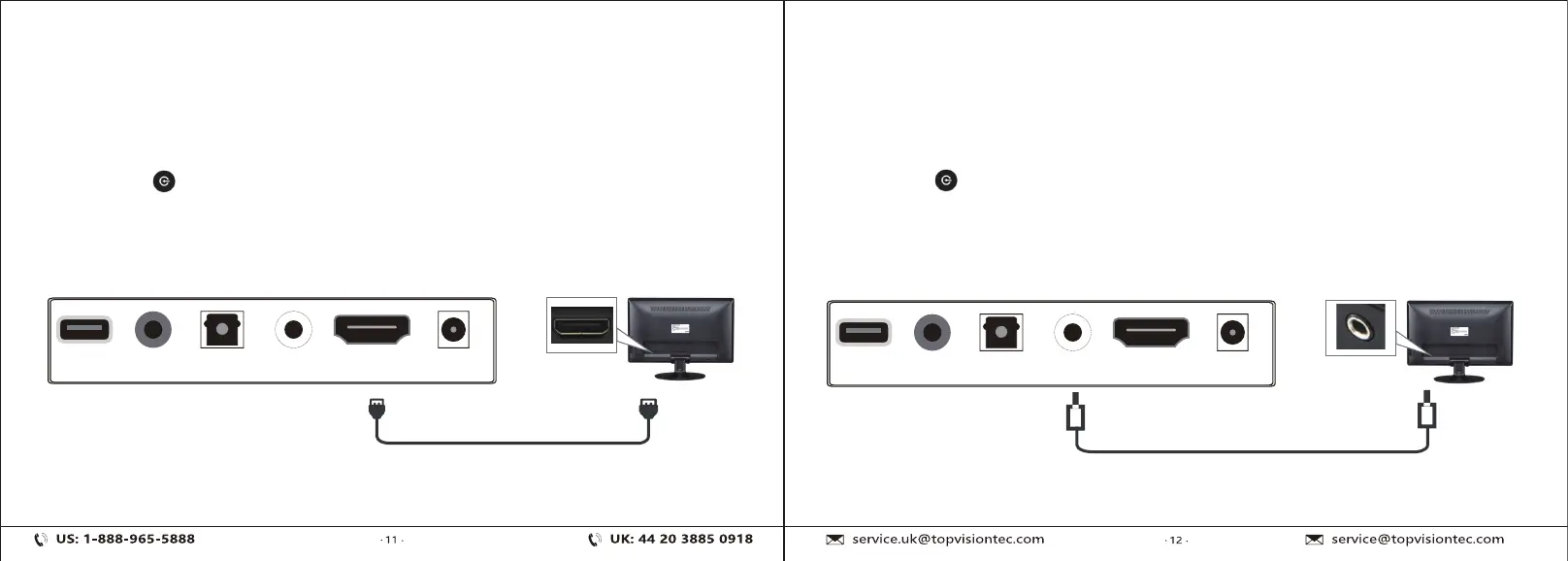
USB
AUX OPTICAL COAXIAL HDMI DC
Method 1. Connecting using an HDMI cable
1. Connect the DIGITAL AUDIO IN(HDMI)jack on the Soundbar to the HDMI
OUT jack of the TV with a HDMI cable.
2. Press the button to switch to HDMI mode, then the voice announcement
prompts"HDMI Mode".
3. Set the TV's audio output to "PCM". (More information on PCM page)
Connect with TV
HDMI OUT
HDMI digital cable(supplied)
USB
AUX OPTICAL COAXIAL HDMI DC
Method 2. Connecting using an Coaxial cable
1. Connect the DIGITAL AUDIO IN(COAXIAL) jack on the Soundbar to the
Coaxial OUT jack of the TV with a digital coaxial cable.
2. Press the button to switch to Coaxial mode, then the voice
announcement prompts"Coaxial Mode".
3. Set the TV's audio output to"PCM".(More information on PCM page)
COAXIAL OUT
Coaxial digital cable (supplled)


 To Next Page