English 5
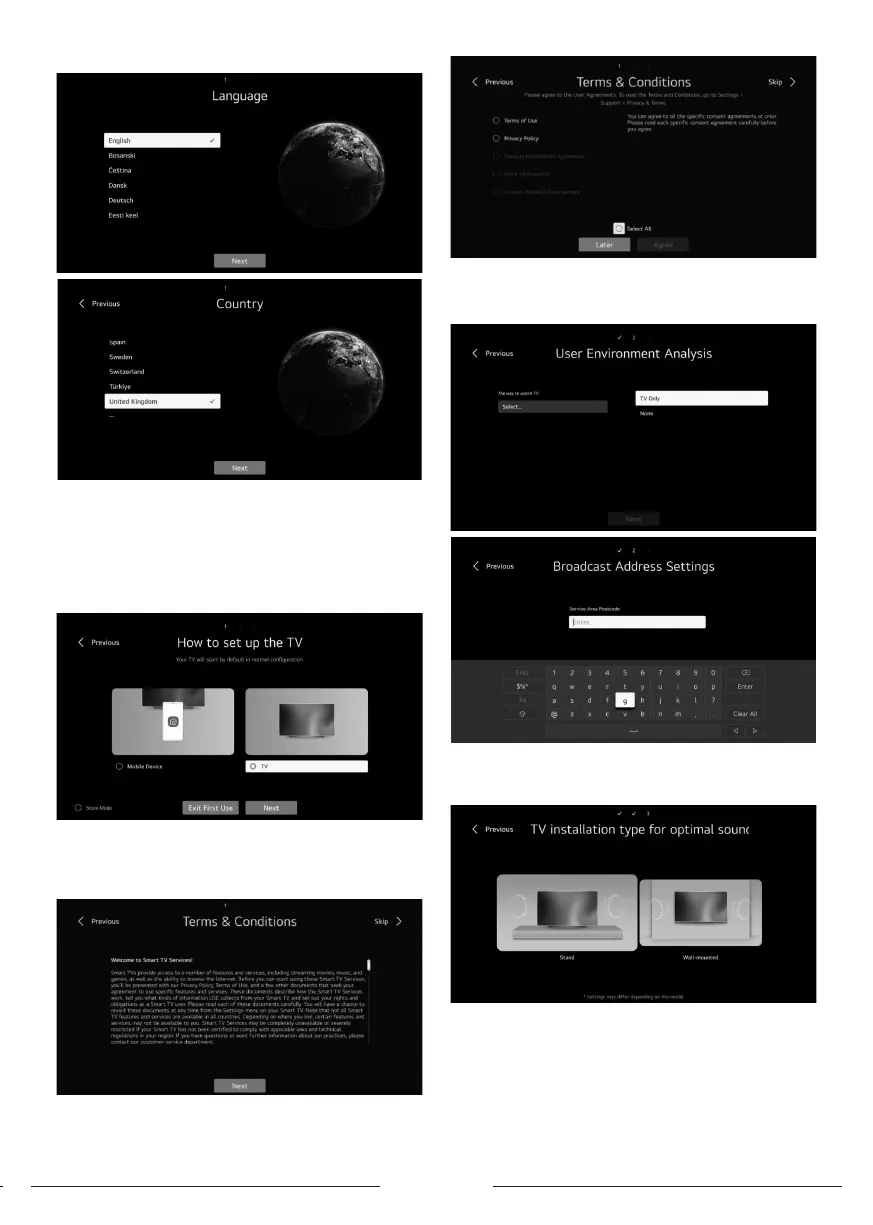
3- Select the desired way to setup your TV.
- Exit r use: to skip connect network then art using TV.
- TV (Default): to art connecting network then using TV
tuning as you wish.
- Mobile device: For connecting your mobile with TV via TV
ThinQ app or signing in using your account of TV ThinQ app
then art connecting network and TV tuning If you want.
4- Accepting Terms & Conditions
After selecting TV (default) follow below inructions:
- Press right / left and Ok to accept terms and conditionsfor
completing r time inallation.
5- User environment analysis
- Select TV only
- Enter your service area pacode then continu
6- TV Type
Press left/right and ok to Select the position of TV (Putting
on and – Or lifting on wall).
7- Program Tuning
- Press Up/down buttons to select the antenna type that
you want (Antenna-Cable-satellite) for art searching.



 To Next Page