English 11
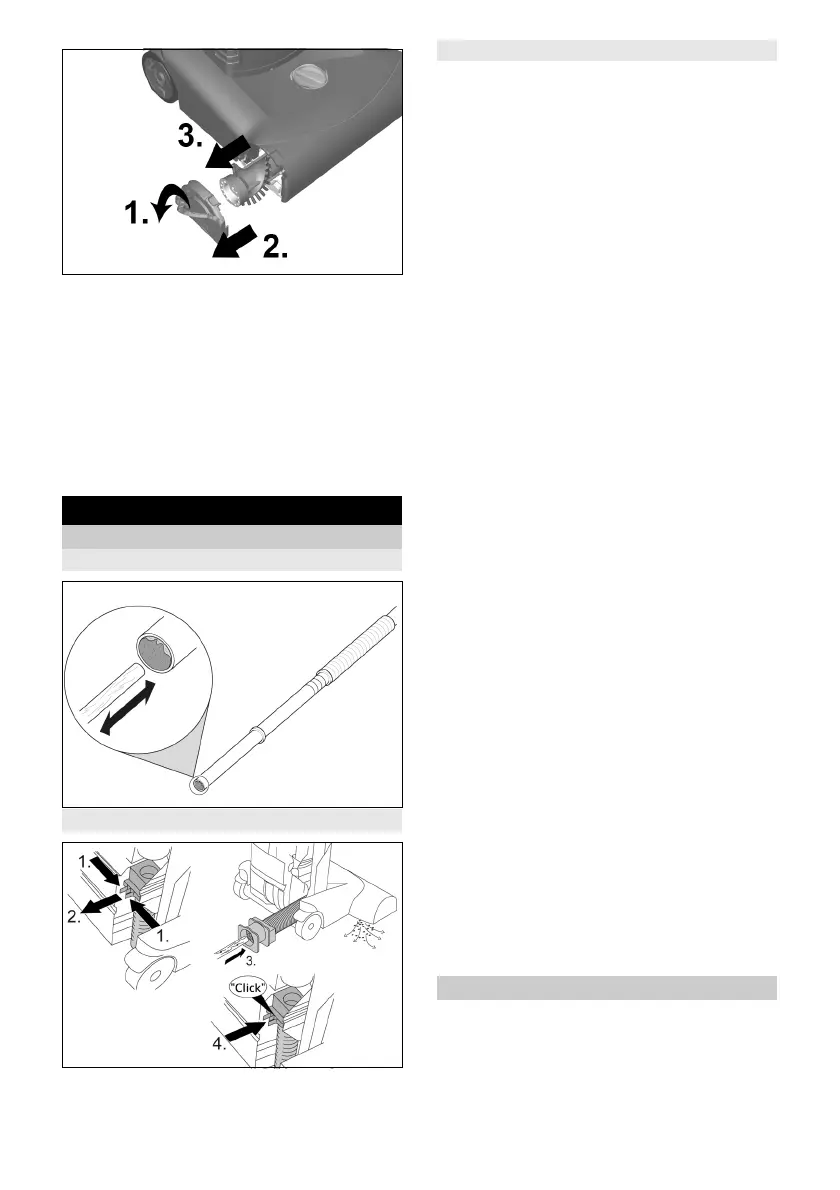
1. Fold the bracket on the side section fully
upwards and remove the side section.
2. Pull out the old roller brush and dispose
of it.
3. Insert a new roller brush in the side sec-
tion.
4. Push the side section together with the
roller brush into the device.
5. Fold the bracket fully downwards to lock
the side section.
Troubleshooting guide
Remove the blockage
Suction pipe/suction hose
Suction hose at brush head
Roller brush/brush head
Note
Remove the brush cover if necessary to
make the work easier (see "Cleaning the
roller brush").
Motor not running
No electrical voltage present
Check the power socket and power sup-
ply fuse.
Check the main cable and the main plug
of the device.
Check the main cable plug connection at
the handle.
The thermal protection switch has switched
off the motor due to overheating
Check the filter and suction hose. Re-
place the used filter or remove the block-
age from the suction hose.
Allow the appliance to cool down.
Unsatisfactory vacuuming result
Check the roller brush for blocking ob-
jects and remove these if present.
Remove blockages from the brush head,
suction pipe and suction hose.
Replace the filter bag.
Replace the exhaust filter or motor pro-
tection filter.
Set the carpet height selection knob to
the correct setting .
Replace the roller brush.
Filter indicator lamp lights up orange
Remove blockages from the brush head,
suction pipe and suction hose.
Replace the filter bag.
Electronic brush monitoring indicator
light lights up orange
Set the carpet height selection knob to a
lower carpet height.
Indicator light - electronic brush moni-
toring indicator light lights up even at
the lowest setting
Replace the roller brush.
Customer Service department
If the malfunction cannot be corrected, the
device must be checked by the Customer
Service department.




 To Next Page