EasyManua.ls Logo

Toro Lawn Master II 53805 - User Manual

Toro Lawn Master II 53805
40 pages
Print Icon
To Next Page IconTo Next Page
Loading...
i
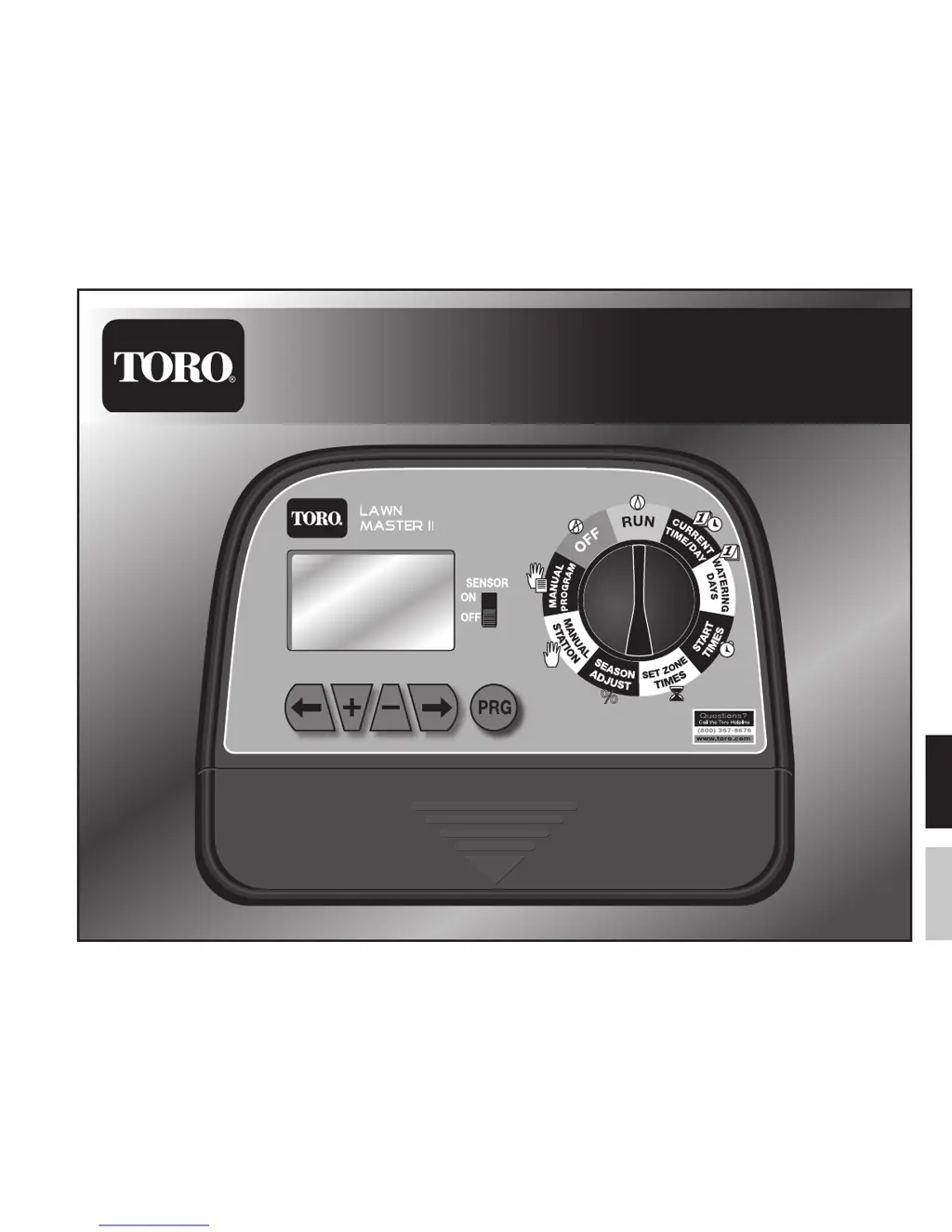
Lawn Master
TM
II Landscape Timer
Models: 53805 (4-Zone) & 53806 (6-Zone)
Installation & Programming Guide
EnglishSpanish

Questions and Answers

  • V
    Victoria DuncanJul 27, 2025
    How to fix wrong and flashing current time on Toro Lawn Master II 53805?
    • E
      Emily NormanJul 27, 2025
      If the current time on your Toro Timer is wrong and flashing after a power outage or unplugging, the battery is likely weak or missing. Replace the battery and reprogram the timer to resolve this issue.
  • M
    Mark CarrAug 1, 2025
    What to do if manual station and program operations do not activate on Toro Timer?
    • B
      Brian ChapmanAug 2, 2025
      If Manual Station and Program Operations do not activate on your Toro Timer, it might be because the Function Dial was rotated too quickly to the RUN position. Rotate the function dial slowly to the RUN position.
  • C
    christinephelpsAug 7, 2025
    Why no valves operate on my Toro Lawn Master II 53805?
    • A
      austinryanAug 7, 2025
      If no valves are operating on your Toro Timer, several issues could be the cause. First, ensure the function dial is set to the RUN or MANUAL position, not OFF. Then, verify that the START TIMES, WATERING DAYS, and SET ZONE TIMES are correctly programmed and not set to off. Also, check that the SEASON ADJUST is not set to 0%. Finally, confirm that the AC power source is properly connected; check and reconnect the plug-in transformer, especially if 'NO AC' is displayed.
  • J
    James ReidAug 14, 2025
    What to do if some valves do not operate on my Toro Lawn Master II 53805 Timer?
    • J
      Justin SanchezAug 14, 2025
      If some valves are not operating on your Toro Timer, it could be due to a defective solenoid. Test and replace the solenoid to resolve this. Another possible cause is a loose wire connection. Secure all wire connections and check for wire continuity.
  • I
    iacostaAug 19, 2025
    Why won’t valves turn off on my Toro Timer?
    • C
      Catherine CruzAug 20, 2025
      If the valves on your Toro Timer won’t turn off, even with the function dial switch in the OFF position, the mechanical override might be engaged. Turn the valve’s solenoid fully clockwise to disengage the manual bleed and allow the valve to close properly.

Summary

Components Overview

Control Interface

Includes LCD display, function dial, and navigational buttons.

Connectivity and Power

Covers terminal block, sensor switch, program button, and battery.

Function Dial Operation Guide

Program Modes

Covers RUN, MANUAL STATION, MANUAL PROGRAM, and OFF.

Programming Setup

Includes TIME/DAY, WATERING DAYS, START TIMES, ZONE TIMES.

Seasonal Adjustment

Covers SEASON ADJUST % for watering adjustments.

LCD Display Elements

Time and Date Displays

Displays MONTH, DAY, YEAR, AM/PM.

Program and Status Indicators

Shows PROGRAM, SENSOR, Active Watering, RUN TIME.

Schedule and System Indicators

Includes STATION, Weekdays, ODD/EVEN, Season Adjust %, NO AC, Low Battery.

Controller Installation

Mounting and Placement

Steps for marking, installing screws, and hanging the controller.

Optional Center Mounting

Installing an additional mounting screw for stability.

Battery Installation

Accessing Battery Compartment

Removing the controller's lower panel cover.

Installing and Securing Battery

Connecting the 9V battery and securing it.

Reinstalling Panel Cover

Closing the battery compartment.

Power Connection

Terminal Connections

Connecting transformer cables to AC terminals.

Outlet Connection

Plugging the transformer into a wall outlet.

Rain Sensor Installation (Optional)

Sensor Wiring

Connecting sensor cables to RS1 and RS2 terminals.

Sensor Activation

Placing the SENSOR switch to ON.

Master Valve and Station Wiring

Common Wire Setup

Splice common wire to solenoid leads.

Valve and Station Connections

Connecting MV and station wires to terminals.

Terminal Compartment

Accessing and closing the terminal compartment.

RUN Position

CURRENT TIME;DAY Setup

Setting Date and Time

Adjusting the current year, month, day, hour, and minute.

Setting AM;PM

Selecting AM or PM for the current time.

Completing Setup

Returning the dial to RUN after adjustments.

WATERING DAYS Setup

Program Selection

Choosing the program (A, B, or C) to configure.

Day Scheduling Options

Setting Weekday, ODD, or EVEN day watering schedules.

Finalizing Setup

Configuring other programs and exiting setup.

START TIMES Setup

Program and Time Selection

Selecting program and start time number.

Setting Start Times

Setting the specific start time for programs.

Completing Setup

Configuring remaining times and exiting.

SET ZONE TIMES Setup

Program and Station Selection

Selecting program and station number.

Setting Station Runtime

Setting the run time for each station.

Completing Setup

Configuring all stations and exiting.

SEASON ADJUST Setup

Accessing and Setting Adjustment

Accessing seasonal adjustment and setting percentage.

Completing Season Adjust

Exiting setup and returning to RUN mode.

MANUAL STATION Operation

Initiating Manual Station

Selecting and activating manual station operation.

Setting and Activating Runtime

Setting temporary run time and starting manual station.

MANUAL PROGRAM Operation

Initiating Manual Program

Selecting and activating manual program operation.

Setting Program Runtime

Setting temporary run times for stations within the program.

Activating Manual Program

Starting the manual program watering.

Shutting Down Lawn Master II

Troubleshooting Guide

Valve Operation Issues

Addresses problems with valves not operating or turning off.

Time and Manual Operation Issues

Fixes for incorrect time and manual operations failing.

Specifications

Limited One-Year Warranty

Toro Dedication to Quality

Quick Reference Guide

Quick Setup Procedures

Guides for adjusting time/day, watering days, and start times.

Quick Operation Procedures

Guides for setting zone times, manual station, and manual program.

Toro Lawn Master II 53805 Specifications

General IconGeneral
BrandToro
ModelLawn Master II 53805
CategoryTimer
LanguageEnglish

Related product manuals