213
The T-1 Notebook : Reference & Guide
212
The T-1 Notebook : Reference & Guide
NOTESNOTES
System Conguration
10
System Conguration
10
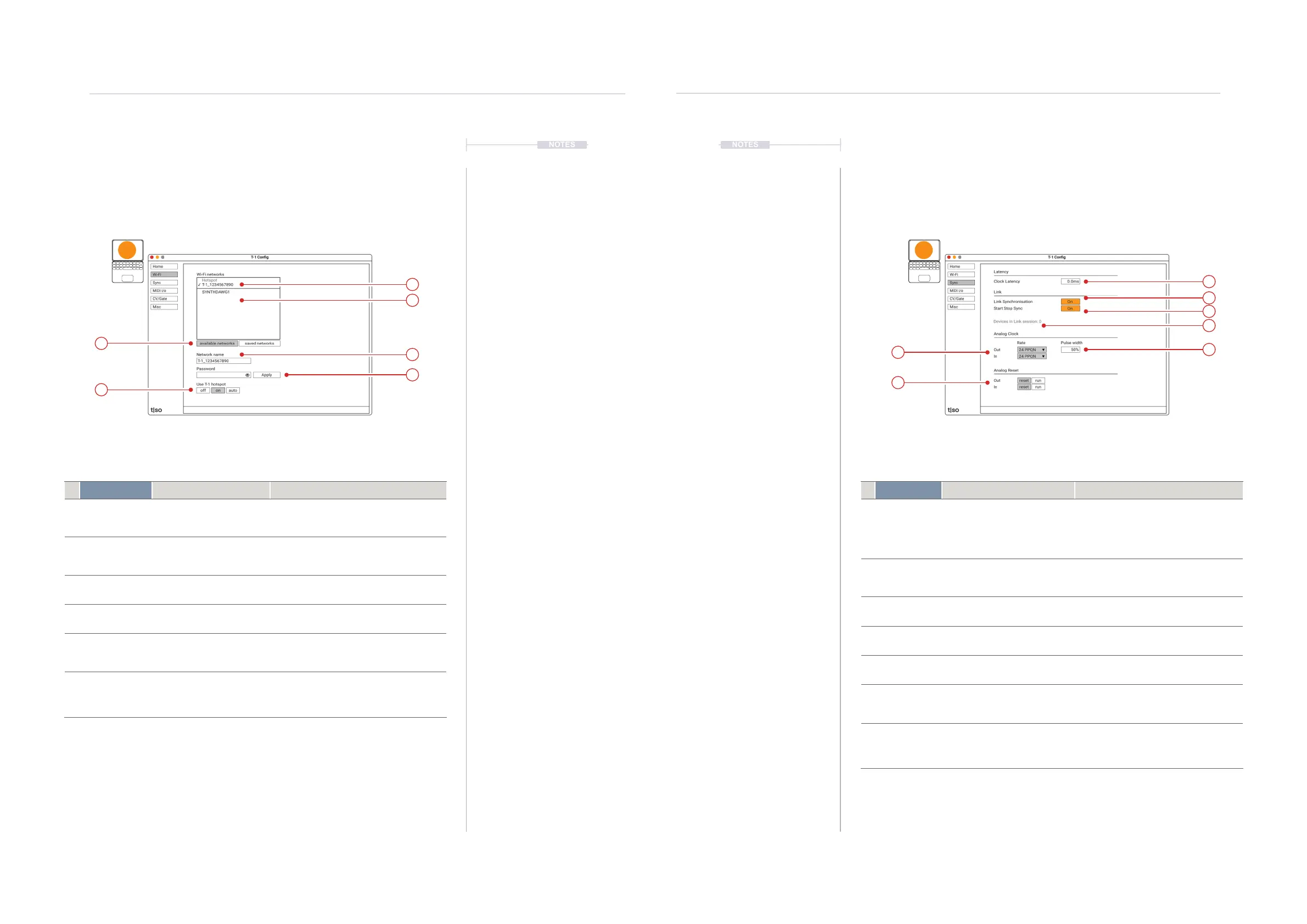
Setting Function Description
1 Active Network Currently connected WiFi
network
The active connected network or hotspot
shown checked.
2 Networks Available networks List of available or saved networks to
choose to connect.
3 Filter Lists available or saved
networks
Filters the view to list either available or
previously saved networks
4 Network Name Hotspot name Available when selecting a hotspot. Name
can be edited.
5 Password Password Entry Option to enter a hotspot password in order
to connect. Also entry for a password to
access a selected network
6 Use T-1 Hotspot Selects Hotspot Option Available when selecting hotspot. Option to
set as hotspot. Yes - Set as Hotspot, Off -
Do not use Hotspot, Auto - Use hotspot
when no saved networks are available
1
2
4
5
3
6
T1 Cong - WiFi Page
Used to set up and connect devices over a wireless network. T-1 has the ability to act as a
wireless hotspot.
t|so
Setting Function Description
1 Latency Clock Latency Allows compensation for any lag on
control between connected devices.
Clock Latency - Default 0.00ms. Can be
adjusted -200ms to 200ms if there is a
timing error between the clock and notes.
2 Link Sync Ableton Link Synchronisation Enables - On or disables - Off
synchronisation across wireless
connections with Ableton link
3 Start Stop Sync Synchronisation of transport T-1 reacts to incoming link messages
from peers for start stop when on.
4 Link Devices Number of connected devices Indicator of the number of link currently
connected devices.
5 Analog Clock Incoming and Outgoing clock Sets the PPQN - Pulses Per Quarter
Note rate for the analog clock connection.
6 Pulse Width Analog Clock Pulse Width Adjustment of clock pulse width for the
analog clock connections. Settings
between 15%-85% are available.
7 Analog Reset Analog Reset Input / Output Select option for the analog reset
connections. Can act as a short pulse
reset signal or run signal, high when T-1
is playing, low when stopped.
1
2
3
6
4
5
7
T1 Cong - Sync Page
General synchronisation between devices. Mainly covers the wireless link and analog
signal connections which are accessed at the rear of T-1.
t|so



 To Next Page