21
The T-1 Notebook : Reference & Guide
20
The T-1 Notebook : Reference & Guide
NOTES
NOTES
Step 2. Scope Out The Idea and Objective
Building on the drum beat a melody could consist of a lead line, pad,
ambient drones, chimes etc. The options are many.
* Destination also refers to the Digitakt and Digitone factory presets
7 Steps To Creating A Melody.
Objective. The objective is to build on the drum beat project and add more
melodic elements. Also to include additional hardware in the process as a
sound source. The melodic sounds will be handled by a desktop FM synth,
in this case Elektron’s Digitone but could equally be another device or DAW.
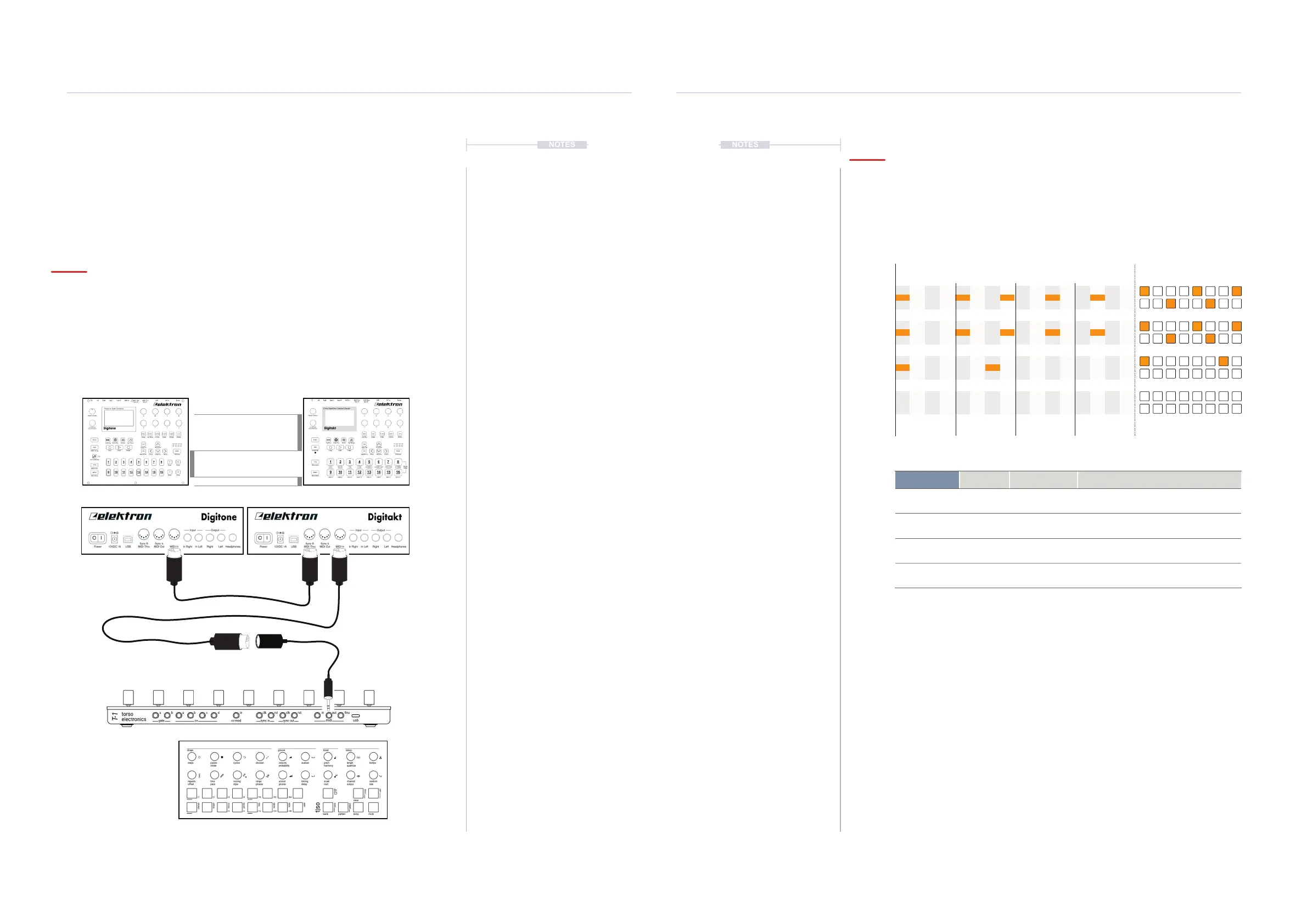
Step 1. Connect the Gear.
MIDI Out
Using the 5 Pin to
3.5mm adapter
MIDI Cong
The destination device must be congured to receive MIDI. The MIDI IN and Thru connections are used
to ensure a single MIDI network with two devices controlled by T-1. Clock can be external from T-1 but
Transport should be off, so that only T-1 controls the sequence. Device tracks and associated MIDI
Channels should match with the sound required.
Audio Cong
Both sound modules can be connected to a mixer and in turn to monitors or headphones.
Track / Channels:-
Track 1, Channel 1 = Kick
Track 2, Channel 2 = Snare
Track 3, Channel 3 = HiHat
Track 4, Channel 4 = Bass
Track 5, Channel 5 = Lead
Track 6, Channel 6 = Lead
Track 7, Channel 7 = Lead
Track 8, Channel 4 = CC Ctrl
Track / Channels:-
Track 1, Channel 1 = Kick
Track 2, Channel 2 = Snare
Track 3, Channel 3 = HiHat
Track 4, Channel 4 = Bass
Track 5, Channel 5 = Lead
Track 6, Channel 6 = Lead
Track 7, Channel 7 = Lead
Track 8, Channel 4 = CC Ctrl
MIDI In
Connected to drum
sound module
MIDI In
Connected from drum
sound module
MIDI Thru
Connected from drum
to synth module
5. Pluck
6. Piano
7. Chord
9. Bass
Linear Track Notes
1 5 9 13 16
T-1 Button Notes
1-16
Sound T-1 Track MIDI Channel Destination *
Bass Filter Track 9 Channel 4 Digitakt CC #74
Plucky lead Track 5 Channel 5 Digitone Track 1 - Plucky eA
Alt piano lead Track 6 Channel 6 Digitone Track 2 - Epiano VGS JM
Chord stab Track 7 Channel 7 Digitone Track 3 - Autochord SM
Getting Started
1
Getting Started
1



 To Next Page