35
The T-1 Notebook : Reference & Guide
34
The T-1 Notebook : Reference & Guide
2.5 Banks.
Banks are used to organise patterns and are the highest level of order in
the T-1 structure. T-1 has a total of 16 Banks which operate like folders,
each bank storing up to 16 patterns. With a total of 256 patterns available
in T-1, banks simplify the organisation of patterns and their access.
The 16 Banks are represented by the 16 Value buttons and are directly
linked to the associated library of patterns.
Value buttons are numbered left to right, top row 1 - 8, and bottom row 9 - 16.
bank
save
NOTES
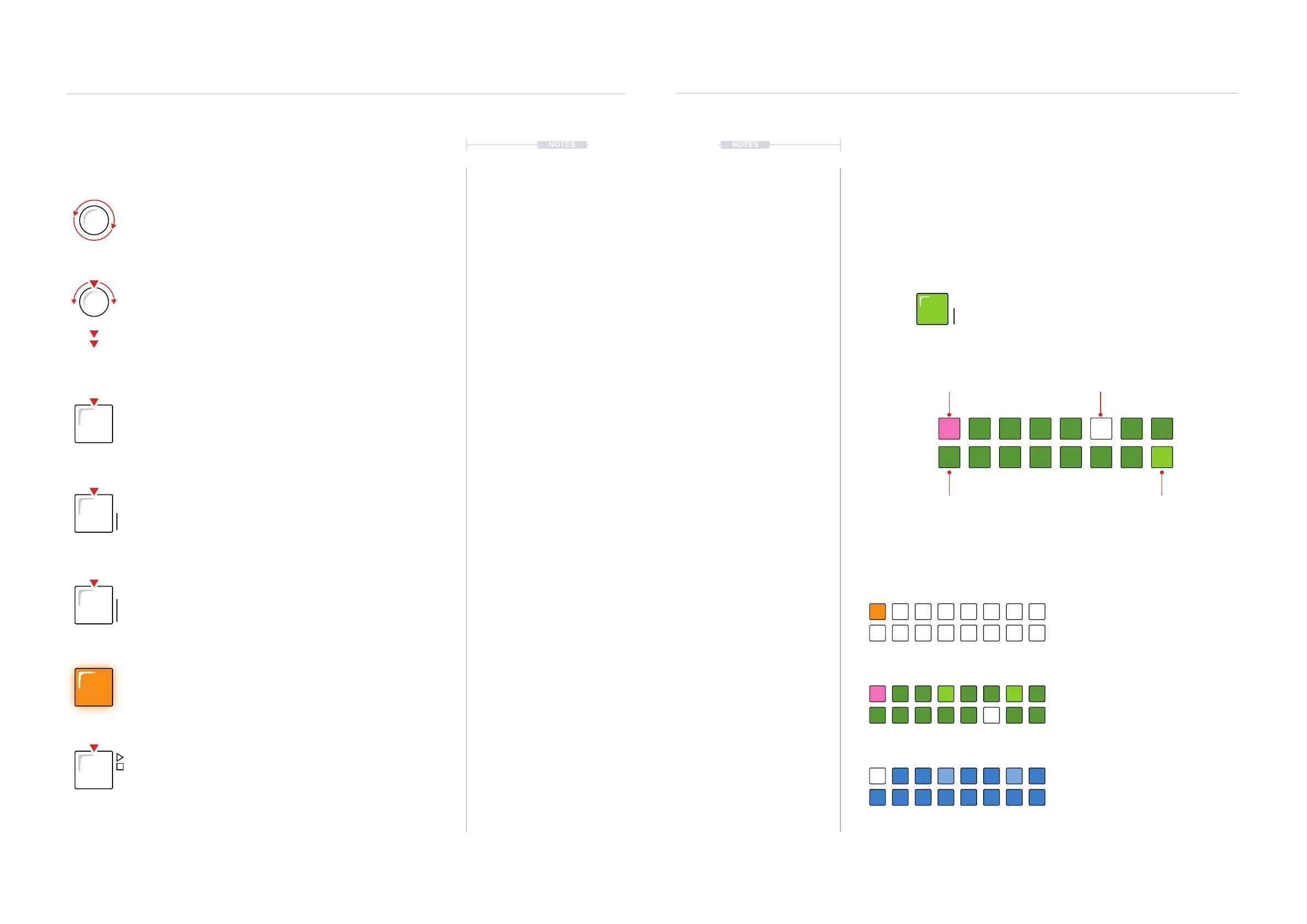
Default ‘Home’ view in T-1 at power up or after
pressing [BANK] to the track view. The currently
active track is illuminated ORANGE ⬛ for note
tracks or CYAN ⬛ for CC tracks.
Hold [BANK] to display bank view. The value
buttons will mainly be lit DARK GREEN ⬛.
While still holding [BANK] after selecting a bank,
the pattern selection page is presented, mainly
illuminated DARK BLUE ⬛.
Hold [BANK] to view the currently active bank and other
available banks, [BANK] will illuminate GREEN ⬛.
The value button of the currently
active bank will illuminate
WHITE ⬛ or Bright PINK ⬛
The value button of an edited and saved
bank will illuminate GREEN ⬛.
The value button of an edited but
unsaved bank will illuminate PINK ⬛.
The value button of an empty bank
will illuminate DARK GREEN ⬛.
TRACK View - Default ‘home’ View
BANK View
PATTERN View
Generic Setup
2
Generic Setup
2
NOTES
2.4 Control Overview
T-1 consists of 18 Rotary / Push knobs and 23 pad buttons.
The control knobs are endless encoders with a ‘click’ on rotation
that adjusts the designated parameter. For example 1 click will
change by +/-1BPM with Tempo. White labels indicate the primary
function. Grey text below indicates the secondary function
accessed by using [CTRL] + (Knob).
Pressing a knob will display the designated parameter state as
shown on the illuminated buttons. Also Turn to adjust while
viewing the parameters setting. This behaviour can be changed in
cong settings.
Quickly, double press a control knob to lock the designated
parameter setting display on the value buttons button. This will
release when the same knob is pressed again.
Buttons are pressed to select functions. The colour of the button
illumination will determine the state of the designated function.
Colours will change depending on the context and mode in
currently in operation.
Pressing the [BANK] button in any mode will revert to the ‘home’
tracks view mode. This is an additional function for the banks
button in addition to selecting a bank.
The [CTRL] button is held with other functions in order to access
the secondary function.
The [PLAY] button will play or stop the pattern. The button will
ash white every quarter note when playing. MIDI devices can be
excluded from this command by pressing [CTRL] + [PLAY]. Use
[CLEAR] + [PLAY] to kill any stuck MIDI notes. Button is orange if
a link session is connected and synchronised.
The button illumination state and colour will reect the current
mode. The 16 Value buttons act as visual feedback indicators to
display available options and settings specic to the mode selected.
bank
savectrl


 To Next Page
 Loading...

