85
The T-1 Notebook : Reference & Guide
84
The T-1 Notebook : Reference & Guide
NOTESNOTES
4.4 Velocity Accents
While velocity sets the base for all notes, accents control how much
variation is applied to the velocities, giving a more natural feel. The amount
of variation is controlled by (ACCENT) and the actual variation shape by
the selected (GROOVE) template. Accents therefore operate in conjunction
with the groove function.
Agogo
Saw
Timbales
Triangle
Congas
Sine
Bongo
Pulse CV Input
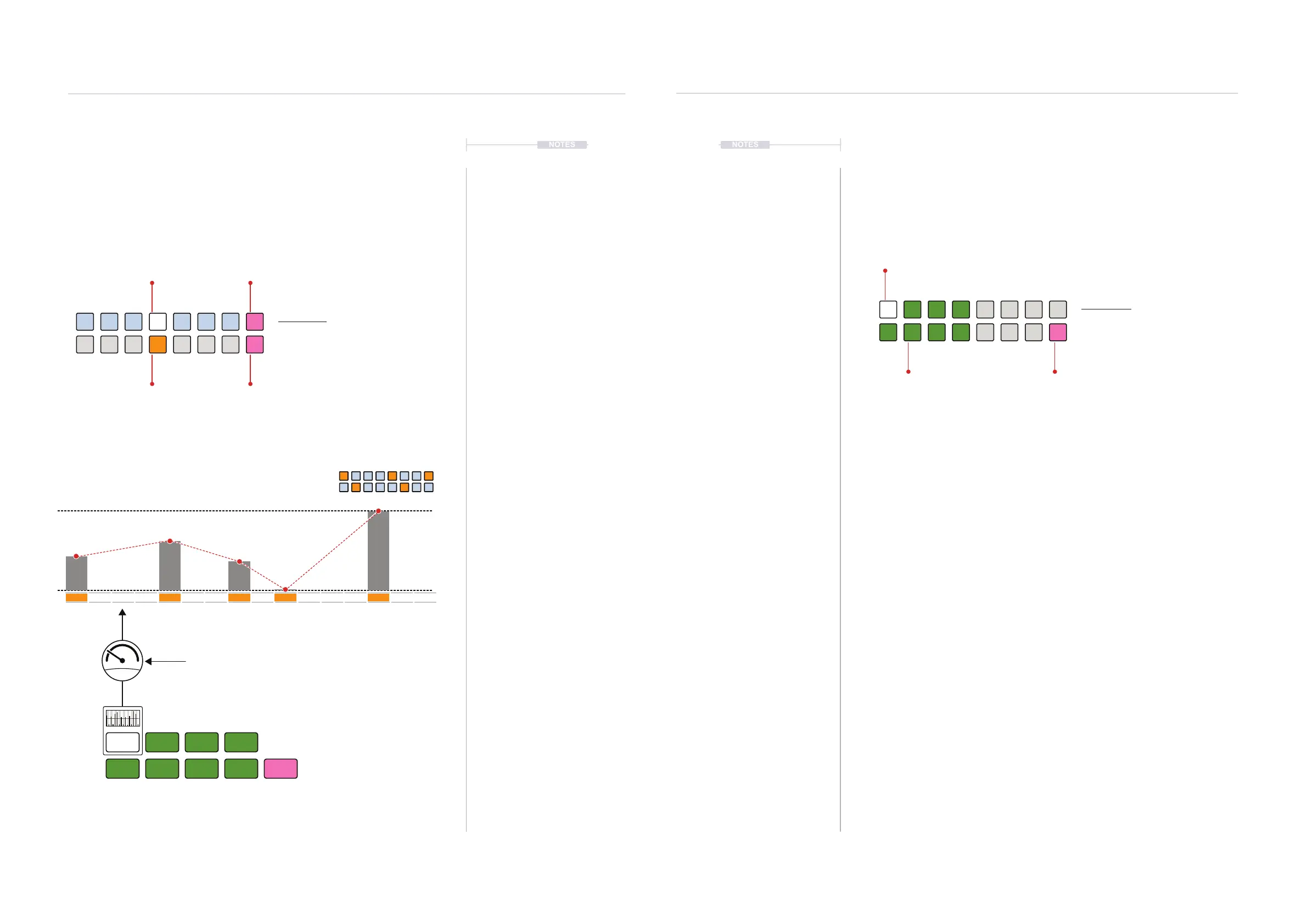
Accent View Mode.
Accent View
Hold (ACCENT). Double tap (ACCENT)
to retain the value button display.
The top row of buttons / illumination represents ne / Hi-res changes to the accent amount.
Bottom row of buttons represents coarse / Lo-res adjustment of the accent amount. The pink
buttons affect the accent behaviour.
ORANGE ⬛
Accent Lo-Res
PINK ⬛
Behaviour Change
WHITE ⬛
Accent Hi-Res
PINK ⬛
Behaviour Change
5 Pulses / Accents Full Amount
Groove
Selected groove template is assigned to the velocity prole of the track
Accent
Amount of groove applied to the velocity prole
Velocity prole
1
127
64
1 5 9 13
62
82
50
127
1
4.5 Groove Templates
Groove is a predened shape template that is applied to the velocity of a
track. The velocity characteristics are applied from either of the 4 preset
groove shapes or from the 4 wave shapes, 8 in total. An additional option
for velocity and timing control is also available from the CV Mod input.
▌ APPLYING A GROOVE AND ACCENT
1. Select the pattern and track.
2. To view the current groove setting, Hold [CTRL] + Press (GROOVE).
Default is Agogo Groove indicated by the WHITE ⬛ [VB1] value button.
Other options are shown lit DARK GREEN ⬛ or PINK ⬛ for CV Input.
3. To select the groove template;
• While displaying the groove page, Press [VB1] - [VB4] to select a
preset groove template or [VB9] - [VB12] for the wave shape
presets. Most visual method.
• Hold [CTRL] + Turn (ACCENT). This changes the template on each
rotary ‘click’. Fastest method but least visual.
• Hold [CTRL] + Press & Turn (ACCENT). This change template on
each rotary ‘click’. Fast method also visualises settings.
4. To change the amount of groove applied to the track;
• While displaying the accent page, Press [VB1] - [VB8] to select a
ne adjustment or [VB9] - [VB16] for a course amount of variation.
• Turn (ACCENT). This changes the amount iteration on each rotary
‘click’. Fastest method.
• Hold + Turn (ACCENT). Fast method also visualises settings.
Groove View Mode.
Groove View
Hold [CTRL] + (ACCENT).
DARK GREEN ⬛
Groove Options
PINK ⬛
CV Input Groove
WHITE ⬛
Selected Groove
Congas
Sine
Timbales
Agogo
Triangle
Saw
Bongo
Pulse
CV
Rhythmic Variation
4
Rhythmic Variation
4



 To Next Page