95
The T-1 Notebook : Reference & Guide
94
The T-1 Notebook : Reference & Guide
NOTESNOTES
5 Pulses + 1 Repeat
5 Pulses + 1 Repeat
5 Pulses + 1 Repeat
5 Pulses + 1 Repeat
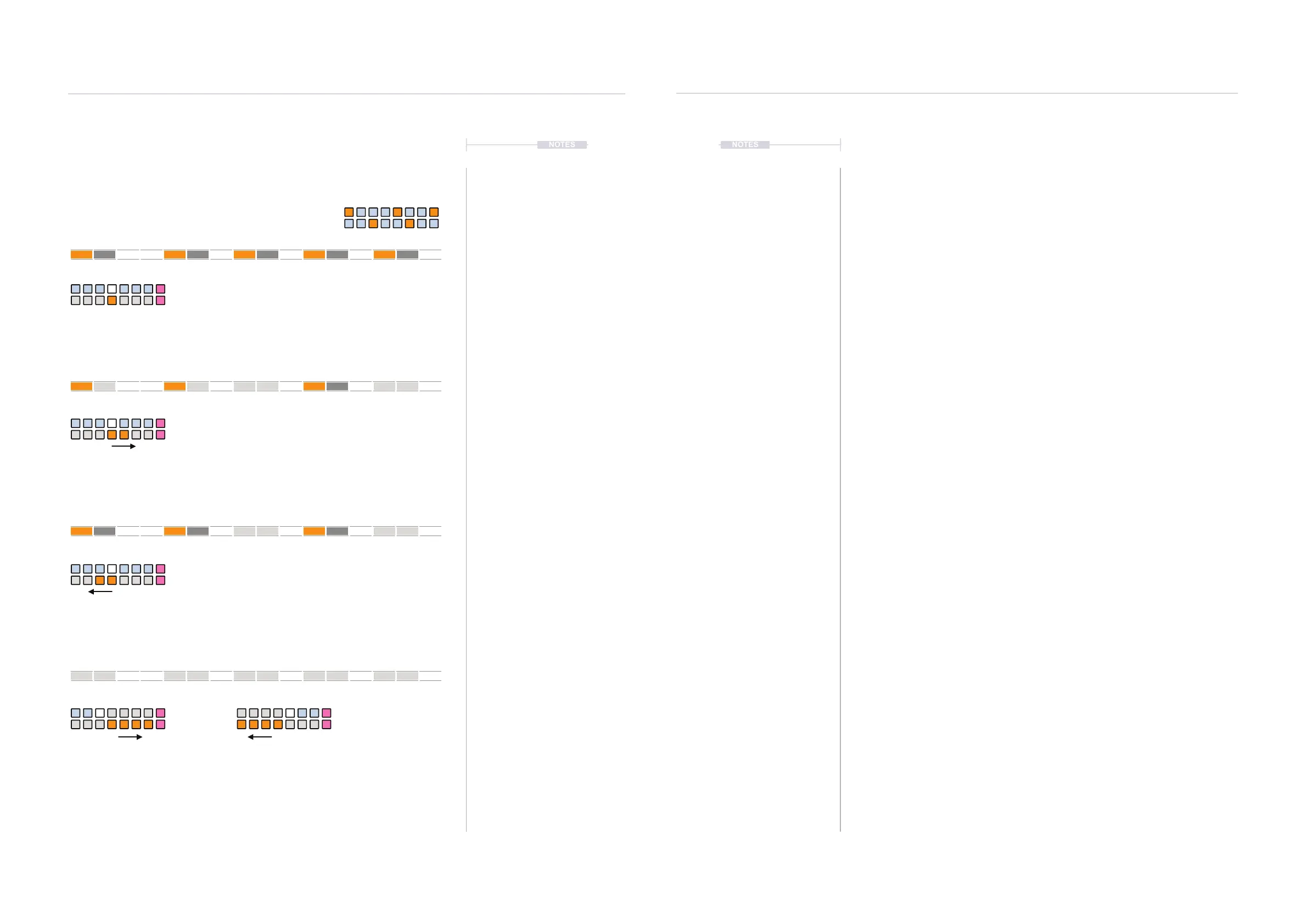
16 Step Pattern unaffected by Probability
Probability Examples
Note Probability - Approx +30%
Probability settings to the left - bottom row or counter-clockwise of
probability knob will always silences repeats if a pulse is silenced.
The notes selected for silencing can be changed by the modulation phase value buttons [VB8]
and [VB16]. This changes the modulation phase of random selection of notes. Random
modulation is linked to the Random controls and hence turning this control will also affect the
probability modulation.
Or
+100% -100%
Probability settings to the right - bottom row or clockwise of
probability knob silences notes + repeats or repeats.
Note Probability - Approx -30%
Note Probability - 100% any direction
1
1
1
1
5
5
5
5
9
9
9
9
13
13
13
13
X X X
X
XXX
X
X
XX
X
X
XXX
X
X
XX
▌ APPLYING NOTE PROBABILITY TO A TRACK
1. Select the pattern and track.
2. To view the current probability setting, Hold [CTRL] + (PROBABILITY).
3. To increase the chance of pulse notes and repeats being silenced;
• Hold [CTRL] + (PROBABILITY) to view the probability page. Press
[VB11] to increase chance of notes being silenced. Press [VB10] or
[VB9] to increase the chance even further. The further left, the
higher the probability. Press [VB1] - [VB7] to ne tune. Fastest
method for editing.
• Hold [CTRL] + Turn (PROBABILITY) Counter-clockwise. This
changes the chance amount iteratively each rotary ‘click’.
• Hold [CTRL] + Press & Turn (PROBABILITY) Counter-clockwise.
This changes the chance iteratively each rotary ‘click’. Slowest
method but more visual.
4. To increase the chance of notes and / or repeats being silenced;
• Hold [CTRL] + (PROBABILITY) to view the probability page. Press
[VB13] to increase chance of notes / repeats being silenced. Press
[VB14] or [VB15] to increase the chance even further. The further
right, the higher the probability. Press [VB1] - [VB7] to ne tune.
Fastest method for editing.
• Hold [CTRL] + Turn (PROBABILITY) Clockwise. This changes the
chance amount iteratively each rotary ‘click’.
• Hold [CTRL] + Press & Turn (PROBABILITY) Clockwise. This
changes the chance iteratively each rotary ‘click’. Slowest method
but more visual.
5. To adjust which notes are selected to silence i.e. random phase
modulation, Hold [CTRL] + (PROBABILITY) + [VB8] or [VB16].
Rhythmic Variation
4
Rhythmic Variation
4



 To Next Page