93
The T-1 Notebook : Reference & Guide
92
The T-1 Notebook : Reference & Guide
NOTESNOTES
▌ APPLYING TRACK NOTE DELAY
1. Select the pattern and track.
2. To view the current delay setting, Hold [CTRL] + (DELAY).
3. To adjust all notes earlier on the grid;
• While displaying the delay page;
• Press [VB11] to adjust notes earlier by 1/16
th
iteration.
• Press [VB10] to adjust notes earlier by 1/8
th
iteration.
• Press [VB9] to adjust notes earlier by a 1/4
th
iteration.
• Press [VB1] - [VB3] or [VB5] - [VB7] to adjust ne with respect to
the note value selected.
• Hold [CTRL] + Turn (DELAY) counter-clockwise. This changes the
delay amount iteratively each rotary ‘click’.
• Hold [CTRL] + Press & Turn (DELAY) counter-clockwise. This
changes the delay iteratively each rotary ‘click’. Slowest method but
more visual.
4. To adjust all notes later on the grid;
• While displaying the delay page;
• Press [VB13] to adjust notes earlier by 1/16
th
iteration.
• Press [VB14] to adjust notes earlier by 1/8
th
iteration.
• Press [VB15] to adjust notes earlier by a 1/4
th
iteration.
• Press [VB1] - [VB3] or [VB5] - [VB7] to adjust ne with respect to
the note value selected.
5. With [VB4] & [VB12] selected the notes will be on grid and no delay
applied to any notes.
4.9 Probability
The nal function in the groove section is the Probability parameter. This
sets whether an active note will be played and is audible or whether the
note will be silenced. The chance of the note being silenced is based on
the probability parameter which increases or decreases the chance that a
note is not played. This is a bi-polar setting which operates on any note or
repeat or on pulses plus the respective repeats. This can introduce an
organic and unpredictable variation, creating space in a rhythmic pattern.
Range 0 to -100%
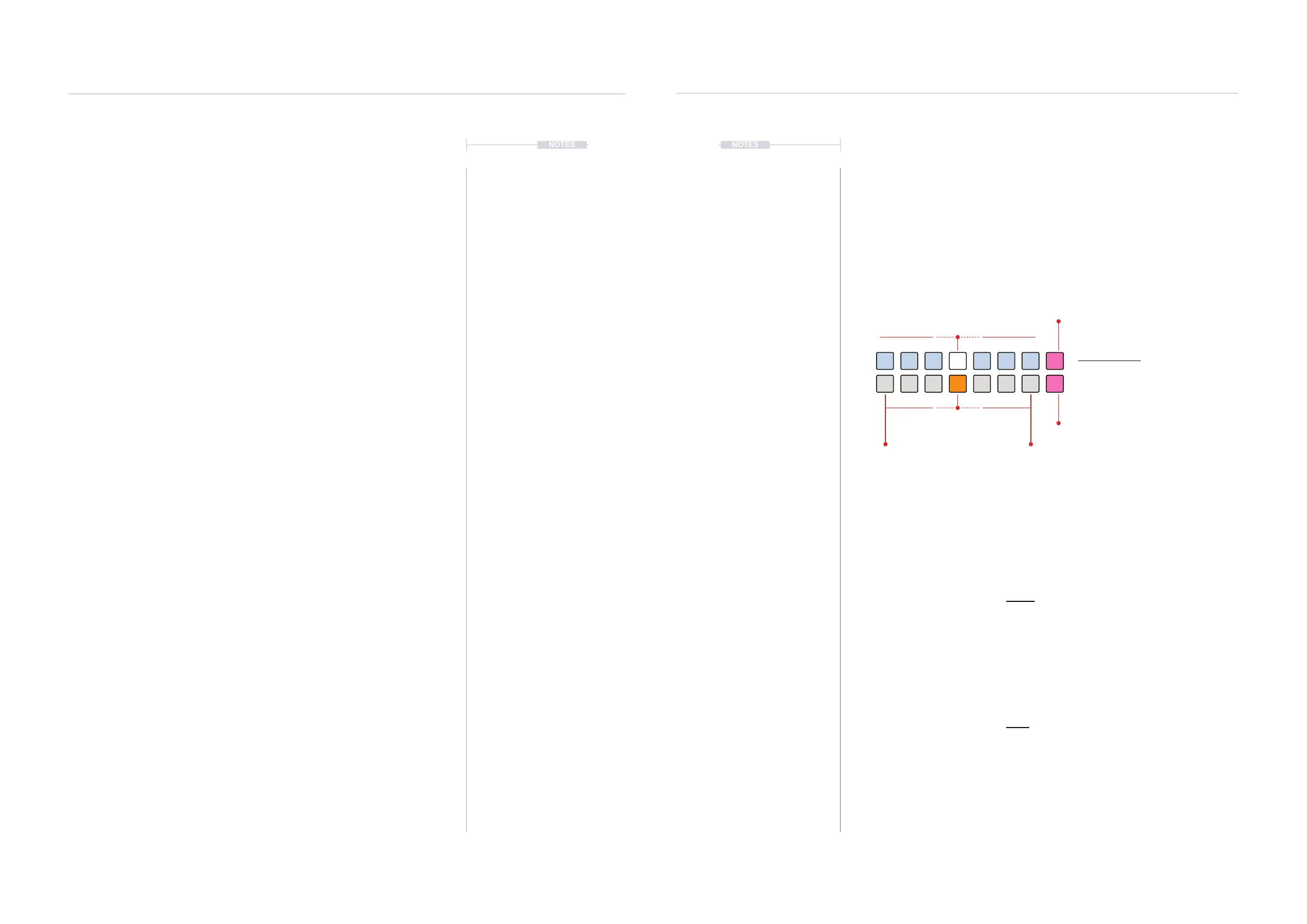
The range on the left i.e. bottom row, ORANGE ⬛, value buttons [VB9] -
[VB11] or adjusted by [CTRL] + Turn (PROBABILITY) Counter-clockwise,
represents the chance that a pulse is silent. This is also adjusted as ne
tuning using the top row value buttons. When a pulse is silent is associated
repeats will also be silenced.
Range 0 to +100%
The range on the right i.e. bottom row, ORANGE ⬛, value buttons [VB13] -
[VB15] or adjusted by [CTRL] + Turn (PROBABILITY) Clockwise,
represents the chance that a note silent. This could be the main trigger note
and / or a repeat note. This is also adjusted as ne tuning using the top row
value buttons.
Modulation Phase
The modulation phase, adjusted by the PINK ⬛, [VB8] and [VB16] adjusts
the random modulation phase, i.e. which notes are selected to silence.
Probability View Mode.
Illustration shows default - 0% probability i.e. all notes will play as normal. At maximum on
each side, the probability will be 100% meaning notes will be totally silenced.
Probability View
Hold [CTRL] + (PROBABILITY).
ORANGE ⬛
Coarse Probability
PINK ⬛
Modulation Phase
Silence Pulses
also silences it’s repeats
Silence Note
silences notes and / or repeats
WHITE ⬛
Fine Probability
PINK ⬛
Modulation Phase
All
On
Rhythmic Variation
4
Rhythmic Variation
4



 To Next Page
 Loading...
