91
The T-1 Notebook : Reference & Guide
90
The T-1 Notebook : Reference & Guide
NOTESNOTES
▌ APPLYING MICRO-TIMING TO A TRACK
1. Select the pattern and track.
2. To view the current timing setting, Hold (TIMING). Also double Press
(TIMING) to lock value button timing display.
3. To adjust micro timed notes earlier on the grid;
• While displaying the timing page, Press [VB9] - [VB11] to coarsely
set the dened notes early on the grid and Press [VB1] - [VB7] to
nely adjust. No timing adjustment when [VB4] & [VB12] are
selected. Most visual method.
• Turn (TIMING) counter-clockwise. This changes the micro-timing
iteratively each rotary ‘click’.
• Press & Turn (TIMING) counter-clockwise. This changes the micro-
timing iteratively each rotary ‘click’.
4. To adjust micro timed notes later on the grid;
• While displaying the timing page, Press [VB13] - [VB15] to coarsely
set the dened notes early on the grid and Press [VB1] - [VB7] to
nely adjust. No timing adjustment when [VB4] & [VB12] are
selected. Most visual method.
• Turn (TIMING) clockwise. This changes the micro-timing iteratively
each rotary ‘click’. Slowest method and least visual.
• Press & Turn (TIMING) clockwise. This changes the micro-timing
iteratively each rotary ‘click’. Slowest method but more visual.
5. To change the grid division and hence dened note behaviour;
• While displaying the timing page, Press [VB8] to increase the note
division x2.
• While displaying the timing page, Press [VB16] to increase the note
division x4.
• When both are lit same colour PINK ⬛ the default x1 division is set.
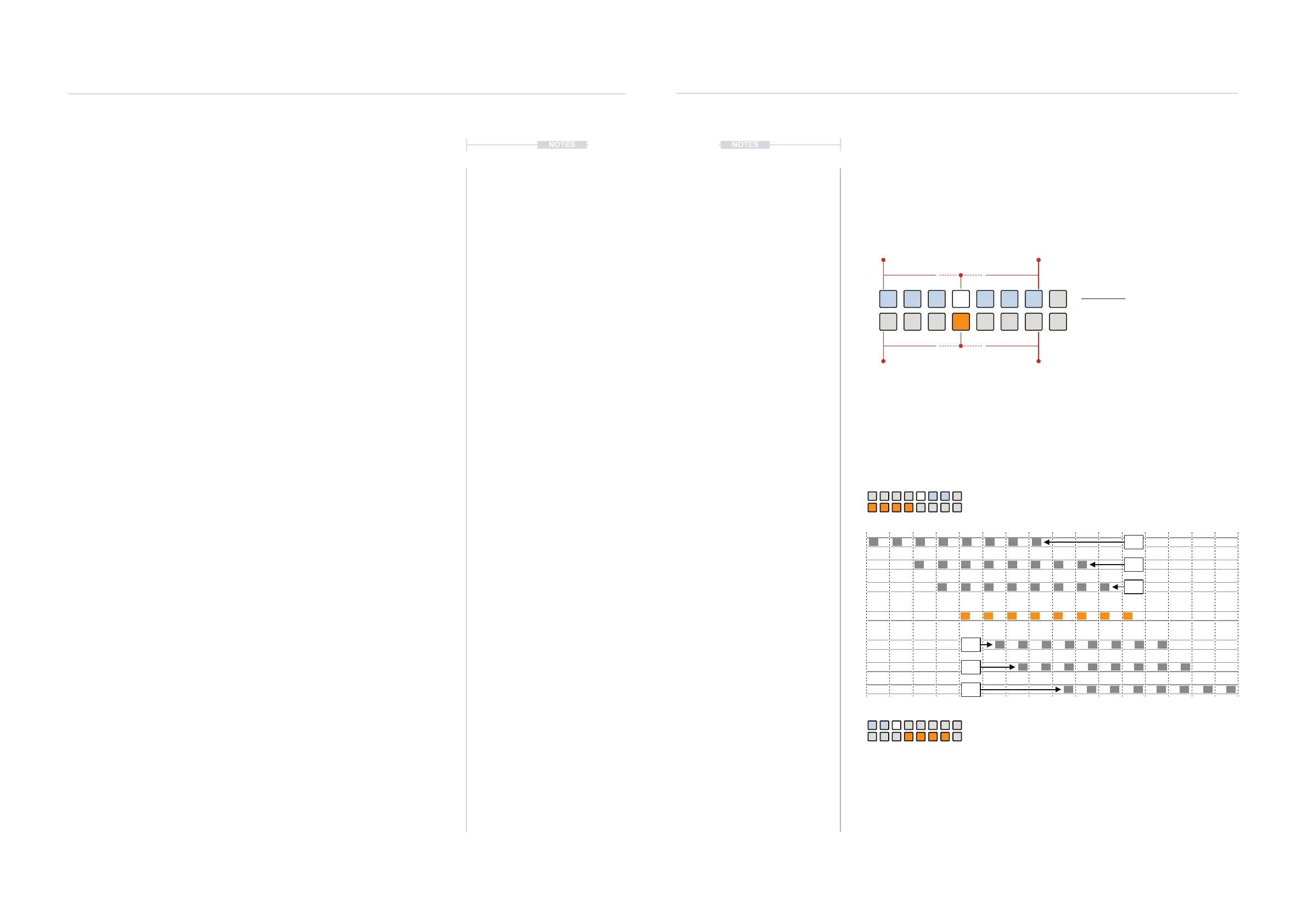
4.8 Note Delay
Delay can adjust all notes in a track to be triggered earlier or later within the
note grid. The note division value can be selected for shifting the notes.
4.8 Note Delay
Delay can adjust all notes in a track to be triggered earlier or later within the
note grid. The note division value can be selected for shifting notes.
Example: Extreme delay settings.
1 5 9 13
Delay Later +
Delay Earlier -
Early
Late
Delay View Mode.
Delay View
Hold [CTRL] + (DELAY).
ORANGE ⬛
Delay Offset
- Early
- Early
+ Late
+ Late
WHITE ⬛
Fine tune from offset
1/16 1/161/8 1/81/4 1/4
On
Grid
1/4
1/4
1/8
1/8
1/16
1/16
Rhythmic Variation
4
Rhythmic Variation
4



 To Next Page