99
The T-1 Notebook : Reference & Guide
98
The T-1 Notebook : Reference & Guide
NOTESNOTES
4.11 Note Repeats
The number of repeats, set by (REPEATS) ranges from 0 - 48 and nally to
an innite number. Repeats generally follow the same characteristics as the
triggered pulse note. Illustration below indicates number of repeat and not
the total number of pulses
▌ CREATING REPEATS
1. Select the pattern and track.
2. To view the current repeat setting, Hold or double tap (REPEATS).
3. To change the number of repeats;
• While viewing repeats page, Press [VB9] - [VB15] to select the
range of repeats to select from i.e. [VB9] sets the top row of buttons
as 0-7 repeats, [VB15] selects the top row of buttons as 43-48-
innite repeats. The precise number selected with [VB1] - [VB7].
• Turn (REPEATS) to select the number of repeats iteratively on each
rotary ‘click’.
• Hold & Turn (REPEATS) to select the number of repeats iteratively
on each rotary ‘click’. Slowest method and also visualises values.
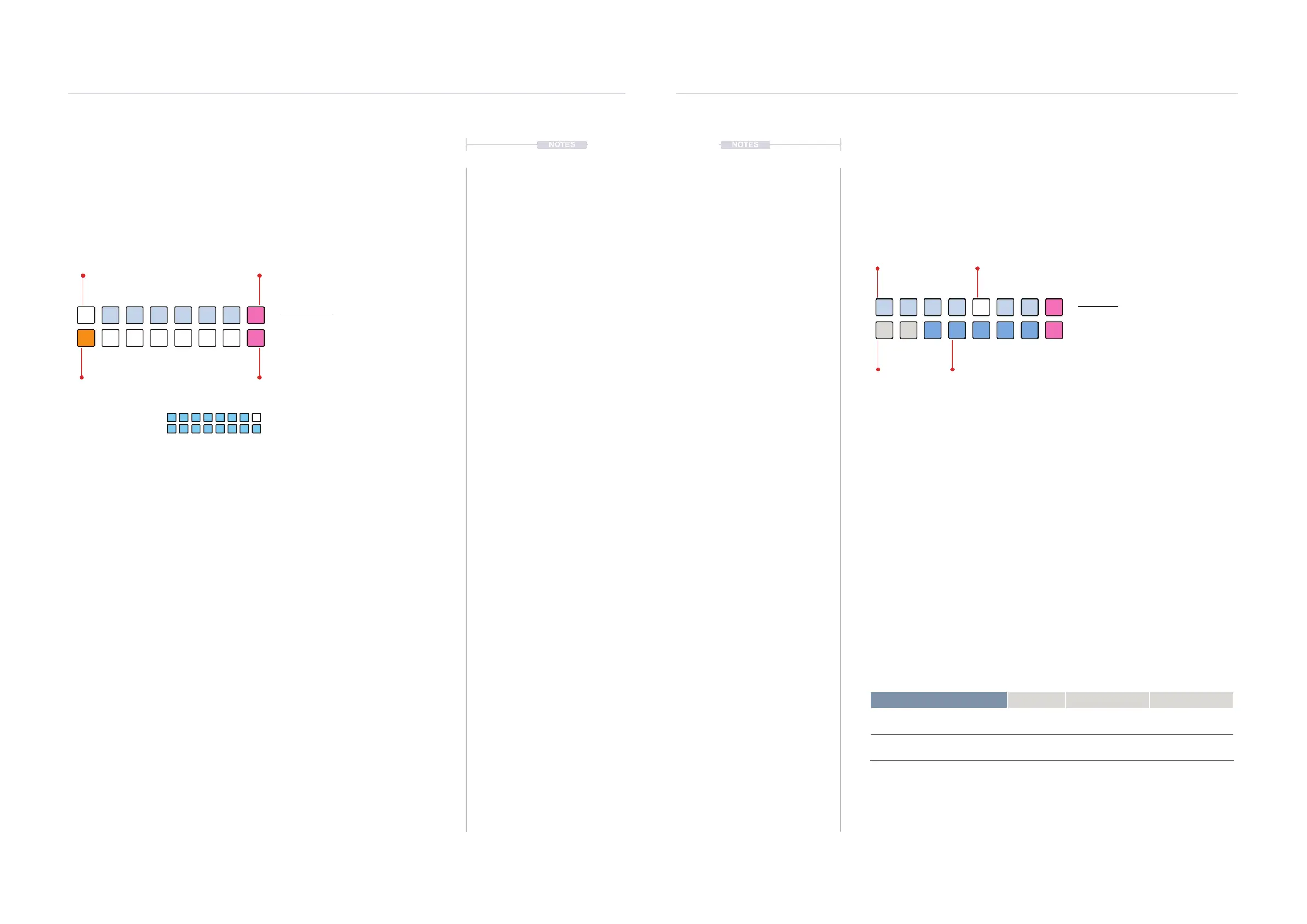
4. To select between repeat behaviour, Press [VB8] to select Choke mode
or Press [VB16] to select Tail mode. The brighter PINK ⬛ button will
indicate the active mode. Choke is default mode.
Repeats View Mode.
Repeats View
Hold (REPEATS) or Double tap (REPEATS)
to lock the value button view.
ORANGE ⬛
Selection Range
PINK ⬛
Tail Mode
The last / highest button selection or when the repeats knob is fully clockwise will set the
pulse repeats to innite. This is displayed as blue on the value buttons.
WHITE ⬛
Selected Repeats - Default 0
PINK ⬛
Choke Mode
BRIGHT BLUE ⬛
Innite Repeats
0-6
0
7-13
1
28-34
4
14-20
2
35-41
5
21-27
3
42-48
6
4.12 Note Repeat Time
The note repeater time division is set by (TIME). This works in conjunction
with the repeats parameter. The length of notes set by (SUSTAIN) is also
applied to the repeated notes.
▌ SELECTING A TIME SETTING
1. Optionally lock the time view. Double tap (TIME). This is not essential
but is good practice. Just holding (TIME) will temporarily view the state
until the knob is released.
2. Value button state. The active time is displayed on a value button
illuminated WHITE ⬛. Top row BLUE GREY ⬛ Indicates available
quadruplet divisions and bottom row BLUE ⬛ available triplets.
3. Selecting a time option. Turn (TIME) to quickly view and change. When
in locked division view, Press [VBx] Where ‘x’ is value button 1-7 or 11-
15 to select row and division.
4. A free running time option can also be set using [VB16].
New pulses triggered will cut off any currently playing repeats or notes. The
repeats behaviour is managed by the choke or tail setting. Division is a macro
that also affects time and rate
Division Options Group Value Button Option Colour
1/1, 1/2, 1/4, 1/8, 1/16, 1/32, 1/64 Quadruplets 1, 2, 3, 4, 5, 6, 7
BLUE GREY ⬛
1/3, 1/6, 1/12, 1/24, 1/48 Triplets 11, 12, 13, 14, 15
BLUE ⬛
Time View Mode.
Time View
Hold (TIME). Double tap (TIME) to retain
the value button display.
WHITE ⬛
Selected division
BLUE GREY ⬛
Quadruplets
BLUE ⬛
Triplets
OFF
Inactive Option
1/1 1/4
1/3
1/32
1/24
1/2
1/16
1/12
1/8
1/6
1/64
1/48
Rhythmic Variation
4
Rhythmic Variation
4


 To Next Page
 Loading...

