111
The T-1 Notebook : Reference & Guide
110
The T-1 Notebook : Reference & Guide
NOTESNOTES
5.3 Pitch and Harmony.
Pitch
Pitch is the rst step in building melodic elements. The Pitch function
assists in the assembly of notes into a group or chord. Notes available to
enter are based on the selected scale. The Pitch parameter knob can then
be used to transpose the notes up or down within the scale.
C
C#
E F
F#
D
D#
G
G#
A
A#
B
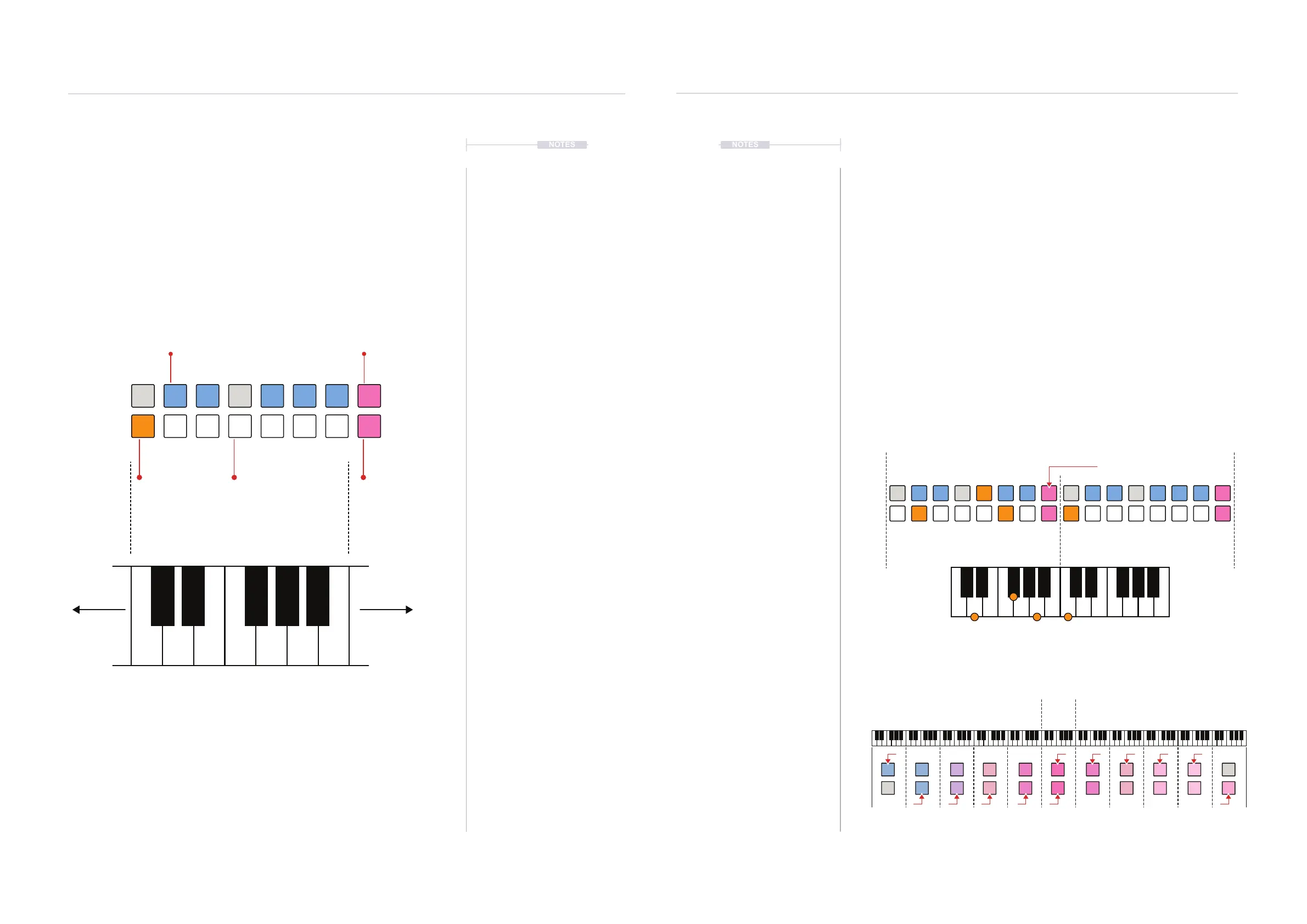
Pitch View Mode.
The pitch view is a unique function which visualises a chromatic keyboard on the
value buttons. To access, Hold (PITCH) or Double Press (PITCH) to lock the display.
Add or remove notes to/from the group by pressing [VBx] when in pitch view, The ‘x’
represents the value button for the note selected. Active notes are lit orange. Notes
which are not available in the selected scale cannot be selected.
The modier buttons shift the value button view up or down an octave each iteration. The
modier buttons will change colour to reect the octave range selected.
A maximum of 8 notes can be transmitted from T-1 simultaneously.
Examples shown use the chromatic scale, which contains all 12 notes. A Tone is the
interval between whole notes, for example D to E or F to G. A semi-tone is the interval
between half notes, for example D to D# or E to F.
BLUE ⬛
Black Keys
BLUE GREY ⬛
Unavailable Notes in the Scale
PINK ⬛
Octave Up
ORANGE ⬛
Active Notes
WHITE ⬛
White Keys
PINK ⬛
Octave Down
Octave Up
Default is C3 - B3
Default
C3 - B3
+1
C4 - B4
-5
C-2 - B-2
+3
C6 - B6
-3
C0 - B0
+2
C5 - B5
-4
C-1 - B-1
+4
C7 - B7
-2
C1 - B1
+5
C8 - B8
-1
C2 - B2
Octave Up C4 - B4
Octave Down
D#
E AD GC
G#
C#
F#
F B
A#
▌ CREATING A PITCH CHORD / GROUP
1. Chromatic keyboard view. Double Press (PITCH) to lock the keyboard
view on the value buttons.
2. Add notes. Press [VBx], where ‘x’ is a value button representing a note
in the scale. Multiple notes can be added simultaneously. Notes not in
the scale are unavailable for selection.
Example: D Major - Add notes D - F# - A = [VB10] - [VB5] - [VB14]
3. The octave range displayed can be changed up or down using the two
PINK ⬛ modier buttons [VB8] - Up and [VB16] Down. Notes can be
added in the displayed page.
Example: D Major7 - Add C to the D Major - Page Up [VB2]
4. Remove notes. Press [VBx], where ‘x’ is a value button representing a
existing note selected in the scale.
D# D#
E EA AD DG GC C
G# G#
C# C#
F# F#
F FB B
A# A#
CAD
F#
Melodic Structures
5
Melodic Structures
5



 To Next Page