117
The T-1 Notebook : Reference & Guide
116
The T-1 Notebook : Reference & Guide
NOTESNOTES
5.4 Scale & Root.
Scale
Melodic functions such as pitch and harmony operate within a dened
scale. T-1 has 8 available scales, including a user dened scale. To select
from the options use the (SCALE) knob. The option to select a root note is
available as a secondary option accessed with the [CTRL] button.
VB Scale Default ‘C’ Notes Description
9 Chromatic
C, C#, D, D#, E, F,
F#, G, G#, A, A#, B
Classic western scale using all 12 notes / tones, with
intervals of a semi-tone.
10 Major C, D, E, F, G, A, B
Common western diatonic scale using 7 notes / tones.
White keys, no sharps or ats.
11 Minor
C, D, D#, F, G, G#, A#
Common western diatonic scale using 7 notes / tones.
12 Pentatonic C, D#, F, G, A# International scale using 5 notes / tones.
13 Hirajoshi C, D, D#, G, G#,
Japanese 5 note scale derived from shamisen 3-
stringed musical traditions. Classic Japanese sound.
14 Iwato C, C#, F, F#, A#,
Japanese 5 note scale from koto instrument traditions
and . derived from Hirajoshi mode.
15 Tetratonic C, E, G, B
Historic, less common 4 note scale. More often found
in Native American, Maori and Inuit cultures.
16
User
Scale
C, C#, D, D#, E, F,
F#, G, G#, A, A#, B
Custom designed by the user.
C#
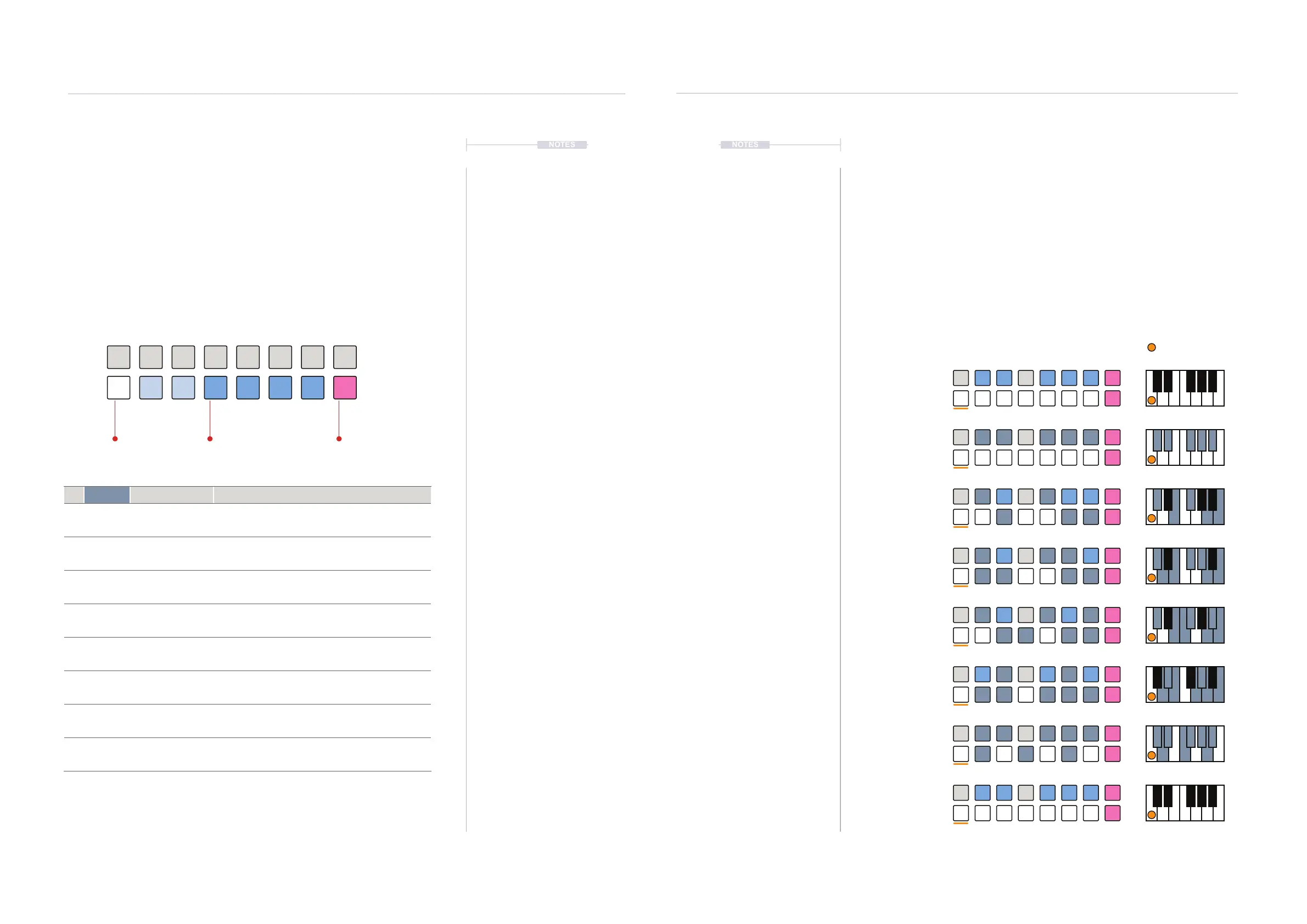
Scale View Mode.
The scale view visualises the available scale options. To access, Hold (SCALE) or
Double Press (SCALE) to lock the display.
Chromatic
[VB9]
Scale examples: Shown in Pitch View. Root Note C
Major
[VB10]
Minor
[VB11]
Pentatonic
[VB12]
Hirajoshi
[VB13]
Iwato
[VB14]
Tetratonic
[VB15]
User
[VB16]
BLUE ⬛
Available Scales
WHITE ⬛
Selected Scale
PINK ⬛
User Scale
▌ SELECTING A SCALE
1. Optionally view the scale menu view. Double Press (SCALE) to lock the
scale view on the value buttons. Actual notes shown in (PITCH) view.
2. Select a scale. Press [VBx], where ‘x’ is a value button 9-16
representing a scale. Example: Major scale, press [VB10].
3. Change a scale. Turn (SCALE) to change the scale. The scale page will
display the current scale. Hold & Turn (SCALE) to view the scale view
on the value buttons while changing.
D#
D#
D#
D#
D#
E
E
E
E
A
A
A
D
D
D
D
D
G
G
G
G
G
G
G
C
C
C
C
C
C
C
C
G#
G#
G#
G#
C#
C#
C#
F#
F#
F#
F
F
F
F
F
F
B
B
B
B
A#
A#
A#
A#
A#
Chro Maj Pent IwatMin Hira Tetra User
Melodic Structures
5
Melodic Structures
5



 To Next Page