119
The T-1 Notebook : Reference & Guide
118
The T-1 Notebook : Reference & Guide
NOTESNOTES
Root
A root note establishes the pitch tonality of a chord or scale and is the
lowest / rst note in the group. Chords are typically named after the root, for
example C Major has a C root note, G Major has a G root note. The root
note therefore denes the key of a chord and is the note on which a scale is
built. The root note for a scale can be changed in T-1. This changes only
the scale root and does not transpose any existing chords or notes.
▌ SELECTING A ROOT NOTE
1. View the root note page. Hold [CTRL] + Press (ROOT) to view the value
button chromatic display.
2. Set the root with the root knob. Hold [CTRL] + Turn (ROOT).
3. Set root note with value buttons. While the root page is displayed, Press
[VBx] where ‘x’ is the value button representing a note on the chromatic
keyboard.
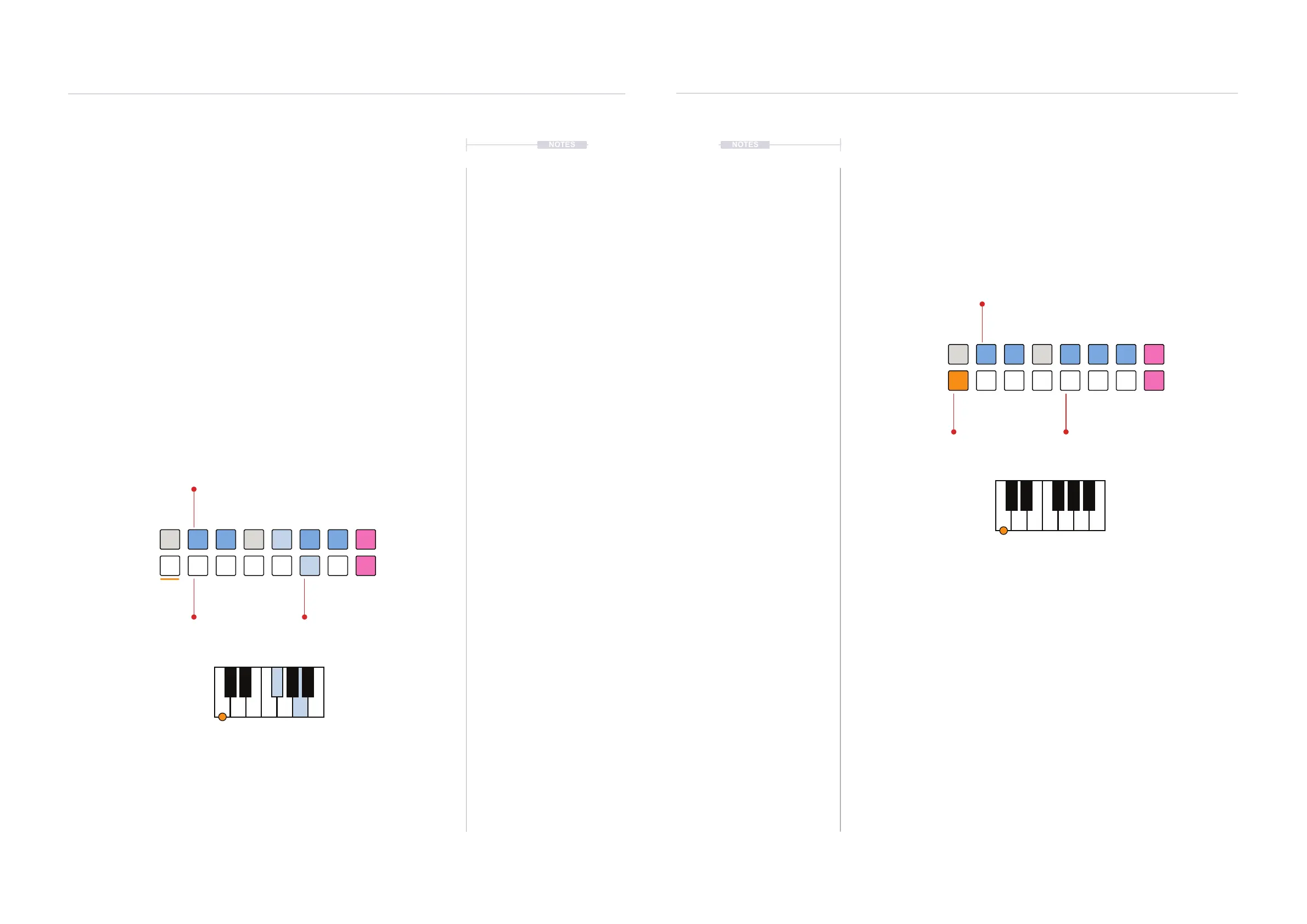
4. The currently selected root note is shown by the ORANGE ⬛ lit value
button.
▌ CREATING A USER SCALE FOR THE TRACK
1. Ensure that ‘C’ is selected as the root note. This will be the reference
when transposing the root.
2. Select User Scale. Hold (SCALE) + Hold [VB16]. Keep the knob and
button held throughout the process.
3. The user scale note options will be displayed on the value buttons.
Initially all note will be available. Black keys are represented by the
BLUE ⬛. Buttons and White keys by WHITE ⬛ Buttons.
4. Select notes for the scale. Press [VBx], where ‘x’ is a value button
representing a note to remove from the scale.
5. Notes not selected in the scale are shown as BLUE GREY ⬛.
6. When the scale has been created release the (SCALE) + [VB16]
controls. The scale will now be active in the user scale option for the
selected track. Other tracks also have the option for a user scale.
BLUE GREY ⬛
Deselected Notes
WHITE ⬛
Notes in the Scale
BLUE ⬛
Notes in the Scale
User Scale
[VB16]
Ensure Root note is ‘C’ when building user scales
D#
ED GC
G#
C#
F B
A#
C
C
ORANGE ⬛
Active Root Note
WHITE ⬛
Available Notes
BLUE ⬛
Available Notes
D#
ED G AC
G#F#
C#
F B
A#
Melodic Structures
5
Melodic Structures
5



 To Next Page