11
The T-1 Notebook : Reference & Guide
10
The T-1 Notebook : Reference & Guide
Steps
Euclidean pattern generator - number of steps.
Velocity / Probability
Base velocity of notes. Secondary function adjusts the
note lter based on a chance.
Pitch / Harmony
Keyboard style pitch application and transposition of
notes. Secondary function for harmonic transposition.
Length / Quantize
Track and loop length. Secondary function for
quantization of current pattern with respect to transport.
Top Row 1 - 8
Represent tracks 1-8 and illuminate to visualise
selected function. Functions are dependant on mode.
Play / Stop
Transport control for pattern.
Temp
Hold and turn a parameter to temporarily change its value.
Shape
Groove
Tonal
Setup
Value Buttons
General
Performance Buttons
Pulses / Rotate
Euclidean pattern generator - number of note pulses.
Secondary function sets / shifts starting point of pattern.
Sustain
Note length adjustment.
Scale / Root
Scale of the track. Secondary function sets the root note.
Tempo
Project tempo from 24bpm - 280bpm, default 120bpm.
Bottom Row 9 - 16
Represent tracks 9-16 and illuminate to visualise
selected function. Functions are dependant on mode.
Clear / Copy
Clear tracks, patterns or parameters. Copy using
secondary option.
Mute
Hold along with a value button to mute the selected track.
Cycles
Edit parameter lock automation settings.A cycle
contains a setting for each of T-1 parameters.
Accent / Groove
Adds a velocity variation to notes. Secondary option
introduces a velocity groove character.
Channel / Output
MIDI Channel between 1-16. Secondary function,
‘output’ is not currently implemented.
Ctrl
Hold to access secondary options for other buttons.
Pattern / Select
Selects pattern view. Select pattern with value button.
Silently select pattern when using secondary function.
Repeats / Offset
Number of note repeats added after each pulse.
Secondary function applies velocity ramp for repeats.
Division
Euclidean pattern generator - note interval value of each
step of the pattern.
Timing / Delay
Microtiming asymmetrical stretch across the beat grid.
Secondary function introduces a +/- track ‘delay’ offset.
Random / Rate
Randomization amount of parameters in the sequence.
Secondary function is sequence modulation playback rate.
Bank / Save
Selects bank view. Select bank with value button. Save
bank state using secondary function. Also used as the
Exit / Home function to revert to default mode.
Time / Pace
Adjusts note interval value of repeats. Secondary
function adjusts repeat acceleration / deceleration.
Voicing / Style
Adjusts order of inserted notes in the pitch menu.
Secondary option for arpeggiator style.
Range / Phrase
Range of pitch modulation. Based on LFO’s and shapes.
Secondary function to select modulation shape.
5
7 8
6
4
12
18
24
2
10
14
16
20
22
27
3
11
17
23
25
1
9
13
15
19
21
26
1 9
5
19
20 24 25 26 27
21 22 23
11
3
7 14
2 10
6 12
4 15 1613
8 17 18
T-1
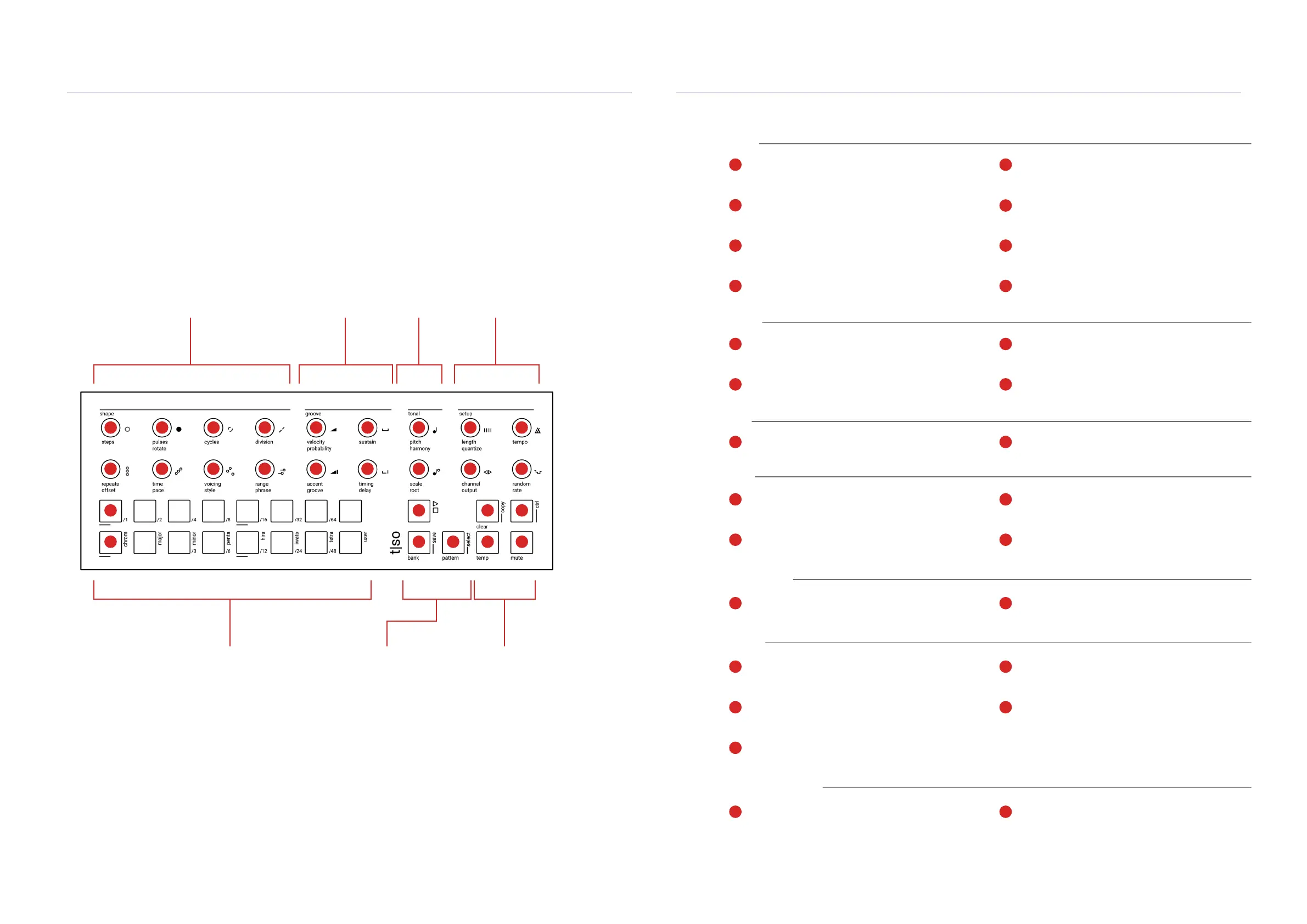
The user interface has a total of 7 control areas consisting of 18 endless rotary / push control knobs
and 23 multi-colour buttons. The knobs are clustered towards 3 specic workow / performance
topics plus conguration setup. The two rows, total of 16 value buttons are used by default for track
selection plus they also act as a visual indicator. The 2 performance buttons, temp and mute, help
control on-the-y changes and variations. The remaining 5 control buttons are used for general
functions including transport control, editing and bank / pattern selection.
Main functions are labelled in black and secondary functions in grey. Secondary functions are
accessed by holding the [CTRL] button in addition to the function. Other button combinations can be
used to access various options. The value buttons are multifunctional and also illuminate, where the
colour acts as a visual indicator when adjusting settings.
Shape
Used to build and layer Euclidean patterns,
create movement and adjust voicing
Value Buttons
Used to access the 16 tracks and illuminate as
visual representation of knob press functions.
Groove
Composition timing and
rhythmic feel
Tonal
Pitch & Scale
Setup
General MIDI & Track
Conguration
General Buttons
Used for the 5 overall control,
editing and transport functions.
Performance Buttons
2 buttons for on-the-y variations
and live performances.
Getting Started
1
Getting Started
1


 To Next Page
 Loading...

