187
The T-1 Notebook : Reference & Guide
186
The T-1 Notebook : Reference & Guide
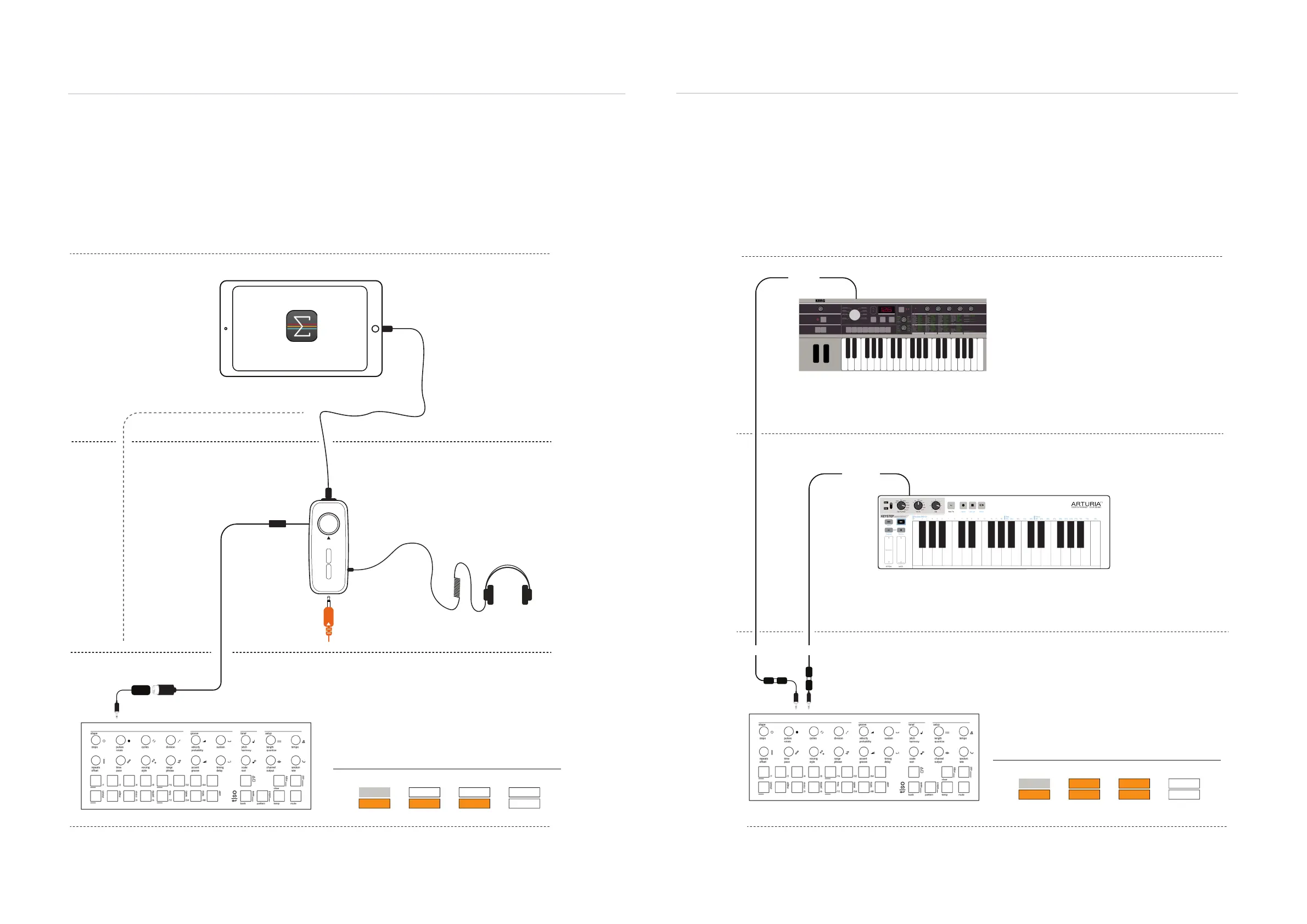
The iPad has a single USB input / output and often it is useful to connect via an Audio / MIDI
interface. The advantages are that this will power the T-1 as well as allowing an audio output
connected. A direct USB connection to T-1 is also possible.
8.20 MIDI Application Example - External Controller
An external MIDI controller can be connected to T-1 to allow live play out of MIDI chords and notes.
MIDI controllers such as a keyboard, drum pads, sequencer are also options that can be connected.
Example Conguration: T-1 Controlling AUM hosted on iPad
MIDI In
MIDI Out
MIDI Adapter from Output
Channel 1
T-1 to play the hosted instrument
on the iPad. Other apps such as
effects can also be controlled by
notes and CC.
Optionally connect USB direct
iPad / AUM Environment
Interface Environment
T-1 Environment
Example Conguration: T-1 with External MIDI Controller
MIDI Out
MIDI In
MIDI Out
MIDI In
On On Off
Off
On On On
MIDI trs
Notes Start / StopClock Prg. Change
In
Out
T-1 Cong
MIDI Adapter for Input / Output
Channel 1
Microkorg Environment
Keystep Environment
Stereo Out
Additional Audio
Option i.e. Synth
iPad compatible interface for connecting both
Audio and MIDI is an option. This example uses
the IK Multimedia iRig Pro I/O, a single channel
iPad compatible interface
Controller notes can be transmitted ‘thru’ T-1 to
a destination synth. Also the external controller
can control transport and clock.
Example with Microkorg as secondary follower.
The T-1 can send sequence MIDI information or
notes / sequencing from the external controller
input can be retransmitted from T-1.
Off Off Off
Off
On On On
MIDI trs
Notes Start / StopClock Prg. Change
In
Out
T-1 Cong
Defaults are shown. USB can also be used.
T-1 Environment
MIDI & WiFi Connectivity
8
MIDI & WiFi Connectivity
8



 To Next Page