185
The T-1 Notebook : Reference & Guide
184
The T-1 Notebook : Reference & Guide
8.18 MIDI Application Example - Desktop Synth Presets
Program Change messages allow T-1 to change a preset or patch on a destination device using
MIDI messaging.
8.19 MIDI Application Example - iPad Audio
Mobile music applications and especially on iOS platforms is a growing area of music production
and has now reached a professional level. Several Hosting apps allow audio apps and plugins
conguration as well as managing the interface with hardware.
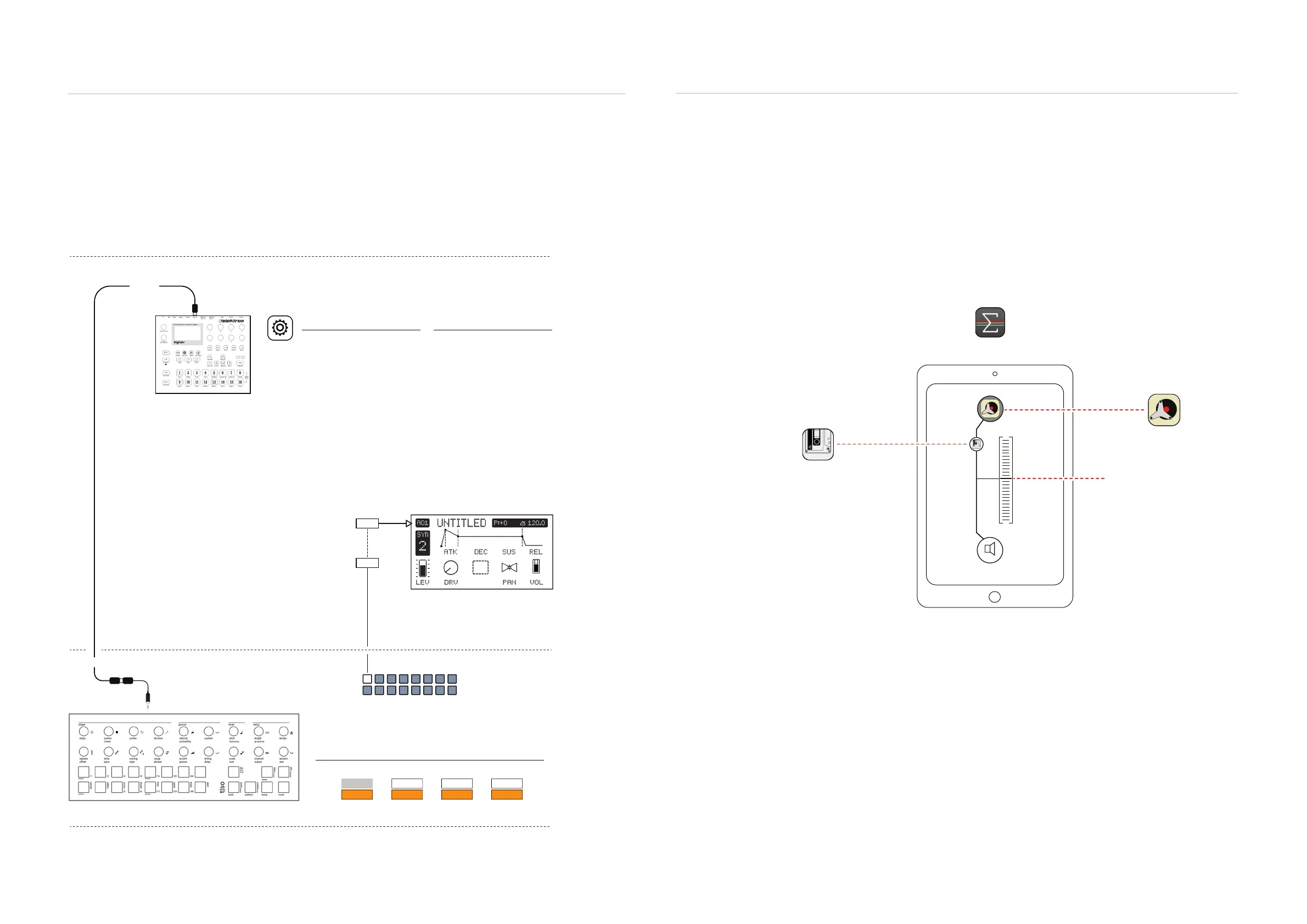
Example Conguration: T-1 Controlling Elektron Digitakt
MIDI In
MIDI Out
Off Off Off
On
On On On
MIDI trs
Notes Start / StopClock Prg. Change
In
Out
T-1 Cong
Prg. Change set to On. Others are set as defaults.
MIDI Adapter from Output
Prog Change on Channel 1 and 2
Primary lead is T-1 which controls transport and clock
synchronised in the Digitakt secondary follower.
G02 = Bank 15, Pattern 2
G01 = Bank 15, Pattern 1
Patterns are changed in Digitakt when a
pattern changes in T-1.
Digitakt patterns numbered A01 - H16
Pattern Changes
Digitakt Environment
T-1 Environment
MIDI Cong
USB CONFIG
USB Audio/MIDI = On
If used with USB connection
SYNC:
Clock Receive = On
Transport Receive = On
PORT CONFIG:
Input From = MIDI or MIDI+USB
Receive Notes = On
Receive CC/NRPN = On
CHANNELS:
Prog Chg In Ch = 2
System
G02
G01
Example iPad Overview: T-1 Controlling iOS Apps via AUM
1: Retro Piano
SPKR
AUM
As the host Audio / MIDI
Mixer and hub.
Audio Channel
iPad / iPhone
MSXII Fly Tape
Plug-in effect in the audio chain
Audiokit Retro Piano
Plug-in Audio instrument
Connection to iPad can be direct from USB-C MIDI or via a MIDI interface. Power will
need to be supplied to T-1 but this is possible from most modern iPads.
T-1 should be set as the MIDI control input and routed to the instrument app within AUM.
MIDI & WiFi Connectivity
8
MIDI & WiFi Connectivity
8



 To Next Page