183
The T-1 Notebook : Reference & Guide
182
The T-1 Notebook : Reference & Guide
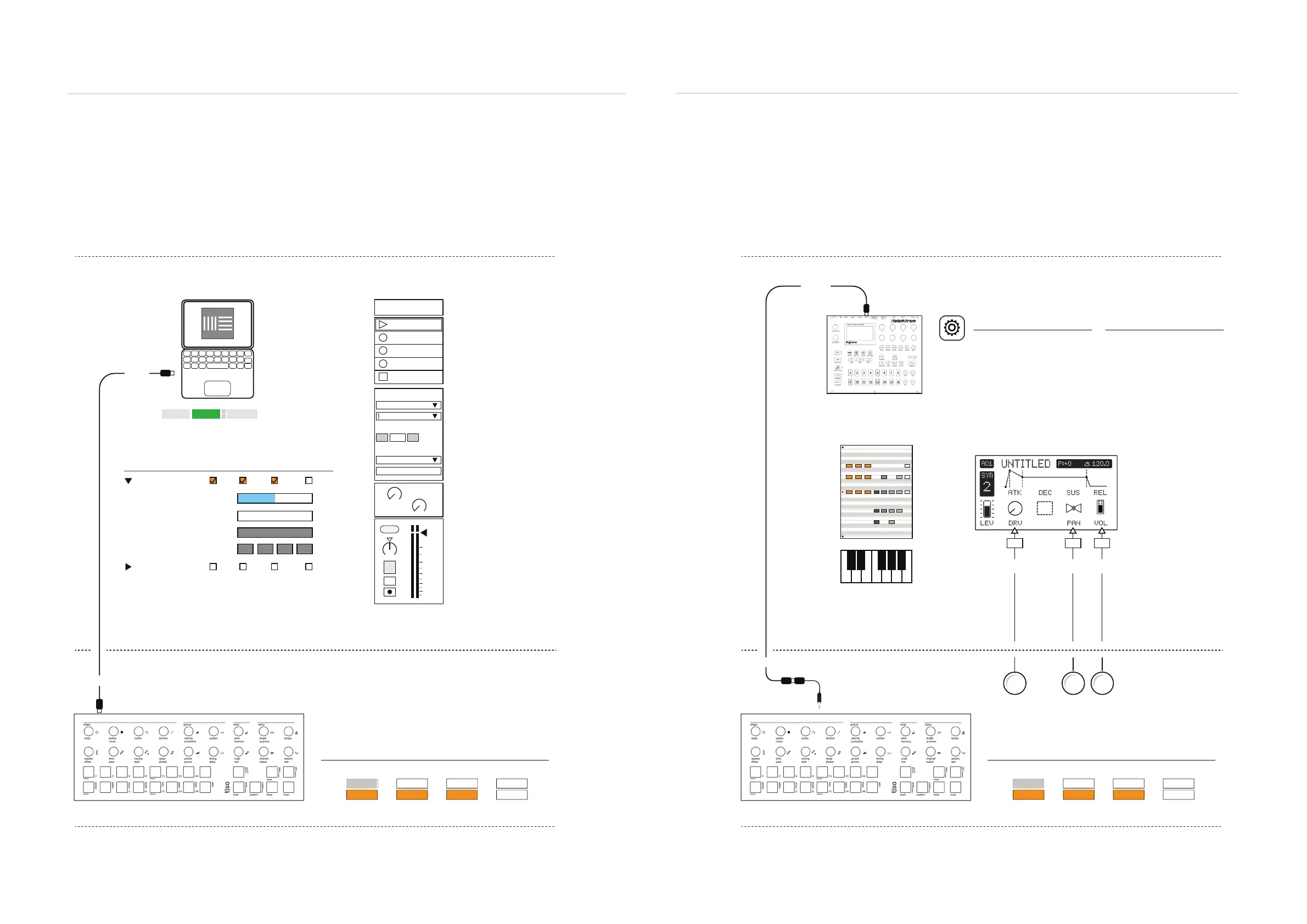
8.16 MIDI Application Example - Digital Audio Workstation
MIDI can be connected by the 5 Pin DIN using the Type A adapter or by USB. When used with PC
or Mac hosted software tools such as a DAW, the USB option is more common. The PC / Mac can
also power the T-1 hardware. This is a simple set up, useful to control software plug-in synth tracks.
8.17 MIDI Application Example - Desktop Synth Melody
MIDI can be connected to a desktop synth using the 5 Pin DIN and the Type A adapter. When used
with a desktop device, the MIDI DIN option is more common. This is a simple set up, useful to
control synth melodies and also synths parameters.
Link EXT TAP
102.00
1 Plugin A
MIDI From
T-1
Master
Ch. 1
In
1
s
Auto
Monitor
Audio To
A
Sends
B
1.53
0
12
24
36
48
60
Ableton Live MIDI Preferences
MIDI Ports Track Sync Remote MPE
In: T-1
MIDI Clock Sync Delay:
Sync Type:
MTC Frame Rate:
MTC Start Offset
Out: T-1
0.00 ms
MIDI Clock
All
00 : : :0000 00
Auto On to Monitor Input
Audio Output to Master Bus
Track Enabled
MIDI Channel 1
MIDI Input from T-1
Synth Plug-In Assigned
Example Conguration: T-1 Controlling an Ableton Live Synth. Example Conguration: T-1 Controlling Elektron Digitone
USB
MIDI In
USB
MIDI Out
Off
Off OffOff OffOff Off
Off Off
On OnOn OnOn On
MIDI usb MIDI trs
Notes NotesStart / Stop Start / StopClock ClockPrg. Change Prg. Change
In In
Out Out
T-1 Cong
These are defaults.
T-1 Cong
These are defaults.
Channel 1
MIDI Adapter from Output
Channel 1
Primary lead is T-1 which controls transport and clock
synchronised in the Ableton Live secondary follower.
Primary lead is T-1 which controls transport and clock
synchronised in the Digitone secondary follower.
Ableton Live Environment Digitone Environment
T-1 Environment T-1 Environment
MIDI Cong
USB CONFIG
USB Audio/MIDI = On
If using USB Connection
SYNC:
Clock Receive = On
Transport Receive = On
PORT CONFIG:
Input From = MIDI or MIDI+USB
Receive Notes = On
Receive CC/NRPN = On
System
CC#9
10
CC#10
64
CC#7
70
9 10 7
MIDI & WiFi Connectivity
8
MIDI & WiFi Connectivity
8



 To Next Page