EasyManua.ls Logo

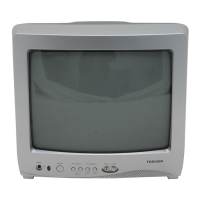
Toshiba 13A23 - User Manual

Toshiba 13A23
17 pages
Print Icon
To Next Page IconTo Next Page
Loading...
13A23
13A23W
FRANÇAIS ENGLISH
ESPAÑOL
ENGLISH
3M10501A-E COVER 5/3/03, 12:39 PM1

Other manuals for Toshiba 13A23

Questions and Answers

  • P
    Pamela WardAug 18, 2025
    Why is my Toshiba CRT TV remote not working?
    • L
      Lawrence LyonsAug 18, 2025
      If your Toshiba CRT TV remote isn't working, try these steps: First, replace the batteries or ensure they are correctly inserted. Then, move closer to the TV, within 15 feet, and make sure the remote is aimed at the sensor without any obstructions. Finally, confirm the TV's power cord is plugged in.
  • S
    Stephen GarciaAug 20, 2025
    How to fix a Toshiba CRT TV that won't turn on?
    • W
      William LindseyAug 20, 2025
      If your Toshiba CRT TV isn't working, ensure it's properly plugged into a functioning AC outlet. Check the fuse or circuit breaker to confirm power is available. As a last resort, try unplugging the unit for an hour and then plugging it back in.
  • F
    fsmithAug 23, 2025
    What to do if my Toshiba CRT TV has poor picture quality?
    • M
      Michael SpencerAug 23, 2025
      If your Toshiba CRT TV has poor picture quality or no picture, try tuning to another channel to rule out station issues. Ensure the channels are correctly set into memory. Check the antenna or CATV connections and adjust the antenna. Look for any potential sources of interference. Verify the picture control adjustments and press CAP/TEXT to turn off Closed Caption mode.
  • S
    Susan ShortAug 26, 2025
    Why does my Toshiba CRT TV have no sound?
    • D
      Debbie HortonAug 26, 2025
      If your Toshiba CRT TV has poor sound quality or no sound, first tune to another station to rule out any station-related problems. Then, check the sound adjustments, specifically the volume and mute settings. Also, check for any potential sources of interference that might be affecting the sound.
  • E
    Elizabeth DavisAug 28, 2025
    How to fix color issues on my Toshiba CRT TV?
    • J
      Joshua TurnerAug 28, 2025
      If your Toshiba CRT TV shows poor color or no color, try tuning to another station to rule out station-related issues. Ensure the channels are set into memory. Check the picture control adjustments and inspect the antenna or CATV connection, adjusting the antenna as needed.
  • G
    gary13Aug 30, 2025
    How to improve reception on my Toshiba CRT TV?
    • J
      jorge69Aug 31, 2025
      If your Toshiba CRT TV has poor reception on some channels, try tuning to another station to rule out any station-related problems. Make sure the channels are set into memory. If a station is weak, adjust the antenna to improve reception. Check for any potential sources of interference.
  • R
    Ryan NewmanSep 2, 2025
    Why does my Toshiba CRT TV keep shutting off?
    • R
      Rachel RobertsSep 2, 2025
      If your Toshiba CRT TV is shutting off unexpectedly, it could be due to several reasons. One possibility is that there is no broadcast on the tuned station. Another reason could be that the Sleep Timer is set. Finally, there might have been a power interruption.
  • C
    Christopher SmithSep 4, 2025
    How to fix no CATV reception on Toshiba CRT TV?
    • R
      Ryan RyanSep 4, 2025
      If you're not getting CATV reception on your Toshiba CRT TV, try tuning to another station to rule out station or CATV system problems. Check all CATV connections to ensure they are secure. Also, set the TV/CABLE menu option to the CABLE mode.
  • S
    Sara WhiteSep 7, 2025
    What causes horizontal bars on Toshiba CRT TV screen?
    • T
      triciapattersonSep 7, 2025
      If you see horizontal or diagonal bars on your Toshiba CRT TV screen, check the antenna connections and reorient the antenna. Also, check for any potential sources of interference.
  • J
    jeffmorrisSep 10, 2025
    Why is closed caption not working on my Toshiba CRT TV?
    • L
      Logan AndrewsSep 10, 2025
      If you are experiencing issues with closed captions on your Toshiba CRT TV, first try another channel, as the TV station may be experiencing problems or the program tuned is not closed captioned. Check the CATV connection or VHF/UHF antenna, repositioning or rotating the antenna if necessary. Finally, press CAP/TEXT to turn on the closed caption decoder.

Summary

Safety Precautions

TV Stand Instability Warning

Warning about TV stand instability and potential injury or death.

Child Safety

Tune Into Safety

Tips for safe TV placement and securing furniture.

Important Safety Instructions

General Safety Guidelines

Key safety instructions for operation and maintenance (items 1-14).

Installation, Care, and Service

Installation Recommendations

Guidelines and warnings for installing the TV safely (items 15-22).

Service

LOCATION OF CONTROLS

Front Controls

Description of front panel buttons and jacks.

Back Panel Connections

Description of back panel connections.

REMOTE CONTROL

Remote Control Buttons

Explanation of the functions of each button on the remote.

ANTENNA;CATV CONNECTIONS

Antenna and Cable Types

Connection options for different antenna and cable services.

TV OPERATION

Channel Selection Methods

Methods for selecting channels using buttons and direct input.

SETTING THE V-CHIP

USING THE LOCK MENU

LOCKING CHANNELS

Instructions for locking specific TV and cable channels.

LOCKING VIDEO INPUT

Instructions for locking video inputs and specific channels.

SETTING THE GAME TIMER

Setting a time limit for playing TV games with VIDEO LOCK.

TROUBLESHOOTING GUIDE

Common Symptoms and Solutions

Table listing common TV issues and their possible solutions.

Limited United States Warranty

Your Responsibility

Limited Canada Warranty

Warranty Terms

Details of limited warranties for labor, parts, and picture tube in Canada.

Your Responsibility (Canada)

Toshiba 13A23 Specifications

General IconGeneral
BrandToshiba
Model13A23
CategoryCRT TV
LanguageEnglish

Related product manuals