Introduction / Getting started
9
o PC/HDMI (AUDIO) (input terminal)—PC
audioinputterminalissharedwithHDMI
analogueaudioinputterminal,andtheiruse
canbeconguredintheSETUPmenu(-
pages24,25).
10 A (aerial input terminal)—Analogueaerial
signalinput(-page7).
11 o RGB/PC (input terminal)—Foruse
whenconnectingapersonalcomputer(PC)
(-page25).
12 O AUDIO (output terminals)—Standard
audiooutputs(FIXED)(-page23).
13 o COMPONENT / VIDEO INPUT (input
terminals)—High-denitioncomponent
videoandstandard(analogue)stereoaudio
inputs,orstandard(composite)videoand
standardstereoaudioinputs(-page23).
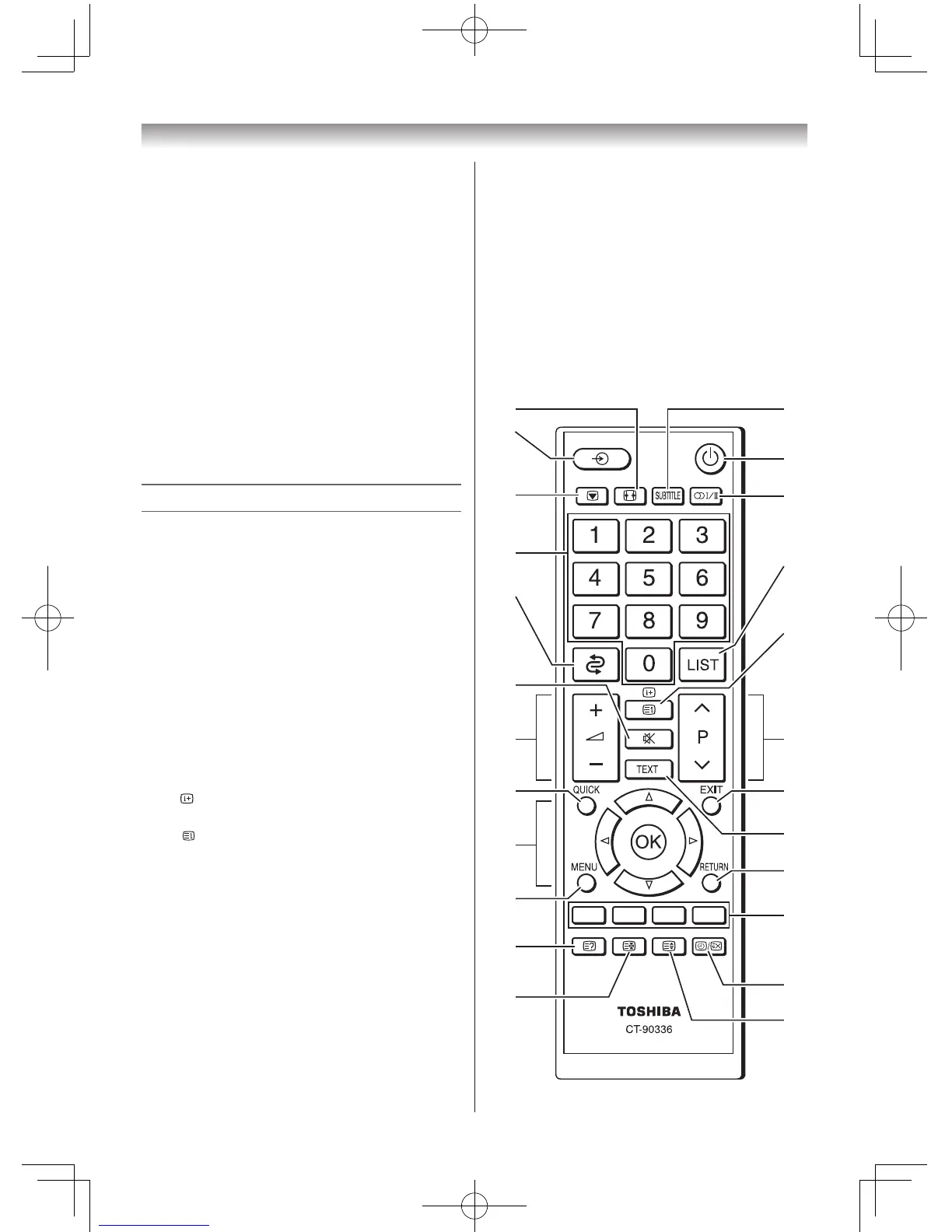
Learning about the remote control
Location of controls
1 PictureSize(-page15)
2 Subtitleon/off(-page21)
3 Inputsourceselection(TV,VIDEOor
COMPONENT,HDMI,PC)(-page14)
4 Poweron/Standby(-page10)
5 Picturestill(-page16)
6 Stereo/Bilingualselection(-pages18,19)
7 Numberbuttons(0-9)(-pages12,19,21)
8 TodisplaytheChannelList(-page14)
9 Toreturntothepreviousprogramme(-
page12)
10 •
Todisplayon-screeninformation
(-page12)
•
Initial/IndexfunctionforTeletext
(-page22)
11 SoundMute(Thisbuttonturnsthesoundoff/
on.)
12 ProgrammepositionUu(-page12)
13 Volume–+(Thesebuttonsadjustthevolume
level.)
14 EXIT(-page12)
15 ToaccesstheQuickMenu(-page11)
16 Teletexton/SuperimposeTeletext/off
(-page21)
17 •Menursvw(-page11)
•OK(-page11)
18 Toreturntothepreviousmenu(-page12)
19 MENU(-page11)
20 Teletextcontrolbuttons(Fourcoloured
buttons:Red,Green,Yellow,Blue)
(-pages21,22)
21 Torevealconcealedtext(- page22)
22 •Toselectapagewhileviewinganormal
picture(-page22)
•Toselectthetimedisplay(-page22)
23 Toholdawantedpage(-page22)
24 Toenlargetheteletextdisplaysize
(-page22)



 To Next Page
 Loading...